Apple Card Now Supports Exporting Transactions in OFX File Format - MacRumorsOpen MenuShow RoundupsShow Forums menuVisit ForumsOpen Sidebar
Skip to Content

Apple Card Now Supports Exporting Transactions in OFX File Format

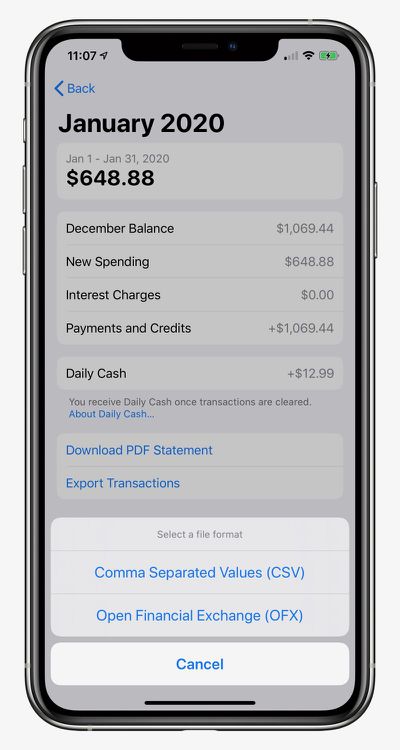
Apple Card users are now able to export their transaction data in an OFX file format for use with third-party financial apps such as Quicken and Mint, as noted by Kyle Seth Gray. The option shows up when a monthly statement is available.

The exporting feature first rolled out last month, but only with CSV file support.
apple card ofx

How to Export and Download Apple Card Transactions

  1. Open the Wallet app on your iPhone and tap on Apple Card.
  2. Tap on Card Balance.
  3. Under Statements, tap on the statement you want to export.
  4. Tap on Export Transactions and choose CSV or OFX.

Apple launched its credit card in the United States in August. Key features include color-coded spending summaries in the Wallet app, no fees beyond any applicable interest, and up to three percent cashback on purchases paid out daily.

To apply for an ‌Apple Card‌, simply open the Wallet app on an iPhone running iOS 12.4 or later, tap the plus button in the top-right corner, and follow the on-screen steps. The process takes just a few minutes, and if approved, your digital ‌Apple Card‌ will be ready for purchases immediately. A physical titanium-based Apple Card is also available for use at retail stores that do not accept contactless payments.

Popular Stories

samsung galaxy card

Samsung Debuts Galaxy Card With 5% Cash Back to Take On Apple Card

Monday July 20, 2026 4:39 pm PDT by
Samsung today announced the launch of its first credit card in the United States, debuting the Samsung Galaxy Card in partnership with Barclays. The Samsung Galaxy Card works as a standard Visa card and offers special financing options for Samsung Galaxy devices purchased through Samsung. Apple Card has a similar financing option for Apple devices. There is no annual fee for the Samsung...
Apple Event Logo

Apple Working on All-New Operating System

Wednesday July 29, 2026 11:39 am PDT by
Apple is developing an all-new operating system that is essentially a mix of tvOS, watchOS, and iOS, according to Bloomberg's Mark Gurman. In a report this week, he said the operating system will feature a grid of icons, widgets, and apps, along with customizable clock faces. The new software platform is intended for Apple's long-rumored smart home hub. With built-in facial recognition,...
imac video apple feature

Apple Made Its Second-Biggest Acquisition Ever This Year

Wednesday July 29, 2026 12:03 pm PDT by
Apple this year acquired Israeli startup Q.ai for close to $2 billion, according to the Financial Times. That would make this Apple's second-biggest acquisition ever, after it paid $3 billion for the popular headphone maker Beats in 2014. This is also the largest known Apple acquisition since the company purchased Intel's smartphone modem business and patents for $1 billion in 2019. Q.ai...

Top Rated Comments

bladerunner88 Avatar
85 months ago
Cant seem to import into Banktivity Vs 5.6.12. I've created a new account but get the following when trying to import the OFX File:


Received this from IGG Support:

Thank you for contacting IGG Software Support. Is this an OFX file downloaded from Apple Card? If so, we have already received reports of this issue. The problem is the OFX file is missing many tags required by the OFX specification. The OFX file will not be able to be imported until Apple (or Goldman Sachs) adds all tags properly, in accordance to the OFX specification. We have brought this to Apple's attention and they hope to have this corrected soon.

Attachment Image
Score: 3 Votes (Like | Disagree)
ajfahey Avatar
85 months ago
I still won’t be using my Apple Card much at all until downloads are supported in “One Step Update”. OFX just isn’t near good enough for me the change my mind. I have two dozen accounts in my Quicken file. Using OFX to update even one of them is one nuisance too far and I have plenty of other credit cards to turn to.
Score: 3 Votes (Like | Disagree)
82 months ago

*UPDATE

I kust received my April statement and was successfully able to import it into Quicken (Mac) for the first time.

Is it working for everyone else now?
OMG!! YAY! IT WORKED! Thank you so much for posting this! It's a real card now. lol
Score: 2 Votes (Like | Disagree)
83 months ago

This now works! I spoke to support at GS and they said since IOS 13.4 the OFX export will work and was able to import statements into Banktivity.
I can confirm this as well. I imported March into Banktivity last week using OFX and it worked great!
One step closer to being able to use this card again!

I should also mention that I put in a feature request to GS for exporting transactions during the month, and for OFX support to connect financial tools.
Score: 2 Votes (Like | Disagree)
85 months ago

Correct me if I'm wrong, but Mint.com doesn't allow you to import transactions. You can manually add transactions one at a time to an existing account if they are missing however it doesn't allow you set up a "Blank" account that isn't linked to a financial institution.
Exactly, until I can import these to Mint directly I will pass on the Apple card
Score: 2 Votes (Like | Disagree)
85 months ago
Quicken isn't importing these either. It's complaining about "OFX parsing failed Missing bid data"
Score: 2 Votes (Like | Disagree)

🔗 Related Apple News & Rumors

Stay updated with the latest Apple ecosystem news and verified rumors















































