Hands-On With Filmic's DoubleTake iPhone App That Lets You Record Video From Two Cameras at the Same Time

When Apple's latest iPhones were introduced in September, Filmic, known for its video recording apps, showed off a new app designed to capture video from multiple iPhone cameras at the same time, allowing for unique new footage.

Filmic today made that functionality available for Apple's latest iPhones through a new DoubleTake app, and we thought we'd check it out to see if it's as interesting and useful as it sounds.


The DoubleTake app works with all of the cameras on Apple's newest iPhones, so on the ‌iPhone‌ 11 Pro, that includes the telephoto lens, the wide-angle lens, and the super wide-angle lens, along with the front-facing selfie camera.

Using the app is fairly simple. When you open it up, there's a video recording interface and four different icons, one in each corner of the app that correspond to different functions. The top left icon lets you access recorded videos, the top right icon lets you swap between cameras, the bottom right icon offers a record button, and the bottom left icon lets you configure which lenses you want to record with.

If you tap on the lens icon, you'll see four boxes on the ‌iPhone‌ 11 Pro (fewer on iPhones with fewer cameras like the dual-lens ‌iPhone‌ 11). You can tap on two of the four lenses to record with, as DoubleTake supports recording from just two of the cameras simultaneously.
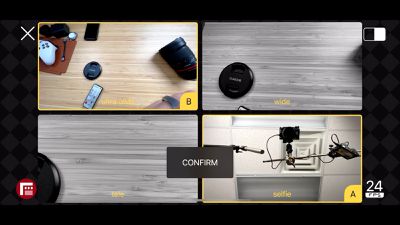
lens selection
Once you've chosen the cameras, you can adjust frame rate (24, 25, and 30 fps are options) and then choose how you want the video displayed when you're recording. There's a picture-in-picture option that shows the secondary camera in a pop out lens, a split screen view, or a discrete view.

These modes affect what the finalized video looks like. The recording features a picture-in-picture recording with that option selected, or a dual-screen recording with split view selected. If you choose discrete, it looks similar to picture-in-picture when recording, but you end up with two separate videos, one from each camera, rather than a combined view.

Discrete is useful if you want to capture a standard video but aren't sure which lens might be best. You can record with the ultra wide-angle and wide-angle lenses at the same time, getting two videos you can work with and edit in post production.

The picture-in-picture and split view modes are perhaps most useful when recording with one of the rear cameras and the selfie camera as you can capture an event and a personal reaction at the same time, or use it for vlogging purposes.
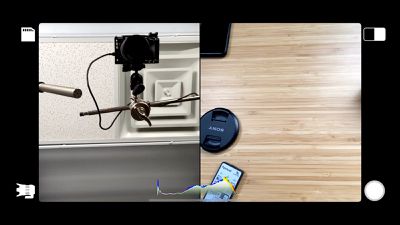
split view
Recording video can be done in either landscape or portrait mode, and the app is no frills and simple to use, so even those not familiar with videography on the ‌iPhone‌ will be able to use it to capture video.

Videos can be saved to the camera roll, shared with people or social media networks, or deleted. There are no editing tools in DoubleTake, so that will need to be done in either the Camera app itself or another third-party video editing app.
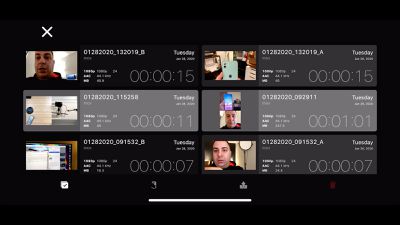
media management
DoubleTake is a neat little concept that's easy to use and can create some fun, unique videos. The only major downside to the app is that recordings are limited to 1080p at 30fps, which means no 4K video recordings. It's possible that will be updated in the future, but for now, it's a limiting factor. The app should still produce video that's great for sharing on social networks and with friends.

DoubleTake works with the ‌iPhone‌ XR, ‌iPhone‌ XS, ‌iPhone‌ XS Max, ‌iPhone‌ 11, ‌iPhone‌ 11 Pro, and iPhone 11 Pro Max. It is not compatible with older iPhones or iPads. For those who want to try it out, it's a free download from the App Store. [Direct Link]

What do you think of the DoubleTake app and what will you use it for, if you're planning to download it? Let us know in the comments.


Popular Stories

Apple Logo Black

Apple Just Made Its Second-Biggest Acquisition Ever After Beats

Thursday January 29, 2026 10:07 am PST by
Apple today confirmed to Reuters that it has acquired Q.ai, an Israeli startup that is working on artificial intelligence technology for audio. Apple paid close to $2 billion for Q.ai, according to sources cited by the Financial Times. That would make this Apple's second-biggest acquisition ever, after it paid $3 billion for the popular headphone and audio brand Beats in 2014. Q.ai has...
Aston Martin CarPlay Ultra Screen

Apple's CarPlay Ultra to Expand to These Vehicle Brands Later This Year

Sunday February 1, 2026 10:08 am PST by
Last year, Apple launched CarPlay Ultra, the long-awaited next-generation version of its CarPlay software system for vehicles. Nearly nine months later, CarPlay Ultra is still limited to Aston Martin's latest luxury vehicles, but that should change fairly soon. In May 2025, Apple said many other vehicle brands planned to offer CarPlay Ultra, including Hyundai, Kia, and Genesis. In his Powe...
14 inch MacBook Pro Keyboard

Apple Changes How You Order a Mac

Saturday January 31, 2026 10:51 am PST by
Apple recently updated its online store with a new ordering process for Macs, including the MacBook Air, MacBook Pro, iMac, Mac mini, Mac Studio, and Mac Pro. There used to be a handful of standard configurations available for each Mac, but now you must configure a Mac entirely from scratch on a feature-by-feature basis. In other words, ordering a new Mac now works much like ordering an...
Apple Logo Black

Apple's Next Launch is 'Imminent'

Sunday February 1, 2026 12:31 pm PST by
The calendar has turned to February, and a new report indicates that Apple's next product launch is "imminent," in the form of new MacBook Pro models. "All signs point to an imminent launch of next-generation MacBook Pros that retain the current form factor but deliver faster chips," Bloomberg's Mark Gurman said on Sunday. "I'm told the new models — code-named J714 and J716 — are slated...
Apple MacBook Pro M4 hero

New MacBook Pros Reportedly Launching Alongside macOS 26.3

Sunday February 1, 2026 5:42 am PST by
Apple is planning to launch new MacBook Pro models with M5 Pro and M5 Max chips alongside macOS 26.3, according to Bloomberg's Mark Gurman. "Apple's faster MacBook Pros are planned for the macOS 26.3 release cycle," wrote Gurman, in his Power On newsletter today. "I'm told the new models — code-named J714 and J716 — are slated for the macOS 26.3 software cycle, which runs from...

Top Rated Comments

seinman Avatar
79 months ago

we go from 4 camera 4K, 30FPS
Might want to double check that. I’m pretty sure 2-camera 4K is what was promised. Makes sense that the free app is limited to 1080p, as the paid app will have 4K.
Score: 3 Votes (Like | Disagree)
Juiceboy Avatar
79 months ago
Coudl you imagine how fast you'll run out of storage when filming 4 cameras at 4K 60FPS at the same time? I make lots of videos and i generally just stick to 1080p, most of my views are mobile and the time it takes to export and processing power needed to render and file size is just too much.
Score: 2 Votes (Like | Disagree)
adamw Avatar
79 months ago
Very good to see this multi-camera support app being released. Hopefully, the 4K support and other refinements will be added to this app, and also they will add multi-camera support to their FiLMiC Pro camera app very soon as well.
Score: 1 Votes (Like | Disagree)
scottct1 Avatar
79 months ago
I wish you could use this to transmit live to Facebook Live or YouTube, that would be awesome!
Score: 1 Votes (Like | Disagree)
adamjackson Avatar
79 months ago
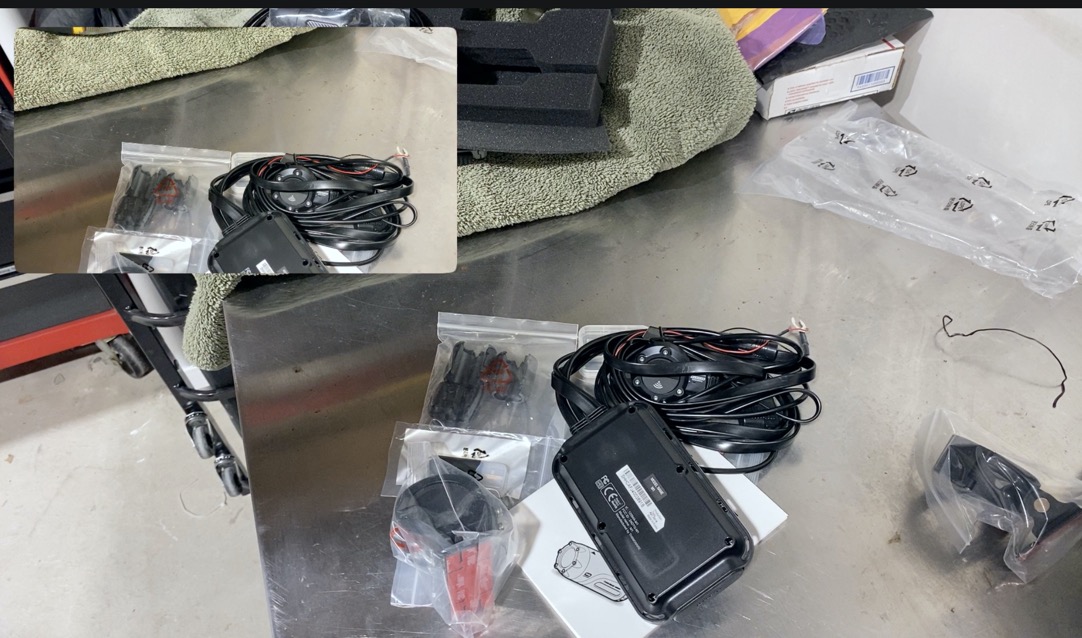
Just used it for a motorcycle dash cam unboxing video but I had PIP enabled so instead of getting 2 video files I could splice together for closeups or commentary, I'm left with 1 video file that has both streams in it which means I have to re-shoot. Oh well.


doubletake multi camera ios app imagedoubletake multi camera ios app image
Score: 1 Votes (Like | Disagree)
elemenohme Avatar
79 months ago
From the keynote, I thought this was going to be more like what Switcher Studio* does, just with one phone. I could really use an app that let me record a closeup and two-shot with the rear camera and an interviewer with the front camera. Doesn't sound like this will do that :(

(*Switcher lets you do multicamera recording over wifi with multiple iphones or ipads, but they moved to a subscription model for web streaming so it's unreasonably expensive if you just want to record.)
Score: 1 Votes (Like | Disagree)