Hands-On With the HomePod's New Multi-User Detection and Ambient Sound Features - MacRumorsOpen MenuShow RoundupsShow Forums menuVisit ForumsOpen Sidebar
Skip to Content

Hands-On With the HomePod's New Multi-User Detection and Ambient Sound Features

Apple in late October released a new 13.2 software update for the HomePod with a bunch of new features, but it turned out the update was bricking some HomePods.

Apple addressed the bug in an updated 13.2.1 software release a couple days later, making the new functionality available without the risk of ruining a ‌HomePod‌. In our newest YouTube video, we go over all of the new ‌HomePod‌ features for MacRumors readers who may have been put off by the bug reports.

Multi-User Support and Voice Detection

With the new update, ‌HomePod‌ can distinguish between different users in the household, introducing multi-user support for the first time.

Siri is able to tell who is speaking, allowing each person in the home to access their own selection of music, playlists, radio stations, and preferences.
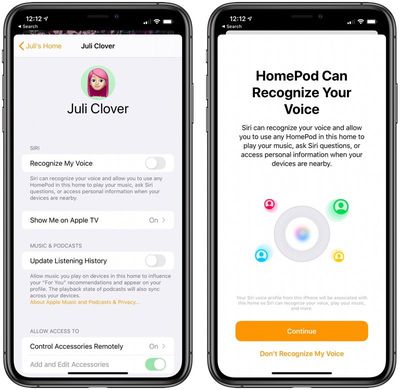
homepodvoicerecognition
Setting up multi-user support requires a device running iOS 13.2 or later, and you need to invite your family members to be a member in the Home app. From there, open the Home app, choose Home Settings, tap on your user profile under people, and then turn on the "Recognize My Voice" option.

Apple has more info on setup in a dedicated support document.

Handoff Support

If you're listening to a song on your iPhone and want to transfer it over to your ‌HomePod‌, you can do so with iOS 13.2.1's new Handoff feature.

To use Handoff, have a song playing on the iPhone and then bring it over to the top of the ‌HomePod‌. The audio playing on the iPhone will swap over to the ‌HomePod‌, pausing audio on the iPhone. You'll get a notification letting you know about the transfer of content, and while this feature is still a bit buggy, it's useful.

Handoff works with the Apple Music app, podcasts, phone calls, and more. If you don't want to use the feature, you can turn it off in the Settings app by going to General > AirPlay > Handoff and toggling off "Transfer to ‌HomePod‌."

Adding Music to HomeKit Scenes

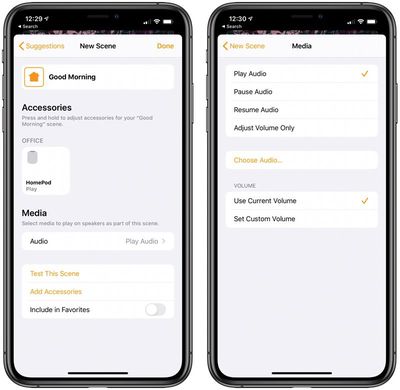
When creating or editing a HomeKit scene, you can now add songs from your ‌Apple Music‌ Library. You can, for example, create a "Good Morning" or "Relax" scene that does things like change the lighting and start a song playing on ‌HomePod‌.

homepodapplemusicscenes
Just select the "‌HomePod‌" option when creating a scene under the list of accessories. From there, choose the "Play Audio" option and then select "Choose Audio" to select a song.

Ambient Sounds

The 13.2.1 update also introduces a neat new feature called Ambient Sounds, which is designed to let you ask Siri to play relaxing sounds like rain, white noise, and more.

There are seven different options that you can choose from:

  • Rain
  • Stream
  • White Noise
  • Fireplace
  • Forest
  • Night
  • Ocean

To use Ambient Sounds, just ask ‌Siri‌. Asking ‌Siri‌ to play Ambient Sounds will select a random sound, but you can also ask for a specific sound with a command like "Hey ‌Siri‌, play rain sounds."

Setting a Sleep Timer

Ambient Sounds can be set up with a sleep timer so that the noise automatically turns off after a set period of time. When an Ambient Sound is playing, ask ‌Siri‌ to set a sleep timer for a set amount of time.

"Hey ‌Siri‌, set a sleep timer for 45 minutes," for example, will play the ambient noises for 45 minutes before the ‌HomePod‌ turns off.

If you don't want to listen to Ambient Sounds, this also works with any music that happens to be playing.

Downloading the Update

Downloading the new ‌HomePod‌ software can be done by opening up the Home app, selecting "Home Settings" after tapping the house icon in the upper left corner, and choosing the "Software Update" option. If the "Install Updates Automatically" feature is turned on, your ‌HomePod‌ has likely already updated to 13.2.1.

Related Roundup: HomePod
Buyer's Guide: HomePod (Caution)

Popular Stories

Rumored Home Products Thumb

Apple's 2026 Smart Home Lineup: New Apple TV, HomePod, and Home Hub

Wednesday July 15, 2026 11:03 am PDT by
Now that Siri AI is ready to launch in iOS 27, iPadOS 27, and macOS 27 Golden Gate, Apple can finally introduce new smart home products built to work with the smarter version of Siri. Subscribe to the MacRumors YouTube channel for more videos. Apple has multiple new home devices in development, several of which are rumored to launch before the end of the year. We're waiting on a new version...

Apple Event Logo

Apple Working on All-New Operating System

Wednesday July 29, 2026 11:39 am PDT by
Apple is developing an all-new operating system that is essentially a mix of tvOS, watchOS, and iOS, according to Bloomberg's Mark Gurman. In a report this week, he said the operating system will feature a grid of icons, widgets, and apps, along with customizable clock faces. The new software platform is intended for Apple's long-rumored smart home hub. With built-in facial recognition,...
imac video apple feature

Apple Made Its Second-Biggest Acquisition Ever This Year

Wednesday July 29, 2026 12:03 pm PDT by
Apple this year acquired Israeli startup Q.ai for close to $2 billion, according to the Financial Times. That would make this Apple's second-biggest acquisition ever, after it paid $3 billion for the popular headphone maker Beats in 2014. This is also the largest known Apple acquisition since the company purchased Intel's smartphone modem business and patents for $1 billion in 2019. Q.ai...

Top Rated Comments

goobot Avatar
88 months ago
Open up Bluetooth already Apple. It’s funny how they think Bluetooth is the future for iPhone but somehow not for HomePod. Just like usb c being the future on Mac but somehow not on iPhone. So much greed.
Score: 4 Votes (Like | Disagree)
88 months ago
No worries! There are plenty of things Apple doesn't do that I wish they would (why did you kill back to my mac) but I don't ascribe other motivations beyond their vision is different than mine unless I Know better. Also, you had some misinformation about needing to be on the wifi network to stream to a HomePod. I don't see that changing your mind but don't want to spread bad info ether.


Two questions:
- does voice recognition prevent someone from having access to personal information like text messages and calendar?

- how do you switch phone calls or music from one HomePod to another, if you move to a different room?
Yes and no! It is not designed as a security feature so if someone can fake the sound of your voice they could still access that data as long as your device was nearby. So practically it does but this is not secure biometrics. As for the calls, you would probably have to pull it back to your phone and drop it to the other HomePod.
Score: 3 Votes (Like | Disagree)
88 months ago
I'm with @goobot on bluetooth should be accessed by the user. Funny how my guests and their partners can come to my house and cast whatever they want to my Sony TV or Apple TV. But homepod? Nope. Bose with the Alexa/Google integration solved that issue for me.

I never understood the disdain for having options and then when somethings clearly missing, uninformed unofficial answers are made to why instead of saying..."Yeah why not have both options as there are many users out there with different setups".

The excuses made for bluetooth range are ridiculous. I've been to many events, holiday and house parties where a tablet or phone was playing music over bluetooth and was never a problem.
Score: 3 Votes (Like | Disagree)
goobot Avatar
88 months ago

Yes... an Apple device and Apple ID are needed to setup HomePod. And since an Apple device is needed for setup, clearly an Apple device, or service such as Apple Music, will be used to play music.

That is hardly greed. The same is true for the Apple Watch.
You insinuate that because someone used an iPhone to set up a HomePod that it’s the only device they would ever want to use on it. Something like a HomePod (speakers) is a devices used by an entire family and very often is used by friends. A “smart” speaker that can only be used with a handful of devices isn’t that smart. Also plenty of Apple users use Spotify or would want to use music that they purchased rather than be forced to just stream a service. All of this indicates greed because Apple wants no one but Apple users to be able to use the HomePod. An android user with music purchased from iTunes can’t play that music on HomePod. iPod was Mac only originally, it was vastly more popular when it came to windows.
Score: 3 Votes (Like | Disagree)
88 months ago

Forcing you to use Apple device to play music.
Yes... an Apple device and Apple ID are needed to setup HomePod. And since an Apple device is needed for setup, clearly an Apple device, or service such as Apple Music, will be used to play music.

That is hardly greed. The same is true for the Apple Watch.
Score: 3 Votes (Like | Disagree)
th1nk Avatar
88 months ago

Handoff is my favorite feature on the HomePod right now. When playing a song, waving my iPhone transitions the song over to the HomePod seamlessly. Also works for phone calls too.


Did you enable the setting in Settings>General>AirPlay & Handoff? It was disabled by default when I updated my iPhone.
Yes :( Thank you for caring.

Edit: I disabled and enabled this setting and now it is suddenly working. Or is it because you have to shake the iphone? I never tried that before... happy now 🤩
Score: 3 Votes (Like | Disagree)

🔗 Related Apple News & Rumors

Stay updated with the latest Apple ecosystem news and verified rumors