

Apple today released iPadOS, which is the version of iOS that runs on the iPad. The first version of iPadOS is iPadOS 13.1, with Apple opting not to release a version of iOS 13 for the iPad.
The iPadOS update is available on all eligible devices over-the-air in the Settings app. To access the update, go to Settings > General > Software Update.
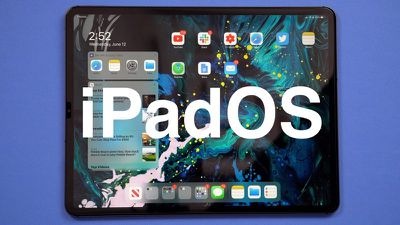
With iOS 13, Apple split iOS and iPadOS into two different software updates, but iPadOS includes almost all of the features available in iOS 13 (and iOS 13.1) along with some capabilities built specifically for the larger display of the iPad.
That means that all of the features in our iOS 13 roundup are available in iPadOS, along with the iOS 13.1 updates like Shortcut Automations, Share ETA, audio sharing improvements, and more. Apple alongside the release of iPadOS debuted a new video showing off some of the features:
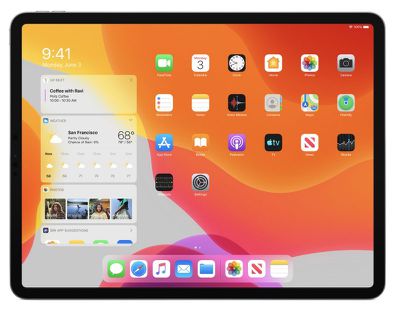
Specific to the iPad, iPadOS introduces a new Home screen that shrinks down the icon size so you can fit more apps on each page. There's also a new option to add the Today Widgets from the left side of the screen onto the Home screen itself for easier access.
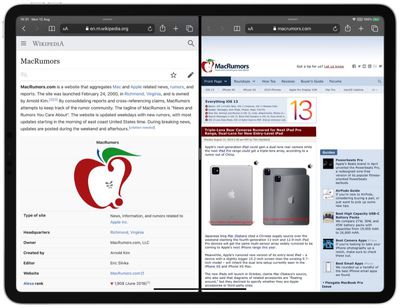
Split View and Slide Over, the iPad's multitasking features, now support multiple windows from the same app so you can do things like open two Safari windows side by side.
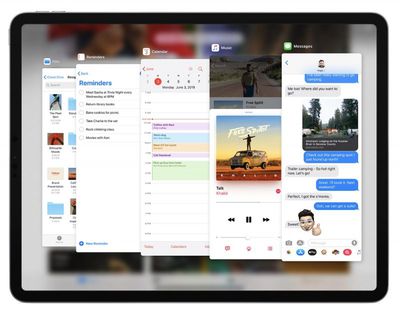
When using the Slide Over view, there's also a new option to view and switch between multiple apps with a card-style interface, plus a new App Exposé feature lets you view all of the open windows from a particular app and then swap between them with a tap.
Tapping on the iPad's display with Apple Pencil opens up Markup, which can be used for anything from webpages and documents to screenshots and emails. There's a redesigned tool palette for Markup that has quicker access to tools plus a new ruler option, an object eraser, and a pixel eraser.
Apple Pencil latency has been reduced, dropping it from 20ms on the iPad Pro to 9ms, and as on the iPhone, iPadOS now supports connecting external drives to the Files app for the first time.
There are more than 30 new keyboard shortcuts in iPadOS, and when using Safari on iPad, you'll always get the desktop version of a website instead of the mobile version.
Safari has a new download manager, and the iPad supports all of the new text editing gestures available on the iPhone. A new swipe gesture lets you select text and there are new gestures for cut, copy, paste, and undo.
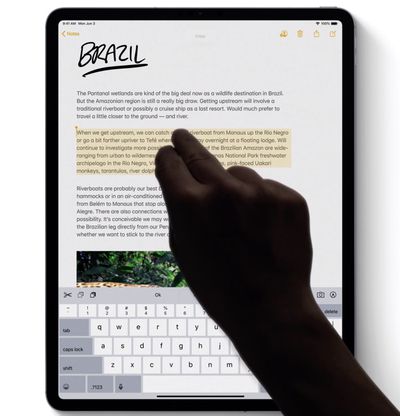
A floating keyboard that supports the new QuickPath swipe feature allows you to type one handed, and there's support for installing fonts across the system. Apple's full release notes for the update are below:
iPadOS, the powerful operating system with a new name to recognize the distinctive experience of iPad. iPadOS builds on the same foundation as iOS, adding powerful new capabilities and intuitive features specific to the large display and versatility of iPad. This update features new ways to work with multiple apps, presents more information at a glance on a redesigned Home screen, makes using Apple Pencil feel even more responsive along with a new way to instantly mark up anything, provides a dramatic new Dark Mode, allows a simple way to sign in to websites that protects your privacy, and gives new tools to edit and view your photos. iPadOS is faster and more responsive with optimizations across the system.
Home Screen
- Today Widgets on the Home screen for at-a-glance information
- A new layout to put even more apps on each pageMultitasking
- Slide Over with support for multiple apps to access your favorite apps from anywhere in iPadOS and quickly switch between them
- Multiple windows from a single app in Split View to work with two documents, notes, or emails, side-by-side
- Enhanced Spaces to open the same app across multiple spaces
- App Exposé to quickly see all of the open windows for an appApple Pencil
- Lower latency with Apple Pencil, making it feel more responsive than ever
- Redesigned tool palette, with a fresh new look, new tools, and the ability to drag to any side of the screen
- A new gesture to mark up anything with a swipe from the bottom right or left corner of the screen with Apple Pencil
- A new full page option to mark up entire web pages, Mail messages, iWork documents, and MapsText Editing
- Scrollbar scrubbing to directly drag the scrollbar for quickly navigating long documents, web pages, and email conversations
- Faster and more precise cursor navigation—just pick it up and move it to where you want
- Text selection improvements for easier selection by just tapping and swiping on the text
- New gestures for cut, copy, paste—pinch in once with three fingers to copy, twice to cut, and pinch out with three fingers to paste
- Undo across iPadOS by just double tapping with three fingersQuickType
- New floating keyboard leaving more room for your content—drag it anywhere you like
- QuickPath on the floating keyboard lets you slide to type for easy one-handed typingFonts
- Custom fonts are available from the App Store for use in your favorite apps
- Font management in SettingsFiles
- External drives supported in Files to access and manage files on a USB drive, SD card, or hard drive
- SMB support to connect to a server at work or a home PC
- Local storage for creating folders on the local drive and adding your favorite files
- Column to drill down into nested folders
- Preview pane with high resolution file previews, rich metadata, and Quick Actions
- Zip and Unzip support for creating and expanding Zip files
- New keyboard shortcuts to manage your files even faster with an external keyboardSafari
- Desktop-class browsing in Safari with websites automatically optimized for the large Multi-Touch display iPad display
- Web platforms like Squarespace, WordPress, and Google Docs now supported
- Download manager to access downloads quickly and check the status of a file you’re downloading
- Over 30 new keyboard shortcuts to navigate the web even faster with an external keyboard
- Updated start page with favorites, frequently visited, most recently visited websites, and Siri suggestions
- View options in the Smart Search field for quick access to text size controls, Reader view, and per‑site settings
- Per‑site settings to choose Reader view, and enable content blockers, camera, microphone, and location access for individual websites
- Option to resize when uploading photosDark Mode
- A beautiful new dark color scheme that delivers a great viewing experience especially in low-light environments
- Can be scheduled to turn on automatically at sunset, at a certain time, or turned on from Control Center
- Four new system wallpapers that automatically switch appearances with Light and Dark ModePhotos
- An all-new Photos tab with a curated view of your library making it easy to find, relive, and share your photos and videos
- Powerful new photo editing tools that make it easier to edit, adjust, and review photos at a glance
- Video editing with over 30 new tools, including Rotate, Crop, and EnhanceSign in with Apple
- A private way to sign in to participating apps and websites with the Apple ID you already have
- Simple account setup with only your name and email address
- Hide My Email to share a unique email address that is automatically forwarded to you
- Built-in two-factor authentication to protect your account
- No tracking or profiling by Apple as you use your favorite appsApp Store with Arcade
- Unlimited access to groundbreaking new games with one subscription, no ads or additional purchases
- An all-new Arcade tab in the App Store to browse the latest games, personalized recommendations, and exclusive editorial content
- Available to play across iPhone, iPod touch, iPad, Mac, and Apple TV
- Option to download large apps over your cellular connection
- Ability to view available app updates or delete apps from the Account page
- Support for Arabic and HebrewMaps
- An all-new map rolling out in the US featuring broader road coverage, improved address precision, better support for pedestrians, and more detailed land cover
- Look Around to explore cities in a high-resolution, interactive 3D experience
- Collections for the lists of places you love and can easily share with friends and family
- Favorites for quick and easy navigation to the places you visit dailyReminders
- All-new design with more powerful and intelligent ways to create and organize reminders
- Quick toolbar to add dates, locations, flags, attachments and more to reminders
- New smart lists—Today, Scheduled, Flagged and All—to easily keep track of upcoming reminders
- Subtasks and grouped lists to organize your remindersSiri
- More natural Siri voice, particularly while speaking longer phrases
- Personalized Siri Suggestions in Apple Podcasts, Safari, and Maps
- Over 100,000 live radio stations from around the world available with SiriShortcuts
- Shortcuts app now built-in
- Suggested automations in the Gallery personalized to your daily routine
- Personal and home automations for automatically running shortcuts based on triggers
- Home app support for shortcuts as advanced actions in the Automation tabMemoji and Messages
- New Memoji customization options including new hairstyles, headwear, makeup, and piercings
- Memoji sticker packs in Messages, Mail, and third‑party apps and available on iPad mini 5, iPad (5th generation and later), iPad Air (3rd generation), and all iPad Pro models
- Your name and photo, or even Memoji, now optionally shared with your friends
- Search enhancements to easily find messages with intelligent suggestions and categorization of resultsAugmented Reality
- People Occlusion for apps to place virtual objects naturally in front or behind people using iPad Pro (2018), iPad Air (2018), iPad mini 5
- Motion Capture for apps to understand the body position and movement of a person so you can animate a character or interact with virtual objects using iPad Pro (2018), iPad Air (2018), iPad mini 5
- Multiple face tracking for AR content on up to 3 faces at a time so you can have fun with your friends using iPad Pro (2018)
- AR Quick Look to view and interact with multiple AR objects at the same time
- Block sender to move all email messages from a blocked sender directly to the trash
- Mute thread to stop notifications from an overly active email thread
- Format bar with easy access to rich text formatting tools and attachments of all kinds
- Font support for all system fonts, as well as new fonts you download from the App StoreNotes
- Gallery view with your notes as visual thumbnails helping you find the note you need
- Shared folders to collaborate with others giving them access to entire folders of notes
- More powerful search for visual recognition of images inside your notes and text in items you’ve scanned
- New checklist options to easily reorder checklist items, indent them, or move checked items to the bottom of the list automaticallyApple Music
- Time-synced lyrics make listening more fun with perfectly timed lyrics
- Over 100,000 live radio stations from around the worldScreen Time
- 30-day usage data to compare Screen Time numbers over the previous weeks
- Combined limits to include multiple app categories, specific apps, or websites in one limit
- “One more minute” option to quickly save your work or log out of a game when a Screen Time limit is metPrivacy and Security
- Allow Once location permission with the option to share your locations with apps only once
- Background tracking alerts now notify you when an app is using your location in the background
- Wi-Fi and Bluetooth enhancements help prevent apps from accessing your location without your consent
- Location sharing controls give you the option to easily omit location data when sharing photosSystem Experience
- Wi‑Fi networks and Bluetooth accessories selection in Control Center
- A redesigned, unobtrusive volume control in the top middle
- Full-page screenshots for web pages, Mail messages, iWork documents, and Maps
- Redesigned share sheet with intelligent suggestions to share content with just a few taps
- Audio Sharing for two sets of AirPods, Powerbeats Pro, Beats Solo3, BeatsX and Powerbeats3 to share a single stream of audio
- Dolby Atmos playback for a thrilling surround sound experience from content with Dolby Atmos, Dolby Digital, or Dolby Digital Plus soundtracks on iPad Pro (2018)Language support
- Support for 38 new keyboard languages
- Predictive input in Cantonese, Dutch, Hindi (Devanagari), Hindi (Latin), Najdi Arabic, Swedish, and Vietnamese keyboards
- Separate emoji and globe keys make it easier to quickly switch between languages and select emoji
- Automatic language detection for dictation
- Bilingual dictionary support in Thai and English and Vietnamese and EnglishChina
- A dedicated QR code mode in Camera, accessible from the Control Center, for improved QR code performance, a flashlight option, and enhanced privacy
- Junction View in Maps for drivers in China to more easily navigate complex roadways
- Adjustable handwriting area on the Chinese keyboard
- Cantonese predictions on the Cangjie, Sucheng, Stroke, and Handwriting keyboardsIndia
- All‑new Indian English male and female Siri voices
- Support for all 22 official Indian languages with the addition of 15 new keyboard languages
- Bilingual keyboard for Hindi (Latin) and English keyboard, including typing predictions
- Typing predictions on the Hindi (Devanagari) keyboard
- New Indian language system fonts for Gujarati, Gurmukhi, Kannada, and Odia for greater clarity and ease when reading in apps
- 30 new document fonts for Assamese, Bangla, Gujarati, Hindi, Kannada, Malayalam, Marathi, Nepali, Odia, Punjabi, Sanskrit, Tamil, Telugu, and Urdu
- Contacts with hundreds of new relationship labels to help more accurately label your contactsVoice Control
- A new way to control your iOS devices, entirely with your voice
- Comprehensive navigation with just your voice to open apps, search the web, tap, swipe, pinch, zoom, press the Home button and more
- Accurate dictation using the Siri speech recognition engine
- Rich text editing to make corrections using just your voice, or select from word and emoji suggestions
- Custom words, such as legal or medical terms, to ensure Voice Control recognizes words you commonly use
- Seamless transitions from text dictation to voice commands
- Attention Awareness to keep Voice Control off when you turn your head away from True Depth camera on supported iPhone models
- On‑device processing so your personal data is kept privatePerformance
- Up to 2x faster app launch-
- Up to 30 percent faster Face ID unlocking on iPad Pro 11-inch, iPad Pro 12.9-inch (3rd generation)--
- 60 percent smaller app updates on average-
- Up to 50 percent smaller apps from the App Store-Other features and improvements
- Low Data Mode to reduce your data usage over your cellular network or specific Wi-Fi networks you select
- PlayStation 4 and Xbox Wireless Controller support
- Find My iPhone and Find My Friends combined into a single app with the ability to locate a missing device even if it can't connect to a Wi-Fi or cellular network
- Apple Books reading goals help make reading a daily habit
- Apple News+ options to remove downloaded issues, follow a title, or browse the back catalog from the More button in the My Magazines section
- Stocks app with business stories from Apple News+
- Calendar supports adding attachments to events
- Home app redesigned controls for HomeKit accessories with a combined view for ones with multiple services
- Pinch-to-zoom for more precision when editing recordings in Voice MemosSome features may not be available for all regions, or on all Apple devices, for more information visit:
https://www.apple.com/ios/feature-availability and https://www.apple.com/ipados
For more on all of the new features that are available in iPadOS, make sure to check out our iPadOS roundup.



















































