

Apple's iWork Apps for Mac and iOS Gain Text Styles, Apple Pencil Customization Options and More - MacRumorsOpen MenuShow RoundupsShow Forums menuVisit ForumsOpen Sidebar
Skip to Content

Apple's iWork Apps for Mac and iOS Gain Text Styles, Apple Pencil Customization Options and More

by

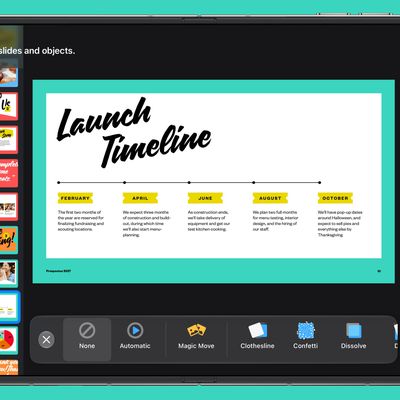
Apple today updated its line of iWork apps for iOS and macOS, bringing new features to Pages, Keynote, and Numbers on both iOS devices and Macs.

All of the apps have a new feature designed to let you style text by filling it with gradients or images, or by applying new outline styles. Images, shapes, and equations can be placed inline in text boxes so they move with text, and using face detection features, subjects in photos are intelligently positioned in placeholders and objects.

iworkiosapp
In Pages, Apple added new templates for novels, and the option to reapply text to a master page so text and placeholders return to their default style and position. Release notes for Pages are below:

iOS Version:

- Style your text by filling it with gradients or images, or by applying new outline styles.
- Customize lists by choosing from new bullet types, changing the size and color of bullets, creating custom bullets, adjusting indentation levels, and more.
- Choose Learn Spelling to add a word to the spelling dictionary.
- Create links from text to other pages in a page layout document.
- Copy and paste pages or sections between documents.
- Use new chart editing capabilities to change the style of individual series, adjust spacing between columns, add trendlines, and more.
- Adjust the appearance of cell borders in tables.
- Place images, shapes, and equations inline in text boxes so they move with text.
- Choose whether Apple Pencil is used to start drawing or to select and scroll -- or toggle between these options via double-tap using a supported Apple Pencil.
- Using face detection, subjects in photos are intelligently positioned in placeholders and objects.
- Reapply a master page so text and media placeholders return to their default style and position.
- Create books using new templates for novels (available in English only).

macOS Version:

- Style your text by filling it with gradients or images, or by applying new outline styles.
- Create links from text to other pages in a page layout document.
- Copy and paste pages or sections between documents.
- Place images, shapes, and equations inline in text boxes so they move with text.
- Using face detection, subjects in photos are intelligently positioned in placeholders and objects.
- Reapply a master page so text and media placeholders return to their default style and position.
- Create books using new templates for novels (available in English only).

Keynote for iOS and macOS has a new feature for editing master slides while collaborating on a presentation, while Keynote for iOS specifically has options like customizing lists with new bullet types, selecting what the Apple Pencil can do, and more. Release notes for Keynote are below:

iOS Version:

- Edit master slides while collaborating on a presentation.
- Place images, shapes, and equations inline in text boxes so they move with text.
- Style your text by filling it with gradients or images, or by applying new outline styles.
- Use new chart editing capabilities to change the style of individual series, adjust spacing between columns, add trendlines, and more.
- Using face detection, subjects in photos are intelligently positioned in placeholders and objects.
- Adjust the appearance of cell borders in tables.
- Choose whether Apple Pencil is used to start drawing or to select and scroll -- or toggle between these options via double-tap using a supported Apple Pencil.
- Customize lists by choosing from new bullet types, changing the size and color of bullets, creating custom bullets, adjusting indentation levels, and more.
- Choose Learn Spelling to add a word to the spelling dictionary.

macOS Version:

- Edit master slides while collaborating on a presentation.
- Style your text by filling it with gradients or images, or by applying new outline styles.
- Place images, shapes, and equations inline in text boxes so they move with text.
- Using face detection, subjects in photos are intelligently positioned in placeholders and objects.

Numbers for Mac and iOS offers improved performance while editing and sorting tables and the option to add rows to filtered tables. For iOS, there are ‌Apple Pencil‌ options and customizable lists. Release notes for Numbers are below:

iOS Version:

- Greatly improved accuracy using the enhanced 128-bit calculation engine.
- Style your text by filling it with gradients or images, or by applying new outline styles.
- Create links from text to other sheets in a spreadsheet.
- Add rows to filtered tables.
- Use new chart editing capabilities to change the style of individual series, adjust spacing between columns, add trendlines, and more.
- Adjust the appearance of cell borders in tables.
- Place images, shapes, and equations inline in text boxes so they move with text.
- Using face detection, subjects in photos are intelligently positioned in placeholders and objects.
- Choose whether Apple Pencil is used to start drawing or to select and scroll -- or toggle between these options via double-tap using a supported Apple Pencil.
- Customize lists by choosing from new bullet types, changing the size and color of bullets, creating custom bullets, adjusting indentation levels, and more.
- Choose Learn Spelling to add a word to the spelling dictionary.

macOS Version:

- Greatly improved accuracy using the enhanced 128-bit calculation engine.
- Style your text by filling it with gradients or images, or by applying new outline styles.
- Create links from text to other sheets in a spreadsheet.
- Place images, shapes, and equations inline in text boxes so they move with text.
- Using face detection, subjects in photos are intelligently positioned in placeholders and objects.
- Improved performance while editing and sorting tables.
- Add rows to filtered tables.

All of the new updates are available from the iOS App Store and macOS ‌App Store‌ as of this morning.

Apple's iWork apps are free downloads for everyone.
Top Rated Comments

sracer Avatar
96 months ago
I totally agree. Everyone I know uses MS Office. I really wonder who the end users are for these products. They are really good but what is the user base?


Everyone I know uses MS Office... and I use it too, but when I have a choice, i use the iWork suite. Pages allows me to easily create documents with medium to advanced layouts and formatting without getting in the way so that I can spend my time on the content of the document, not how it looks.

The greatest hurdle I've seen for people to warming up to iWork is that they take an "MS Office mindset" to these apps. One needs to "think different" about how to accomplish the final results. Once over that hurdle, there are many situations where iWork can be used more efficiently and effectively than MS Office.

Apple has done a stellar job in attempting feature parity between the web/macOS/iOS versions. So much so, that I can start work on a document on my iMac, continue on my iPad, and finish it up on my Pixelbook.

Here's the web version of Pages running on my Pixelbook (chromebook).
(click to expand)


Attachment Image
Score: 17 Votes (Like | Disagree)
easteraries Avatar
96 months ago
Indeed. I don't think PC can use .pages (or .keynote) files, except perhaps if they login to icloud.com
That's unfortunate because I find iWork substantially superior in terms of UI, features, stability. They've done a wonderful job here and they keep upgrading them with new features.
I have the incredible good fortune to work in an all-Apple company. We use all the internally and are soooo much happier for it.

And we credit Keynote for a big portion of the wow factor our client get from our presentations. Not to mention that we do essentially all our page-layout in Pages, and our collateral looks so much better for it.
Score: 11 Votes (Like | Disagree)
techpr Avatar
96 months ago
Nice that they keep updating these at regular intervals.

But I never have come across people who actually use these. At work, my shopping life , my friends and family always either use Office or Google Docs.

I never get pages or number files
I use them almost everyday. Pages and Keynote specially. Keynote is far superior to PowerPoint.
Score: 8 Votes (Like | Disagree)
96 months ago
Mac Users: we use pivot tables on Excel and Sheets

Apple: announcing face detection!
Score: 7 Votes (Like | Disagree)
96 months ago
Nice that they keep updating these at regular intervals.

But I never have come across people who actually use these. At work, my shopping life , my friends and family always either use Office or Google Docs.

I never get pages or number files
Score: 7 Votes (Like | Disagree)
AllergyDoc Avatar
96 months ago
I use all three: Pages almost daily, Numbers when I have sales, and Keynote for educational seminars. I work alone, though, very little collaboration.

I ended up deleting the all then redownloading them to get the new versions.
Score: 6 Votes (Like | Disagree)

Popular Stories

iphone duo keynote

Apple's iWork Apps Get 'Intelligent Assistant' and iPhone Duo Support

Thursday October 22, 2026 1:02 pm PDT by
Apple today added an "Intelligent Assistant" to Keynote, Numbers, and Pages. The feature is available in beta for Apple Creator Studio subscribers. The update is available again following the temporary removal of the apps from the App Store. In Numbers, Intelligent Assistant can build formulas, visualize data, help generate formulas with natural language, and generate tables. The Pages...
Apple MacBook Pro with PROLED XDR Display family lineup feature

Apple Announces OLED MacBook Pro With Touch Display

Wednesday October 28, 2026 10:11 am PDT by
Apple today announced a new high-end MacBook Pro, which is available in 14-inch and 16-inch sizes. The new device has a PROLED XDR display that supports touch gestures, and a glowing rear Apple logo. Pricing on the MacBook Pro starts at $2,899 for the 14-inch model and $3,399 for the 16-inch model. Apple says the MacBook Pro has the "world's best display in a pro laptop." The PROLED...
iPhone Duo Display Cracking

Apple Alerts Stores to iPhone Duo's Display Cracking Issue

Friday October 30, 2026 3:20 pm PDT by
In a memo shared with Apple Stores and Apple Authorized Service Providers this week, and later obtained by MacRumors, Apple provided technicians with guidance on how to diagnose and address the iPhone Duo's inner display cracking issue. If a customer reports the issue, Apple advised technicians to inspect the iPhone Duo and repair or replace it in accordance with their standard procedures....
Latest Stories
Apple Watch Ultra 4 Hits All-Time Low Price With Amazon's $99 Discount
3 hours ago
Reminder: Apple's Big Discount on Beats 360 Ear Cushions Ends Today
3 hours ago
Here's a New Tour of Apple's HomeView Software
3 hours ago
Apple Reveals New iPad Mini's Battery Capacity
4 hours ago
Top Stories: Apple's Big MacBook Pro, iPad mini and iMac Updates
6 hours ago
'Pluribus' Season 2 Reportedly Starts Production Today
12 hours ago
iPhone 18 Pro Sales Surge in China, Offsetting Decline in U.S. and Japan
13 hours ago
HomeView Software 27.2: Wallpapers, Control Center, and More
19 hours ago
Apple Alerts Stores to iPhone Duo's Display Cracking Issue
20 hours ago
iOS 27.3 Will Enable These Apple Intelligence Features in China
21 hours ago
Apple Says iOS 27.3 Beta Coming Next Week
21 hours ago
Apple's Flash Storage Suppliers Are Finally 'Getting Their Revenge'
22 hours ago
14 New Things Your iPhone Can Do in iOS 27.2
23 hours ago
iPhone Duo Review: One Week Later
1 day ago
Samsung Mocks iPhone Duo Display Cracks in New Ad Campaign
1 day ago
The MacRumors Show: OLED MacBook Pro, iPad Mini 8, and More
1 day ago
MacBook Pro With Touch Display: 15 More Details Revealed
1 day ago
Russia Places Apple on State Surveillance Registry
1 day ago
Halloween Weekend Brings Discounts on Apple Accessories and Pre-Orders
1 day ago
Apple Has Released More Than 25 New Products in the Past Two Months
1 day ago
Local Code Launches as Free, Private AI Assistant Tool for Mac
1 day ago
Apple Acquires Ascend.io
1 day ago
HomePod Mini 2 Launches Today: All the New Features
1 day ago
AirTag 2 4-Pack Drops to New Low Price of $69.99
1 day ago
Rian Johnson's iPhone Camera App Goes Viral
1 day ago
Where Did All the iPhone Duos Go? Mostly to Apple's Stores
1 day ago
Apple's Touchscreen MacBook Pro Could Ship 1.5M Units in 2027
1 day ago
New Apple TV 4K and iPad Mini: RAM Amounts Revealed
2 days ago
Apple Executive Comments on New iPad Mini Lacking 120Hz Display
2 days ago
Here's a Hands-On Look at HomePod Mini 2's New Two-Tone Colors
2 days ago

🔗 Related Apple News & Rumors

Stay updated with the latest Apple ecosystem news and verified rumors











































