

Safari on iPadOS Optimized to Work With at Least Some Desktop Versions of Websites - MacRumorsOpen MenuShow RoundupsShow Forums menuVisit ForumsOpen Sidebar
Skip to Content

Safari on iPadOS Optimized to Work With at Least Some Desktop Versions of Websites

Apple's upcoming iPadOS is designed to bring more desktop-class functionality to iPads with bigger screens, and as part of that aim, Safari is receiving a major overhaul that will enable it to display desktop versions of websites.
google docs ipados
In the first instance, Apple is going about this by adapting Safari's mobile "user agent" – that aspect of the software which retrieves and renders interaction with web content – to enable the iOS browser to retrieve the desktop variety of a website by default, rather than its mobile counterpart.

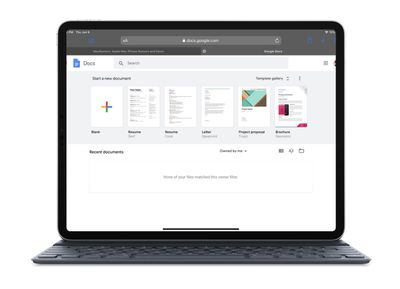
In addition to that, Apple appears to be custom-optimizing the iPadOS Safari user agent to include touch- and keyboard-based interaction with at least some popular websites. As highlighted by The Verge's Dieter Bohn in his brief testing of Google Docs, Apple has made it possible to use touch to hit the menu buttons.

Google Docs has long been a huge problem on the iPad, for two reasons. First, Google’s own iPad app is god-awful and the company seems hell-bent on not updating it to work better. Second, Google Docs in Safari on the iPad right now redirects you to that app even if you “Request Desktop Site.”

On iPadOS, however, Google Docs in Safari seems great.

Admittedly, I only spent about five minutes poking around, but I went straight for the stuff I didn’t expect to work at all — and it worked. Keyboard shortcuts for formatting and header styling, comments, cursor placement, and even watching real-time edits from another person in the doc all worked.

For the productivity suite, Safari for iPadOS seems to be re-rendering the web-based interface to align it more with the site's desktop functionality. Granted, we don't know yet how far this optimization extends – is it only available for a handful of commonly used desktop sites, for example, or will Apple's implementation be more extensible? – but it's at least a sign that Apple is doing a lot under the hood to make Safari on iPad more of a desktop-class user experience.

iPadOS will incorporate several features that recognize the tablet's function as a potential computer replacement, including a new Home screen, an updated Split View to enhance multitasking, improved Apple Pencil support, and additional keyboard shortcuts for use with physical keyboards. iPadOS is due to get its public release in the fall.


Related Forum: iOS 13

Popular Stories

Apple Event Logo

Apple Working on All-New Operating System

Wednesday July 29, 2026 11:39 am PDT by
Apple is developing an all-new operating system that is essentially a mix of tvOS, watchOS, and iOS, according to Bloomberg's Mark Gurman. In a report this week, he said the operating system will feature a grid of icons, widgets, and apps, along with customizable clock faces. The new software platform is intended for Apple's long-rumored smart home hub. With built-in facial recognition,...
imac video apple feature

Apple Made Its Second-Biggest Acquisition Ever This Year

Wednesday July 29, 2026 12:03 pm PDT by
Apple this year acquired Israeli startup Q.ai for close to $2 billion, according to the Financial Times. That would make this Apple's second-biggest acquisition ever, after it paid $3 billion for the popular headphone maker Beats in 2014. This is also the largest known Apple acquisition since the company purchased Intel's smartphone modem business and patents for $1 billion in 2019. Q.ai...
Dynamic Island iPhone 18 Pro Feature

iPhone 18 Pro: Twelve Changes Coming to Apple's Next Flagship

Thursday July 30, 2026 3:43 am PDT by
We're less than two months out from the launch of Apple's premium next-generation smartphone lineup, and while we're not expecting a dramatic change in terms of functionality, there are still several enhancements rumored to be coming to the iPhone 18 Pro and iPhone 18 Pro Max. One thing worth noting is that Apple is reportedly planning a major change to its iPhone release cycle this year,...

Top Rated Comments

93 months ago
I don't think I have ever seen a more inaccurate summary in my life. Holy cow this is off the rails:


In the first instance, Apple is going about this by adapting Safari's mobile "user agent" - that aspect of the software which retrieves and renders interaction with web content - to enable the iOS browser to retrieve the desktop variety of a website by default, rather than its mobile counterpart.
No, a user agent doesn't retrieve or render anything. It is a string, just some text, that say what browser it is and what version, and often lists similar browser rendering engines that it should be compatible with. It is literally just a description of the browser. The server then determines what to send back based on that.


For the productivity suite, Safari for iPadOS seems to be re-rendering the web-based interface to align it more with the site's desktop functionality.
Not even close. Safari on iPad changes how it responds to certain events in on the page. There is no re-rendering. The big obvious one is that if an element has both a hover and a click event, iPad Safari sends the hover first, then waits to see if the page changes at all (as it would on any desktop browser when hovered over, i.e. not re-rendered), and if it does change then it doesn't send the click, so that the user can see the new content and decide to tap on a new option. If the page doesn't change it sends the click after a short delay (a couple hundred milliseconds is what they said in the session on Desktop class browsing at WWDC).

The big change is that Safari on iPad now reports, via the user agent, that it is MacOS, not iOS, and they've updated how it handles events that can have conflicts on a touch based device.
Score: 21 Votes (Like | Disagree)

oneMadRssn Avatar
93 months ago
This whole narrative is a bit frustrating. iPhoneOS 1.0 promised a "desktop class browser" back in 2007. Look at this press release for example:


https://www.apple.com/newsroom/2007/01/09Apple-Reinvents-the-Phone-with-iPhone/

The whole point from the very beginning of iPhone was that the browser was a proper real browser and better than that WAP crud we had before. Then mobile optimization happened and we seemed to have ended up with something better than WAP but still not the promised desktop-class browser.

We keep being promised desktop-class browsing, but that seems to be elusive. What gives?

Attachment Image
Score: 19 Votes (Like | Disagree)
newyorksole Avatar
93 months ago
Apple really made major leaps and bounds this year so far.
Score: 14 Votes (Like | Disagree)
petvas Avatar
93 months ago
This whole narrative is a bit frustrating. iPhoneOS 1.0 promised a "desktop class browser" back in 2007. Look at this press release for example:


https://www.apple.com/newsroom/2007/01/09Apple-Reinvents-the-Phone-with-iPhone/

The whole point from the very beginning of iPhone was that the browser was a proper real browser and better than that WAP crud we had before. Then mobile optimization happened and we seemed to have ended up with something better than WAP but still not the promised desktop-class browser.

We keep being promised desktop-class browsing, but that seems to be elusive. What gives?
Well, I understand how this could be confusing, but the iPhone did change mobile Internet. DO you remember how things were before the iPhone? The iPhone did improve things a lot and of course content was made especially for the iPhone. Websites are optimised for the iPhone and work really nice on the iPhone. On the iPad though, all we got was the same browser, with the same restrictions, with no way to distinguish between Safari on the iPhone and on the iPad. This is apparently changing now, so let's hope that we will get a better experience in Safari on the iPad.
Score: 12 Votes (Like | Disagree)
93 months ago
12 years
12 years!

Since iPhone was first revealed and many websites are completely unusable on iOS. The web experience on iPhone is so hit or miss due to VERY lazy webmasters. It's often like 1995 (or a lot worse) browsing the web on iPhone.

Wake up lazy webmasters! There's a billion of us iPhone users
Score: 6 Votes (Like | Disagree)
macduke Avatar
93 months ago
This whole narrative is a bit frustrating. iPhoneOS 1.0 promised a "desktop class browser" back in 2007. Look at this press release for example:


https://www.apple.com/newsroom/2007/01/09Apple-Reinvents-the-Phone-with-iPhone/

The whole point from the very beginning of iPhone was that the browser was a proper real browser and better than that WAP crud we had before. Then mobile optimization happened and we seemed to have ended up with something better than WAP but still not the promised desktop-class browser.

We keep being promised desktop-class browsing, but that seems to be elusive. What gives?
Stupid developers doing stupid things with user agent strings and crap they shouldn't be messing with.

Mobile first with progressive enhancement. Boom, done. Don't get why so many companies and developers don't do this. If anything it's easier than making a bunch of custom versions for different user agent strings. You only maintain a single codebase for your site, and everything is neatly packaged into breakpoints with fewer and fewer modifications as you scale up. Build your site to be lean and functional on mobile and you have a great foundation for a desktop class site from the start. Instead, a lot of companies keep their existing desktop site and do stupid device tests that load completely separate bits of code. Sometimes the iPad version is so stripped down that it's practically unusable. Drives me crazy because it doesn't have to be that way.
Score: 6 Votes (Like | Disagree)

🔗 Related Apple News & Rumors

Stay updated with the latest Apple ecosystem news and verified rumors











































