

Apple's Clips App Updated With New Posters, Camcorder Filter, Live Titles and More

Apple today updated its Clips app for the iPhone and the iPad to introduce new posters, new title and caption options, updated stickers, a camcorder filter, and more.

The Clips app, for those unfamiliar with it, is a video editing app that's designed to let users combine video clips, images, and photos with voice-based titles, music, filters, and graphics to create unique videos that can be shared on social media.
clipsappupdate
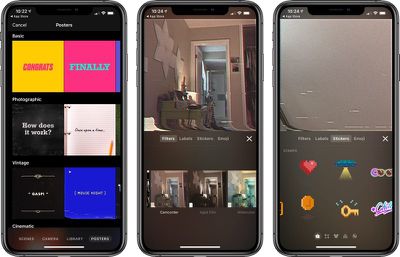
Apple has added a new camcorder filter that's designed to introduce a retro video camera look for your videos, and there are eight new poster background options with colorful vintage designs, a camcorder recording screen, and an animated globe in honor of earth day.

You can create titles and captions using three newly introduced Live Titles styles, and there are new 8-bit and 3D stickers you can add to your videos. Songs created in GarageBand or other music apps can be added to your Clips projects, and there's now ClassKit support to allow students to deliver video assignments to teachers through the Schoolwork app. Full release notes are below:

- Use the new camcorder filter to give your videos a retro video camera look
- Choose from 8 new posters including options with solid backgrounds, colorful vintage designs, a classic blue camcorder recording screen, and an animated globe to celebrate Earth Day.
- Create titles and captions with 3 new Live Titles styles featuring static text that appears all at once or animated text that highlights each word as it's spoken
- Apply new 8-bit and 3D-styled stickers to add emphasis to your videos
- Create songs in GarageBand and other music apps, then add them directly to new or existing Clips projects
- Duplicate and rename projects
- Share projects with friends via AirDrop or email, save them to Files, or upload them to cloud storage service with share extensions
- ClassKit support lets students deliver video assignments to teachers using the Schoolwork app

Apple first released clips in early 2017 and has since updated it multiple times. Clips is compatible with the ‌iPhone‌ 5s and later, the original iPad Air and later, and the iPad mini 2 and later. Style transfer effects require the ‌iPhone‌ 7 or 2017 iPad Pro or later, while Selfie Scenes require an ‌iPhone‌ or ‌iPad Pro‌ with TrueDepth Camera.

Clips can be downloaded from the App Store for free. [Direct Link]

Tag: Clips

Popular Stories

Aston Martin CarPlay Ultra Screen

Apple's CarPlay Ultra to Expand to These Vehicle Brands Later This Year

Sunday February 1, 2026 10:08 am PST by
Last year, Apple launched CarPlay Ultra, the long-awaited next-generation version of its CarPlay software system for vehicles. Nearly nine months later, CarPlay Ultra is still limited to Aston Martin's latest luxury vehicles, but that should change fairly soon. In May 2025, Apple said many other vehicle brands planned to offer CarPlay Ultra, including Hyundai, Kia, and Genesis. In his Powe...
Apple Logo Black

Apple's Next Launch is 'Imminent'

Sunday February 1, 2026 12:31 pm PST by
The calendar has turned to February, and a new report indicates that Apple's next product launch is "imminent," in the form of new MacBook Pro models. "All signs point to an imminent launch of next-generation MacBook Pros that retain the current form factor but deliver faster chips," Bloomberg's Mark Gurman said on Sunday. "I'm told the new models — code-named J714 and J716 — are slated...
Apple MacBook Pro M4 hero

New MacBook Pros Reportedly Launching Alongside macOS 26.3

Sunday February 1, 2026 5:42 am PST by
Apple is planning to launch new MacBook Pro models with M5 Pro and M5 Max chips alongside macOS 26.3, according to Bloomberg's Mark Gurman. "Apple's faster MacBook Pros are planned for the macOS 26.3 release cycle," wrote Gurman, in his Power On newsletter today. "I'm told the new models — code-named J714 and J716 — are slated for the macOS 26.3 software cycle, which runs from...
iOS 26

iOS 26.3 and iOS 26.4 Will Add These New Features to Your iPhone

Tuesday February 3, 2026 7:47 am PST by
We are still waiting for the iOS 26.3 Release Candidate to come out, so the first iOS 26.4 beta is likely still at least a week or two away. Following beta testing, iOS 26.4 will likely be released to the general public in March or April. Below, we have recapped known or rumored iOS 26.3 and iOS 26.4 features so far. iOS 26.3 iPhone to Android Transfer Tool iOS 26.3 makes it easier...
14 inch MacBook Pro Keyboard

Apple Changes How You Order a Mac

Saturday January 31, 2026 10:51 am PST by
Apple recently updated its online store with a new ordering process for Macs, including the MacBook Air, MacBook Pro, iMac, Mac mini, Mac Studio, and Mac Pro. There used to be a handful of standard configurations available for each Mac, but now you must configure a Mac entirely from scratch on a feature-by-feature basis. In other words, ordering a new Mac now works much like ordering an...

Top Rated Comments

AlbinoPigeon Avatar
89 months ago
Lol, I forgot this even existed.
Score: 4 Votes (Like | Disagree)
albebaubles Avatar
89 months ago
Never heard of it.
Score: 4 Votes (Like | Disagree)
IRockThat828pScreen Avatar
89 months ago
Never understood the point of this app. Just build all this into the iMessage camera.
Score: 2 Votes (Like | Disagree)
BootsWalking Avatar
89 months ago
I love the Clips app but it eats through the battery like a ravenous electricity monster.
Score: 2 Votes (Like | Disagree)
JGIGS Avatar
89 months ago
I literally had to look that up to remember what it was
You may have to do the same with Clips one day. ;)
Score: 1 Votes (Like | Disagree)
chrisduketv Avatar
89 months ago
Still no support for vertical video? Wow. You guys are on top of current trends, Apple. Spot on

Until vertical video support is added, this app is dead to me ☠️
Score: 1 Votes (Like | Disagree)















