

Final Cut Pro X Updated With Support for Third-Party Workflow Extensions - MacRumorsOpen MenuShow RoundupsShow Forums menuVisit ForumsOpen Sidebar
Skip to Content

Final Cut Pro X Updated With Support for Third-Party Workflow Extensions

Apple today announced a new update for Final Cut Pro X, which introduces support for workflow extensions that will allow professional video editors to use third-party apps and services directly within the Final Cut Pro app.

Workflow extensions have been designed to match the look of Final Cut Pro, offering tight integration with the app. Media can be dragged into Final Cut Pro libraries, playback can be synced between extensions and the timeline, and more.


Extensions include Frame.io, which enhances post-production, Shutterstock, which allows for browsing and purchasing stock footage, and CatDV for media asset management.
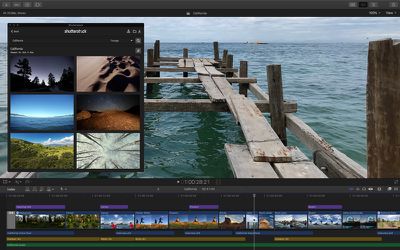
fcpshutterstock
Workflow extensions for Final Cut Pro can be downloaded from the Mac App Store starting today, with Apple planning to add additional third-party FCP extensions on an ongoing basis.

Along with extensions, the new version of Final Cut Pro introduces batch sharing for exporting multiple clips or projects in one step, a new Comparison Viewer window is available for letting editors view reference images while working on color grading, and marquee selection has been improved to make it easier to select individual clips.
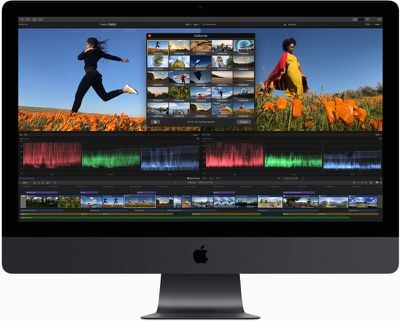
fcpcomparison
Apple has added a new floating timecode window to make it easier for video editors to follow along with color-coded clip names, roles, project timecode, and source timecode, all presented in a customizable display.
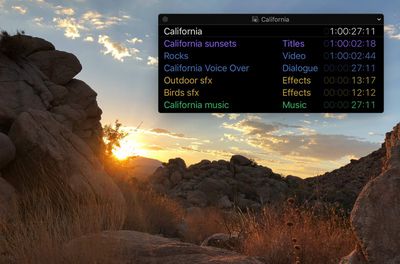
fcptimecode
New noise reduction tools are designed to minimize artifacts in low light footage, and editors can create closed captions in an SRT format or burn them into a video for wider compatibility with various websites.

Motion, the motion graphics companion app for Final Cut Pro, is also being updated today. It gains a comprehensive set of color grading tools that match the color correction features available in Final Cut Pro along with new filters for comic and tiny planet effects.

Compressor, another FCP companion app, now uses a 64-bit engine that better takes advantage of all of the memory in a user's Mac and it supports SRT closed captions.

Final Cut Pro can be downloaded from the Mac App Store for $299.99. [Direct Link]

Motion can be downloaded from the Mac App Store for $49.99. [Direct Link]

Compressor can be downloaded from the Mac App Store for $49.99. [Direct Link]

Popular Stories

Apple Event Logo

Apple Working on All-New Operating System

Wednesday July 29, 2026 11:39 am PDT by
Apple is developing an all-new operating system that is essentially a mix of tvOS, watchOS, and iOS, according to Bloomberg's Mark Gurman. In a report this week, he said the operating system will feature a grid of icons, widgets, and apps, along with customizable clock faces. The new software platform is intended for Apple's long-rumored smart home hub. With built-in facial recognition,...
imac video apple feature

Apple Made Its Second-Biggest Acquisition Ever This Year

Wednesday July 29, 2026 12:03 pm PDT by
Apple this year acquired Israeli startup Q.ai for close to $2 billion, according to the Financial Times. That would make this Apple's second-biggest acquisition ever, after it paid $3 billion for the popular headphone maker Beats in 2014. This is also the largest known Apple acquisition since the company purchased Intel's smartphone modem business and patents for $1 billion in 2019. Q.ai...
Dynamic Island iPhone 18 Pro Feature

iPhone 18 Pro: Twelve Changes Coming to Apple's Next Flagship

Thursday July 30, 2026 3:43 am PDT by
We're less than two months out from the launch of Apple's premium next-generation smartphone lineup, and while we're not expecting a dramatic change in terms of functionality, there are still several enhancements rumored to be coming to the iPhone 18 Pro and iPhone 18 Pro Max. One thing worth noting is that Apple is reportedly planning a major change to its iPhone release cycle this year,...

Top Rated Comments

CmdrLaForge Avatar
101 months ago
Now bring back Aperture and we are good
Score: 15 Votes (Like | Disagree)
Burger Thing Avatar
101 months ago
We need final cut for the ipad now
I honestly hope not. Knowing Apple and their Modus operandi, we would get a Mickey Mouse Version of FCPX on which the whole development team and the gardener was working on. With the unfortunate result that the MacOs Version wouldn’t see upgrades for centuries. And it took already quite a while to bring FCPX on speed.
Score: 13 Votes (Like | Disagree)
PlainviewX Avatar
101 months ago
That only took a decade to implement.....
Score: 12 Votes (Like | Disagree)
dan9700 Avatar
101 months ago
We need final cut for the ipad now
Score: 11 Votes (Like | Disagree)
Kobayagi Avatar
101 months ago
That only took a decade to implement.....
final cut pro x workflow extensions image

Even when Apple does something good, you still complain? They can't win lmao. :D
Score: 10 Votes (Like | Disagree)
101 months ago
I honestly hope not. Knowing Apple and their Modus operandi, we would get a Mickey Mouse Version of FCPX on which the whole development team and the gardener was working on. With the unfortunate result that the MacOs Version wouldn’t see upgrades for centuries. And it took already quite a while to bring FCPX on speed.
See also: what happened to the iWork suite back when the '09 version got "upgraded" to a lowest-common-denominator garbagefest. Keynote, for instance, used to have tons of really powerful control palattes you could spread out around your screen to control everything (kind of the way Adobe Creative Cloud apps work). Now it's got one ****y inspector that you'll find yourself constantly switching around to its different functions. Why is this? So the interface can be more or less identical on iPad, Mac and iCloud.com. I'd rather my Mac apps remain powerful, not get crapped down to the level of what iOS devices are capable of dealing with.
[doublepost=1542313222][/doublepost]

WE have this massively powerful iPad, and the software is holding it back. Also editing with a finger is so much more clumsy than using a proper mouse. Hopefully the next version of iOS will add some sort of file support, other than the photo stream.
To be fair, there is now the Files app for what that's worth. When working in apps that plug into it correctly, it's quite decent. It's no Finder, of course, but it at least lets you open/save to proper folders that sync over to your Mac.
Score: 9 Votes (Like | Disagree)

🔗 Related Apple News & Rumors

Stay updated with the latest Apple ecosystem news and verified rumors












































