

Popular image editing app Pixelmator Pro was today updated to version 1.2, which adds full support for macOS Mojave, a new light mode, faster machine learning tools, and more.

The update introduces compatibility for Continuity Camera and Quick Actions, two macOS Mojave features. Continuity Camera support is designed to let you import a photo into Pixelmator Pro directly from an iPhone, while Quick Actions let you edit images using Finder.
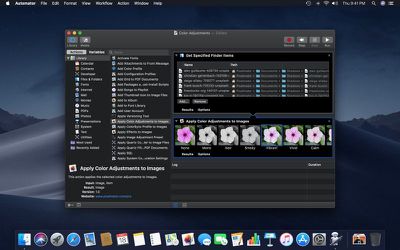
pixelmatorprobatchprocessing
Batch processing functionality has been added to Automator for white balance, auto enhance, color adjustments, effects, and file conversions, and Automator is what powers the new Quick Actions you'll find in Finder. There are also tools for creating your own Pixelmator Pro Quick Actions that can be executed without opening the Pixelmator app.

macOS Mojave brought Core ML 2, which is now powering Pixelmator Pro features like Auto Layer Naming, ML Color Adjustments, ML Hue & Saturation, ML White Balance, ML Lightness, and a new ML Enhance feature that's designed to let Apple's neural network analyze and improve the colors of an image in just a few seconds.

ML Enhance is an auto enhance feature that was trained on 20 million professional photos, which lets it tweak 37 color adjustments all at once for the best possible automatic color tuning.
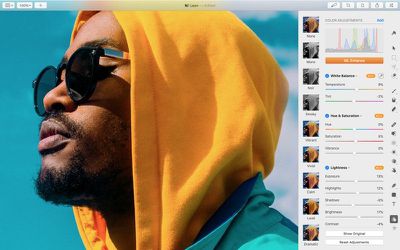
pixelmatorpromlenhance
The updated version of Pixelmator Pro includes a new light appearance and a revamped dark appearance, both of which are designed to work with the Light Mode and Dark Mode in macOS Mojave. Pixelmator Pro will automatically activate one of these modes based on your macOS settings.

SVG fonts are also supported in Pixelmator Pro 1.2, and several bug fixes have been included.

Pixelmator Pro 1.2 can be downloaded from the App Store for $29.99, a 50 percent discount off of the regular Pixelmator Pro price. Customers who have already purchased Pixelmator Pro will get the update for free. [Direct Link]


Top Rated Comments

Pakaku Avatar
95 months ago
The updated version of Pixelmator Pro includes a new light appearance and a revamped dark appearance, both of which are designed to work with the Light Mode and Dark Mode in macOS Mojave.
Pixelmator is the only OSX app that I'm aware of that actually added a light theme after Mojave started adding support for a dark themed UI.
Score: 5 Votes (Like | Disagree)
Nozuka Avatar
95 months ago
I like how fast and consistent they are with adding/using new OS features. I wish other developers would do the same.
Score: 4 Votes (Like | Disagree)
Amazing Iceman Avatar
95 months ago
Allow me please to throw the typical question:
Which one is better now: Pixelmator Pro or Affinity Photo?

It would be a huge plus if Pixelmator Pro releases an iOS app with all the features of the macOS version.
Score: 2 Votes (Like | Disagree)
macbanjo Avatar
95 months ago
Allow me please to throw the typical question:
Which one is better now: Pixelmator Pro or Affinity Photo?

It would be a huge plus if Pixelmator Pro releases an iOS app with all the features of the macOS version.
I have AP on booth the Mac and iPad, AP to me is more a pro tool along the lines of photoshop with the learning curve.
for color corrections I think AP has the edge, but for building a file with layers and text and whatnot I like using PP.
Pixelmator is very Mac like in its layout and learning curve and I like the pro version one window workflow.
I believe I read a while back that they were working on a new version for the Ipad that would be more in line with the desktop version, which I'm hoping to see
Score: 2 Votes (Like | Disagree)
travelsheep Avatar
95 months ago
Pixelmator is the only OSX app that I'm aware of that actually added a light theme after Mojave started adding support for a dark themed UI.
Wow ! Great news ! Plus an option to view the interface without having to use a scanning electron microscope would be nice.
Score: 1 Votes (Like | Disagree)
RMo Avatar
95 months ago
Pixelmator is the only OSX app that I'm aware of that actually added a light theme after Mojave started adding support for a dark themed UI.
I'll have to try this out! Maybe Light Mode will help me see the icons better, but:

Wow ! Great news ! Plus an option to view the interface without having to use a scanning electron microscope would be nice.
Yes, I also wish for non-microscopic icons. Maybe the next release, or so I've been wishing for years. :)
Score: 1 Votes (Like | Disagree)

Popular Stories

Aston Martin CarPlay Ultra Screen

Apple's CarPlay Ultra to Expand to These Vehicle Brands Later This Year

Sunday February 1, 2026 10:08 am PST by
Last year, Apple launched CarPlay Ultra, the long-awaited next-generation version of its CarPlay software system for vehicles. Nearly nine months later, CarPlay Ultra is still limited to Aston Martin's latest luxury vehicles, but that should change fairly soon. In May 2025, Apple said many other vehicle brands planned to offer CarPlay Ultra, including Hyundai, Kia, and Genesis. In his Powe...
Apple Logo Black

Apple Just Made Its Second-Biggest Acquisition Ever After Beats

Thursday January 29, 2026 10:07 am PST by
Apple today confirmed to Reuters that it has acquired Q.ai, an Israeli startup that is working on artificial intelligence technology for audio. Apple paid close to $2 billion for Q.ai, according to sources cited by the Financial Times. That would make this Apple's second-biggest acquisition ever, after it paid $3 billion for the popular headphone and audio brand Beats in 2014. Q.ai has...
Apple Logo Black

Apple's Next Launch is 'Imminent'

Sunday February 1, 2026 12:31 pm PST by
The calendar has turned to February, and a new report indicates that Apple's next product launch is "imminent," in the form of new MacBook Pro models. "All signs point to an imminent launch of next-generation MacBook Pros that retain the current form factor but deliver faster chips," Bloomberg's Mark Gurman said on Sunday. "I'm told the new models — code-named J714 and J716 — are slated...
14 inch MacBook Pro Keyboard

Apple Changes How You Order a Mac

Saturday January 31, 2026 10:51 am PST by
Apple recently updated its online store with a new ordering process for Macs, including the MacBook Air, MacBook Pro, iMac, Mac mini, Mac Studio, and Mac Pro. There used to be a handful of standard configurations available for each Mac, but now you must configure a Mac entirely from scratch on a feature-by-feature basis. In other words, ordering a new Mac now works much like ordering an...
Apple MacBook Pro M4 hero

New MacBook Pros Reportedly Launching Alongside macOS 26.3

Sunday February 1, 2026 5:42 am PST by
Apple is planning to launch new MacBook Pro models with M5 Pro and M5 Max chips alongside macOS 26.3, according to Bloomberg's Mark Gurman. "Apple's faster MacBook Pros are planned for the macOS 26.3 release cycle," wrote Gurman, in his Power On newsletter today. "I'm told the new models — code-named J714 and J716 — are slated for the macOS 26.3 software cycle, which runs from...














