

Yoink 2.0 for iOS Brings iCloud Sync, Handoff Support, Siri Shortcuts, and More - MacRumorsOpen MenuShow RoundupsShow Forums menuVisit ForumsOpen Sidebar
Skip to Content

Yoink 2.0 for iOS Brings iCloud Sync, Handoff Support, Siri Shortcuts, and More

by

Eternal Storms Software today released Yoink 2.0 for iOS and Yoink 3.5 for Mac, two major upgrades to the popular drag and drop-improving "shelf" app.

For those unfamiliar, Yoink acts like a convenient shelf for users to drag in files and other content, do something else (switch apps, tabs, and so on) and then easily access those items again by dragging them out of Yoink.
yoink 2
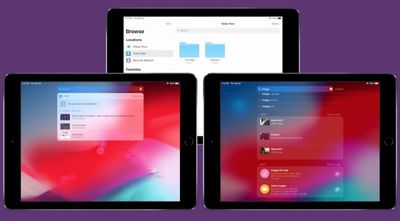
Version 2.0 of Yoink for iOS brings iCloud sync support, so items stored in Yoink are available across iOS devices logged into the same Apple account. Each device has its own "shelf" in iCloud, so all items are grouped for easy discoverability.

The different shelves are accessible through both the Yoink app and also in its extensions, users can access all items via the Today Widget, the keyboard, the file provider, and Spotlight search.

Yoink 2.0 for iOS also brings support for Handoff across iPhones, iPads and Macs, so items selected on one device can be handed off to another and those files are transferred right away.

Elsewhere, Yoink now also includes support for Siri Shortcuts. Using Siri, users can store clipboard contents or download the link to the clipboard in Yoink, without having to switch to or activate Yoink itself.

Items can also be copied from Yoink using Siri (the most recently added image, PDF, text or link, for example), while Yoink can be opened using the virtual assistant to show a specified, synced device's items.

In addition, Yoink for iOS has expanded support for keyboard commands, an optional Dark Mode interface, and optional smaller icons for showing more items stored in the Yoink "shelf" at once.

Meanwhile over on Yoink for Mac, the new version 3.5 update adds Handoff support between Macs and iOS devices, a clipboard history Today Widget that keeps track of your clipboard's contents, and full compatibility with macOS Mojave (including Dark Mode) as well as a Finder Quick Action.

Yoink for iPad and iPhone is available on the App Store for the introductory price of $3.99. After the introductory week has passed, the price will change to $5.99.

Yoink for Mac is available on the Mac App Store for the introductory price of $4.99. After the introductory week has passed, the price will change to $7.99. A free, 15-day trial is also available on the website – the app requires at least OS X Lion 10.7.3, although macOS High Sierra 10.13 or later is recommended.


Tag: Yoink

Top Rated Comments

104 months ago
I fail to recognize the difference between this app vs the Files app? It appears Files already does what this app does. Could someone enlighten me?

Not sure about the iOS version, but the Mac version is basically a little temporary "shelf" that appears on the edge of your screen and lets you put any file or draggable object there. The shelf stays put while you switch apps -- and persists between multiple desktops, full-screen apps, etc -- and then you can drag things back out of it to wherever you're dragging them to. Once things are dragged out, the shelf disappears. I find it indispensible for multiple desktops.

Actually, this video explains it better than I can: https://eternalstorms.at/yoink/mac/
Score: 2 Votes (Like | Disagree)
Jessica Lares Avatar
104 months ago
I fail to recognize the difference between this app vs the Files app? It appears Files already does what this app does. Could someone enlighten me?
It's meant for you to save something temporarily, use it, and then have it automatically go away.
Score: 2 Votes (Like | Disagree)
Abstract Avatar
104 months ago
It’s sort of like the feature that was in Pathfinder 10-12 years ago, except accessible throughout OSX? That’s pretty cool.
Score: 1 Votes (Like | Disagree)
104 months ago
I fail to recognize the difference between this app vs the Files app? It appears Files already does what this app does. Could someone enlighten me?
Score: 1 Votes (Like | Disagree)

Popular Stories

iOS 27 Next to iPhone

Here's When iOS 27 Rolls Out Today in Every Time Zone [Update: It's Out]

Sunday September 13, 2026 3:00 am PDT by
Update 10:04 a.m.: iOS 27 is rolling out now, though it may take a bit for all users to see it, so keep checking! Apple is about to release iOS 27, which will finally deliver more advanced Siri AI capabilities as well as a variety of other refinements, improvements, and new features to iPhones. It's Apple's biggest software update of the year, and Apple announced at Wednesday's iPhone event...
iOS 27 Icon iPhone

iOS 27 Available Today With These 8 New Features

Monday September 14, 2026 9:00 am PDT by
Update: Apple has released iOS 27. During its iPhone 18 Pro and iPhone Duo event last week, Apple announced that iOS 27 will be released widely on Monday, September 14. iOS 27 should be available around 10 a.m. Pacific Time / 1 p.m. Eastern Time today via the Settings app, under General → Software Update. Below, we have highlighted eight new features and changes coming with iOS...
deep black iphone 18 pro

Apple Says iPhone 18 Pro Max Sold in U.S. Differs in One Way

Saturday September 12, 2026 3:27 pm PDT by
As noted by Nicolas Lellouche, who writes for the French tech website Numerama, Apple has updated its tech specs pages for the iPhone 18 Pro and iPhone 18 Pro Max to clarify which models are equipped with its new C2 cellular modem and where. Apple now says the iPhone 18 Pro has a C2 modem worldwide, while the iPhone 18 Pro Max uses the chip in every country except for the U.S. According...

🔗 Related Apple News & Rumors

Stay updated with the latest Apple ecosystem news and verified rumors











































