Apple Watch Series 4 has a new feature called Fall Detection, which uses the new next-generation gyroscope and accelerometer to detect a fall and provide options to contact emergency services if necessary.
As it turns out, Fall Detection is disabled for most users and will need to be manually enabled. In an Apple support document found by a Reddit user, Apple explains that Fall Detection only turns on automatically if you've set your age on Apple Watch or in the Health app and you're over 65 years old.
If you are not over age 65 and want to use Fall Detection, it will need to be enabled in the Emergency SOS section of the Apple Watch app.
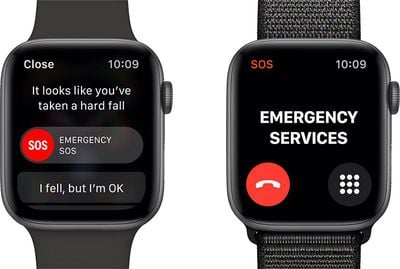
Apple's support document also explains other aspects of the Fall Detection feature. When the Apple Watch Series 4 detects a "significant, hard fall" with Fall Detection enabled, it taps you on the wrist, sounds an alarm, and displays an alert.
From the options that display on the screen, you can select either "I fell but I'm OK," "I did not fall," or "Emergency SOS" to contact emergency services.
If the Apple Watch detects that you're moving, it will wait for a response, but if you're immobile for about a minute, it will begin a 15-second countdown before automatically calling emergency services and alerting emergency contacts that are set up in Medical ID in the Health app on iPhone.
Fall Detection in the Series 4 was tested over the weekend by multiple YouTube channels to see how the feature works and how hard of a fall is necessary to cause an alert.
Test falls onto softer surfaces like foam or carpet didn't seem to trigger the Fall Detection feature, but harder falls onto less forgiving surfaces did appear to work better. YouTube testers were not able to get the feature to trigger with each and every fall, suggesting there's some margin of error, which users should be aware of.
Watch on YouTubeWatch on YouTube