

Apple Seeds Sixth Beta of macOS Mojave to Developers [Update: Public Beta Available] - MacRumorsOpen MenuShow RoundupsShow Forums menuVisit ForumsOpen Sidebar
Skip to Content

Apple Seeds Sixth Beta of macOS Mojave to Developers [Update: Public Beta Available]

Apple today seeded the sixth beta of an upcoming macOS Mojave update to developers for testing purposes, one week after releasing the fifth beta and two months after introducing the software at the Worldwide Developers Conference.

macOS Mojave introduces a new method of installing software updates, so after you've installed the first beta using the appropriate profile from the Developer Center, additional betas can be downloaded through opening up System Preferences and choosing the "Software Update" icon.


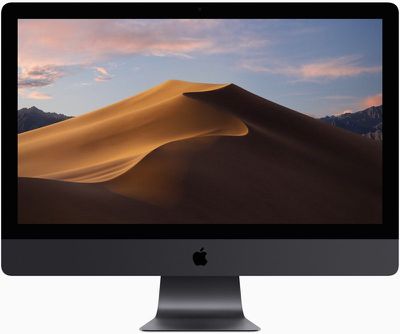
Apple's macOS Mojave update introduces a systemwide Dark Mode, with Mojave users able to choose between a light theme or the new dark theme, which changes the color of the dock, menu bar, apps, and other elements. Dark Mode is accompanied by Dynamic Desktops, aka wallpapers that subtly change throughout the day. Additional wallpapers were introduced in the fourth and fifth betas.

Stacks, a new desktop organization system, keeps all of your desktop files neat and organized, while Finder has been enhanced with a Gallery View, a Sidebar, a revamped Quick Look option and Quick Actions, so you can do more in the Finder window than ever before.

Screenshots can now be edited using Markup tools and a new management options that also allow for easy screen recording, while Continuity camera, a new feature, allows you to import photos and document scans directly from an iPhone or iPad to the Mac.
macosmojaveimac
The Apple News, Stocks, Home, and Voice Memos apps have been ported from iOS to macOS as part of a multiyear project Apple is working on to make it easier to bring iOS apps to Macs, and Apple has introduced several new privacy protections to keep your data safer than ever.

Apple is also making it harder for websites to track you with a range of new Safari tools, and it's also easier to make and store secure, hard-to-guess passwords for each and every website.

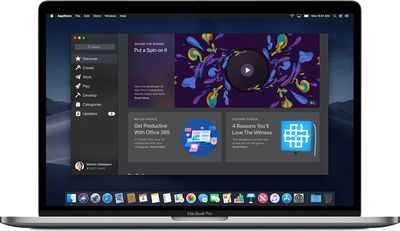
Apple has added an entirely revamped Mac App Store to macOS Mojave that makes it easier to discover apps with a featured section and specific categories for games, creative apps, productivity apps, apps for developers, and more.
macosmojavemacappstore
macOS Mojave is available to developers and public beta testers to work out bugs and other issues ahead of an upcoming fall public release.

Update: As noted on Twitter, an updated version of Windows Migration Assistant released today for macOS Mojave allows more data to be transferred to a Mac from a PC running Windows when using the Migration Assistant functionality.

You can transfer account data that includes documents, email, contacts, and calendar data from apps like Microsoft Outlook. Prior to this update, the Windows Migration Assistant was not able to import data from third-party apps. The Home app also introduces new solid-colored background options while removing previously available Home wallpapers.

Update 2: There is also a new version of macOS Mojave available for Apple's public beta testers.

Related Forum: macOS Mojave

Popular Stories

Apple Watch Ultra 2 Black Titanium

New Apple Watch Series 12 and Apple Watch Ultra 4 Features Revealed

Sunday August 30, 2026 7:54 am PDT by
Bloomberg's Mark Gurman today further outlined what to expect from the Apple Watch Series 12 and Apple Watch Ultra 4 set to be unveiled on September 9. While it was initially rumored that Touch ID may be coming to the Apple Watch this year, Gurman reiterated that he does not expect the Series 12 or Ultra 4 to have any major design changes compared to the current Series 11 and Ultra 3 models. ...


Mac mini vs Studio Feature Sans Text 1

Apple Caught Off Guard by AI Demand for Mac Mini and Mac Studio

Sunday August 30, 2026 8:52 am PDT by
Apple's unusually timed announcement of new Mac mini and Mac Studio models this week was driven by unexpectedly strong enterprise appetite for AI hardware, according to The Information. Apple normally releases new Mac models in the autumn, closer to October or November, making this week's announcement unusually early, falling just before the anticipated arrival of new iPhone models. The...
Apple Event Logo

Apple Unveiled Four New Products This Week

Wednesday August 26, 2026 5:54 pm PDT by
Apple on Tuesday unveiled a new Mac mini with M6 and M5 Pro chip options, a new Mac Studio with M5 Max and M5 Ultra chip options, a new version of the Polishing Cloth with a lower price, and updated Magic Keyboards for Macs. To learn more about these products, read our coverage below: Apple Announces New Mac Mini With M6 and M5 Pro Chips and More Apple Unveils New Mac Studio With M5 Max...

Top Rated Comments

105 months ago
Apple should release Time Machine 2 for APFS drives and disclose APFS specifications for developers to make utilities like DiskWarrior 6 to rebuild APFS directory. Until then, it is a deal breaker. Waiting stuck in macOS 10.12 Sierra just because of that. Hope for 2018, 2019, 2020, ever?
Score: 5 Votes (Like | Disagree)
StellarVixen Avatar
105 months ago
All good with Mojave so far. Just one thing the novelty of Dark Mode has worn off.
It looks horrible. Too dark.

But, let those who like it have it. At least Apple is giving you a choice, they do not force you to use it.

I wish they gave us same choice when they released the disgrace which was Yosemite. But no...
Score: 3 Votes (Like | Disagree)
105 months ago
Can we assume you are aware of the fact that High Sierra DOES NOT SUPPORT APFS on Fusion drives so it would really be interesting to find out how you managed to format a Fusion drive APFS since it doesn’t work and never has. Nor does High Sierra support APFS for Time Machine and never has. Time Machine can backup an APFS volume but it cannot use an APFS volume as the destination. APFS is coming for Fusion drives and Time Machine with Mojave. I think you are majorly confused here. Meanwhile High sierra runs flawlessly for millions and millions of people.

https://support.apple.com/en-us/HT208018

https://support.apple.com/guide/mac-help/disks-you-can-use-with-time-machine-mh15139/10.13/mac/10.13
Early beta releases of High Sierra converted Fusion Drives to APFS, only to drop support later. If your drive was converted in this way you were stuck with an APFS Fusion Drive (which, of course, is unsupported and very buggy in 10.13) in later betas and the final release unless you completely reformatted your drive back to HFS+.
Score: 3 Votes (Like | Disagree)
Guy Clark Avatar
105 months ago
All good with Mojave so far. Just one thing the novelty of Dark Mode has worn off.
Score: 3 Votes (Like | Disagree)
Guy Clark Avatar
105 months ago
It looks horrible. Too dark.

But, let those who like it have it. At least Apple is giving you a choice, they do not force you to use it.

I wish they gave us same choice when they released the disgrace which was Yosemite. But no...
Yosemite was the prototype release of the modern theme was not the best release by a long shot but at least it still had the old Disk Utility which I much preferred. It is one of the reasons I retain a small Mavericks partition.
Score: 2 Votes (Like | Disagree)
ipedro Avatar
105 months ago
Can we assume you are aware of the fact that High Sierra DOES NOT SUPPORT APFS on Fusion drives so it would really be interesting to find out how you managed to format a Fusion drive APFS since it doesn’t work and never has. Nor does High Sierra support APFS for Time Machine and never has. Time Machine can backup an APFS volume but it cannot use an APFS volume as the destination. APFS is coming for Fusion drives and Time Machine with Mojave. I think you are majorly confused here. Meanwhile High sierra runs flawlessly for millions and millions of people.

https://support.apple.com/en-us/HT208018

https://support.apple.com/guide/mac-help/disks-you-can-use-with-time-machine-mh15139/10.13/mac/10.13
Of course I’m aware. High Sierra did in fact support APFS on Fusion Drives when it was announced and in the early betas. It was near its public release that support was pulled.

If you read my post carefully, I’m neither complaining nor am I confused. I said I lived with the bugs waiting for official support and I eventually waited long enough for Mojave to be announced with support for APFS on Fusion Drives. I said that I’d rather move to Mojave with this support sooner and live with any of Mojave’s bugs than to continue living with the significant bugs I’ve dealt with High Sierra which does not support APFS on Fusion Drives.
Score: 2 Votes (Like | Disagree)

🔗 Related Apple News & Rumors

Stay updated with the latest Apple ecosystem news and verified rumors









































