

Share Passwords With AirDrop From iOS 12's New Password Management System - MacRumorsOpen MenuShow RoundupsShow Forums menuVisit ForumsOpen Sidebar
Skip to Content

Share Passwords With AirDrop From iOS 12's New Password Management System

Password managers are a great way to keep your logins secure. Instead of using Post-It Notes or spreadsheets to keep track of your passwords, password managers like 1Password — and Apple's new password management options and API in iOS 12 — allow you to store unique and difficult to crack passwords like (jW2cBCJXXhF in a way that is easily accessible and secure.

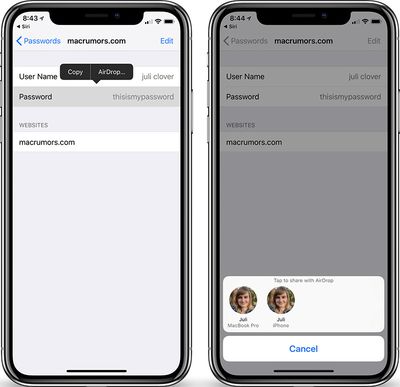
But one of the downsides to making your NYTimes password BKtat8uW(aJb is the difficulty in sharing it with someone else. There are lots of reasons you might want to share a password, and Apple has made it much easier in the new iOS 12 Beta. Now, you can share passwords with other people directly from the iOS Password Manager via AirDrop.
passwordsios12
On an iOS 12 device, open the iOS Settings app and go to Website & App Passwords. Then, select a login, tap on the password field and an option to AirDrop the login will appear. The login can be AirDropped to any iOS 12 or macOS Mojave device. Users on both devices are required to authenticate via Touch ID or Face ID (or a regular old password, depending on which Mac you have) before the password can be sent or saved.

The new password management API (and this sharing system) is meant to streamline and simplify the way passwords work on iOS devices. Apple will automatically suggest strong, unique passwords, with iOS 12 offering the tools to create, store, and retrieve passwords no matter where an account is created. The new features work in both third-party apps like 1Password, as well as Safari. All of your passwords will be stored in iCloud Keychain no matter where they are created and they are synced across all of your devices.

For third-party password apps, such as 1Password or LastPass, Apple is adding a new Password Autofill Extension that will let these password management apps to supply autofill passwords in apps and Safari, making it much easier to enter a password stored in an app like 1Password or LastPass.

Also new in iOS 12 is a feature that lets you ask Siri to get your passwords. With a simple command like "Siri, show me my passwords," Siri will open up your iCloud Keychain after you authenticate your identity with a fingerprint, a Face ID scan, or a passcode.

iOS 12 is available now as a developer beta, with public betas expected later this month and a final public release expected in early fall.


Related Forum: iOS 12

Popular Stories

Apple Event Logo

Apple Working on All-New Operating System

Wednesday July 29, 2026 11:39 am PDT by
Apple is developing an all-new operating system that is essentially a mix of tvOS, watchOS, and iOS, according to Bloomberg's Mark Gurman. In a report this week, he said the operating system will feature a grid of icons, widgets, and apps, along with customizable clock faces. The new software platform is intended for Apple's long-rumored smart home hub. With built-in facial recognition,...
imac video apple feature

Apple Made Its Second-Biggest Acquisition Ever This Year

Wednesday July 29, 2026 12:03 pm PDT by
Apple this year acquired Israeli startup Q.ai for close to $2 billion, according to the Financial Times. That would make this Apple's second-biggest acquisition ever, after it paid $3 billion for the popular headphone maker Beats in 2014. This is also the largest known Apple acquisition since the company purchased Intel's smartphone modem business and patents for $1 billion in 2019. Q.ai...
Dynamic Island iPhone 18 Pro Feature

iPhone 18 Pro: Twelve Changes Coming to Apple's Next Flagship

Thursday July 30, 2026 3:43 am PDT by
We're less than two months out from the launch of Apple's premium next-generation smartphone lineup, and while we're not expecting a dramatic change in terms of functionality, there are still several enhancements rumored to be coming to the iPhone 18 Pro and iPhone 18 Pro Max. One thing worth noting is that Apple is reportedly planning a major change to its iPhone release cycle this year,...

Top Rated Comments

OldSchoolMacGuy Avatar
106 months ago
Share passwords?!
Is this being serious and credible about security?
You can either read your password out loud, or send it to them this way, in which it's encrypted. With this method, while they gain access, they never actually get the plaintext password. Much more secure than the alternative.

iOS already offers the ability to share wifi password access with someone else remotely. That way you don't need to give them your wifi password but can give them access to it.
Score: 15 Votes (Like | Disagree)

OldSchoolMacGuy Avatar
106 months ago
This thread will be filled with people complaining "What if someone steals your phone, gets into it, and then sends all your passwords to someone‽" Just like someone stealing your iPhone X, pointing it at your face, and unlocking it as they run away, it'll never happen but MacRumors members will worry about it and see it as a huge issue.
Score: 11 Votes (Like | Disagree)
106 months ago
unique and difficult to crack passwords like (jW2cBCJXXhF in a way that is easily accessible and secure.

But one of the downsides to making your NYTimes password BKtat8uW(aJb is the difficulty in sharing it with someone else.
Alright, since nobody else has, I'll just drop this here. There's no real reason to make your password "BKtat8uW(aJb" unless you're already using a password manager and will never have to type it — or you just hate yourself.

If you're wanting or needing to remember passwords or relate them to other humans, you can make memorable ones that are just fine (source ('https://xkcd.com/936/')):


Attachment Image
Score: 5 Votes (Like | Disagree)
69650 Avatar
106 months ago
Why can’t we login to apps and websites using Touch/Face ID rather than having to use a password?
Score: 5 Votes (Like | Disagree)
iapplelove Avatar
106 months ago
Why can’t we login to apps and websites using Touch/Face ID rather than having to use a password?
Never understood why we have to put in passwords so many times especially in iTunes when we have face or touch id
Score: 4 Votes (Like | Disagree)
106 months ago
I'd love for you to enlighten us as to why the Keychain is so secure.
No, I'd love for YOU to enlight us about why you think it's NOT safe. It's been a cornerstone of Mac security, protected by AES-256, and also part of iPhone security. And yes, there have been the occasional trojans out there that have masqueraded as other things, and tried to fool people into logging into keychain to steal passwords.

But as a technology, no, I haven't heard a thing about it being an insecure platform.
Score: 3 Votes (Like | Disagree)

🔗 Related Apple News & Rumors

Stay updated with the latest Apple ecosystem news and verified rumors











































