watchOS 5 Beta Adds Manual Wi-Fi Connection Option to Apple Watch Settings Menu - MacRumorsOpen MenuShow RoundupsShow Forums menuVisit ForumsOpen Sidebar
Skip to Content

watchOS 5 Beta Adds Manual Wi-Fi Connection Option to Apple Watch Settings Menu

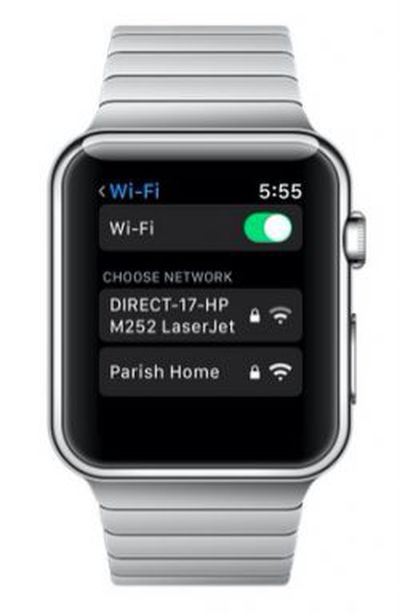
watchos 5 wi fi screenTesters of the first watchOS 5 beta for Apple Watch are hailing a new option in the software's Settings menu that enables you to manually connect your device to nearby Wi-Fi networks.

In previous versions of watchOS, your Apple Watch is locked to the wireless network that your tethered iPhone is using, and there's no way to browse and manually connect to networks from your wrist.

But that all changes in watchOS 5, if the beta 1 seed is anything to go by. Reddit user whiskey_91 found a new option in Settings where users can search for and connect their Apple Watch directly to available Wi-Fi networks when their iPhone is out of range.

After a network is selected from the list, users are prompted to enter the Wi-Fi password via Scribble (scribbling characters one by one on the screen with their finger), while using the Digital Crown to select lowercase/uppercase and special characters. A Join button then appears for users to tap and connect to the network.

The new Wi-Fi option appears on both Apple Watch Series 2 and Series 3 models, but we've yet to confirm whether it works on Series 1 (watchOS 5 doesn't support the original Apple Watch, or Series 0).

There's plenty more to look forward to when watchOS 5 gets its official release in the fall, but eager adopters are advised to stay patient while Apple works out the kinks. Apple temporarily pulled the watchOS 5 beta 1 seed from its developer portal in the early hours of this morning after reports that the software was bricking some devices.


Related Roundup: Apple Watch 11

Popular Stories

3 4 24 Sport Band Refresh Feature

Sketchy Rumor Claims Apple Watch Series 12 Could Introduce Sensor in Band

Friday July 3, 2026 8:54 am PDT by
The Apple Watch Series 12 could ship with a new health sensor built directly into one of its bands, according to a sketchy rumor from a known leaker. The leaker known as "Kosutami" says the sensor will be injection-molded into a silicone band, and only a silicone band, apparently because Apple has not yet solved how to embed similar hardware in bands made from other materials. No detail was...


watchos 27

Siri AI Comes to Apple Watch in watchOS 27 Beta 3

Monday July 6, 2026 1:24 pm PDT by
With watchOS 27 beta 3, Apple added support for Siri AI and the Siri app, so Apple Watch users can now use the features right from their wrist. Apple said Siri AI would be coming to the watch back when watchOS 27 was first introduced, but the feature wasn't live until now. The Dynamic App Grid that pops up when the Digital Crown is pressed displays the Siri app in the center, and the...
Apple Watch Series 10 Jet Black

Apple Watch Series 13 Rumored to Mark the End of an Era

Wednesday July 8, 2026 1:29 pm PDT by
While the Apple Watch Series 12 is still a few months away, a new rumor suggests that next year's Apple Watch Series 13 will mark the end of an era. According to a recent post from a known leaker on the Chinese social media platform Weibo, the Apple Watch will be receiving a major redesign next year, and this will apparently include a new way of attaching bands to the watch. As a result, the ...

Top Rated Comments

107 months ago
This must be an awful way to set your password, nice to have the option but the watch is just not up to inputing difficult passwords.
It's a very rare occurrence where one would need to do this. You'd have to be without your phone and connecting to an unfamiliar WiFi network to actually need this option. Cumbersome but nice to have in a pinch.
Score: 5 Votes (Like | Disagree)
Little Marvin Avatar
107 months ago
Any news about included support of 802.1x certificates to have it connect to WPA2 Enterprise networks?
Yes it works! Just tested it on Apple watch 2.
Score: 4 Votes (Like | Disagree)
107 months ago
It would be nice if the keyboard popped up on the iPhone like it does on Apple TV remote app.
I think this is for when you DON’T have your phone nearby. If you do, why not just connect to WiFi thru your phone as it shares the WiFi with the watch automatically?
Score: 3 Votes (Like | Disagree)
OriginalClone Avatar
107 months ago
This must be an awful way to set your password, nice to have the option but the watch is just not up to inputing difficult passwords.
It would be nice if the keyboard popped up on the iPhone like it does on Apple TV remote app.
Score: 3 Votes (Like | Disagree)
107 months ago
Any news about included support of 802.1x certificates to have it connect to WPA2 Enterprise networks?
Score: 3 Votes (Like | Disagree)
justperry Avatar
107 months ago

After a network is selected from the list, users are prompted to enter the Wi-Fi password via Scribble (scribbling characters one by one on the screen with their finger), while using the Digital Crown to select lowercase/uppercase and special characters. A Join button then appears for users to tap and connect to the network.
This must be an awful way to set your password, nice to have the option but the watch is just not up to inputing difficult passwords.
Score: 2 Votes (Like | Disagree)

🔗 Related Apple News & Rumors

Stay updated with the latest Apple ecosystem news and verified rumors