

Camera+ 2 for iOS Brings New Interface, Photo Library Integration, Raw and Depth Editing, and More - MacRumorsOpen MenuShow RoundupsShow Forums menuVisit ForumsOpen Sidebar
Skip to Content

Camera+ 2 for iOS Brings New Interface, Photo Library Integration, Raw and Depth Editing, and More

by

Camera+ 2 was released for iPhone and iPad today, a complete rewrite of the popular photography app of the same name that appeared almost eight years ago and sold over 14 million copies in that time. The successor app features a completely redesigned interface for accessing manual controls, raw shooting and editing, depth capture, and more.

As a universal app, Camera+ 2 promises a consistent experience across iPhone and iPad, with multitasking support for the latter baked in. Unlike its predecessor, the app also comes with all features, one-touch filters, and tools included as-is – no in-app purchases required.
camera 2
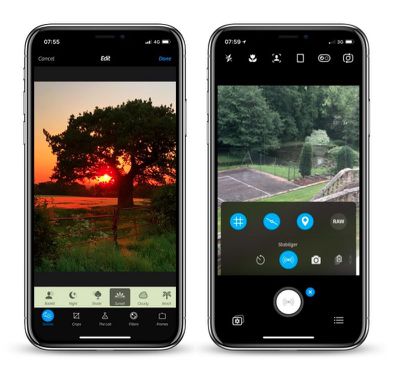
In shooting modes, the manual onscreen wheels and controls include traditional settings like shutter speed, ISO, White Balance, and Macro, with wide-angle and telephoto options available on dual-lens devices. These functions can also be hidden during casual shooting.

With depth capture enabled in Camera+ 2, the depth information is saved alongside the image, and the adjustments in The Lab section of the editor can be selectively applied to distant or close subjects. A collection of filters are also available, with options to adjust their strength and layer them to customize the aesthetic.
camera 2 1
A new Smile mode enables Camera+ 2 to detect smiles and shoot automatically, while a Stabilizer mode shoots only when the iPhone is steady enough to produce a sharp picture. The Slow Shutter mode meanwhile brings the ability to take long exposures, even in daylight, with additional Burst and Timer modes also included.

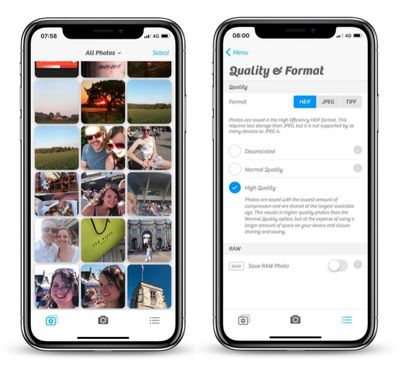
Elsewhere, in a much-requested change, Camera+ now has full Photo Library integration with editing support, with the added ability to switch between the Photo Library and the Lightbox with the tap of a button. Drag and drop gestures on the iPad are supported for copying or sharing photos, while Files and iTunes integration are also available for transferring pictures to a computer or other apps.

Camera+ 2 is available to download on the App Store for $2.99 and requires iOS 11 or later. [Direct Link]


Top Rated Comments

110 months ago
Really what I miss most from traditional cameras is the option to have the date and time stamp automatically applied to images in the proper bottom corner location. Without having to manually add it later.

That’s the feature I want. Otherwise, the built in camera seems adequate for me.
You mean like water mark, why you want to do this unless for print? Image file contains metadata already. Do you add label with GPS coordinates and time zone as well?
Score: 3 Votes (Like | Disagree)
110 months ago
Is this new app related to the original Camera+ app? This not just upgrade for Camera+ app. and looks like they formed a new company with a similar name to that of the original Camera+: both sellers are different but have LateNiteSoft in the name.
If indeed it's the same developers, I wonder why they chose to list this app as from a separate developer and not just alongside the original Camera+.. possibly to avoid backlash from customers since this is a paid app and not a free upgrade
Score: 2 Votes (Like | Disagree)
SantaFeNM Avatar
110 months ago
Mom, what did I tell you about posting on the internet?

(Seriously, that's what metadata is for. Having anything on the picture, ruins the picture. Any time I'm around her, I turn that off on her camera.)
[doublepost=1527685122][/doublepost]

There are circumstances where having the time and date on the photo is important to people. For instance I had a job where I did property inspections. It was important to have the time and date on the photos. Also for insurance purposes documenting belongings or accident damage. There are definitely instances where having it on the photo is important.

For general photos, I agree. I don't want the time and date on those.
Score: 1 Votes (Like | Disagree)
H3LL5P4WN Avatar
110 months ago
Really what I miss most from traditional cameras is the option to have the date and time stamp automatically applied to images in the proper bottom corner location. Without having to manually add it later.

That’s the feature I want. Otherwise, the built in camera seems adequate for me.
Mom, what did I tell you about posting on the internet?

(Seriously, that's what metadata is for. Having anything on the picture, ruins the picture. Any time I'm around her, I turn that off on her camera.)
[doublepost=1527685122][/doublepost]
Halide? Obscura 2? Camera+ 2?

Which one am I supposed to know is best for me?!
Only way to find out is to use them all.
He's pretty much right. I love Halide's GUI, haven't used Obscura 2, and just got Camera+ 2 for nostalgia's sake. It all depends on what you want.

The two camera apps on my main homescreen are Camera.app and Pro HDR X, if for no reason other than I still can't reliably denoise RAW files (and that's what I have Halide for, shooting RAW) on my phone. There's no "one touch" denoise app that I know of.

*goes and looks up Obscura 2*
Score: 1 Votes (Like | Disagree)
daniellidio Avatar
110 months ago
I bought Camera+ 2 just because I have the first since forever and I loved it and they constantly updated the app. 8 years of support by a developer is something very rare these days.

That being said, the new app is a bit buggy on the portrait mode for me (iPhone 8+, tested in iOS 11.3.1 and now on 11.4) and it's jittery/janky/laggy, hope they fix it soon.
Score: 1 Votes (Like | Disagree)
daniellidio Avatar
110 months ago
Really what I miss most from traditional cameras is the option to have the date and time stamp automatically applied to images in the proper bottom corner location. Without having to manually add it later.

That’s the feature I want. Otherwise, the built in camera seems adequate for me.
I sometimes need this as well, found a camera app a while a go called Procamera, it's by Cocologics. It adds Date, Time and Timezone. I will upload a file of mine so you can look how it works.

Also it is a really good camera app.

Attachment Image
Score: 1 Votes (Like | Disagree)

Popular Stories

iPhone Duo Display Cracking

Apple Alerts Stores to iPhone Duo's Display Cracking Issue

Friday October 30, 2026 3:20 pm PDT by
In a memo shared with Apple Stores and Apple Authorized Service Providers this week, and later obtained by MacRumors, Apple provided technicians with guidance on how to diagnose and address the iPhone Duo's inner display cracking issue. If a customer reports the issue, Apple advised technicians to inspect the iPhone Duo and repair or replace it in accordance with their standard procedures....
iPad mini OLED feature 1

Apple Executive Comments on New iPad Mini Lacking 120Hz Display

Thursday October 29, 2026 1:47 pm PDT by
While the new iPad mini has an OLED display, the device does not support ProMotion, meaning the display's refresh rate is limited to 60Hz instead of 120Hz. ProMotion support would have allowed for the iPad mini's refresh rate to automatically adjust from 10Hz to 120Hz depending on the content being displayed, but evidently Apple has kept the feature exclusive to the iPad Pro among iPad...
Pinched iPad Mini

Apple Avoids Showing Pinched Fingers on iPad Mini Page in South Korea

Thursday October 29, 2026 11:52 am PDT by
In the U.S. and most other countries, Apple's website shows the new iPad mini being held by pinched fingers, but this is not the case in South Korea. The new iPad mini shown with pinched fingers on Apple's website in the U.S. On its South Korean website, Apple simply shows an image of the iPad mini on its own. The new iPad mini shown without pinched fingers on Apple's website in South Korea ...
Latest Stories
Apple Watch Ultra 4 Hits All-Time Low Price With Amazon's $99 Discount
14 hours ago
Reminder: Apple's Big Discount on Beats 360 Ear Cushions Ends Today
15 hours ago
Here's a New Tour of Apple's HomeView Software
15 hours ago
Apple Reveals New iPad Mini's Battery Capacity
16 hours ago
Top Stories: Apple's Big MacBook Pro, iPad mini and iMac Updates
17 hours ago
'Pluribus' Season 2 Reportedly Starts Production Today
1 day ago
iPhone 18 Pro Sales Surge in China, Offsetting Decline in U.S. and Japan
1 day ago
HomeView Software 27.2: Wallpapers, Control Center, and More
1 day ago
Apple Alerts Stores to iPhone Duo's Display Cracking Issue
1 day ago
iOS 27.3 Will Enable These Apple Intelligence Features in China
1 day ago
Apple Says iOS 27.3 Beta Coming Next Week
1 day ago
Apple's Flash Storage Suppliers Are Finally 'Getting Their Revenge'
1 day ago
14 New Things Your iPhone Can Do in iOS 27.2
1 day ago
iPhone Duo Review: One Week Later
2 days ago
Samsung Mocks iPhone Duo Display Cracks in New Ad Campaign
2 days ago
The MacRumors Show: OLED MacBook Pro, iPad Mini 8, and More
2 days ago
MacBook Pro With Touch Display: 15 More Details Revealed
2 days ago
Russia Places Apple on State Surveillance Registry
2 days ago
Halloween Weekend Brings Discounts on Apple Accessories and Pre-Orders
2 days ago
Apple Has Released More Than 25 New Products in the Past Two Months
2 days ago
Local Code Launches as Free, Private AI Assistant Tool for Mac
2 days ago
Apple Acquires Ascend.io
2 days ago
HomePod Mini 2 Launches Today: All the New Features
2 days ago
AirTag 2 4-Pack Drops to New Low Price of $69.99
2 days ago
Rian Johnson's iPhone Camera App Goes Viral
2 days ago
Where Did All the iPhone Duos Go? Mostly to Apple's Stores
2 days ago
Apple's Touchscreen MacBook Pro Could Ship 1.5M Units in 2027
2 days ago
New Apple TV 4K and iPad Mini: RAM Amounts Revealed
2 days ago
Apple Executive Comments on New iPad Mini Lacking 120Hz Display
2 days ago
Here's a Hands-On Look at HomePod Mini 2's New Two-Tone Colors
2 days ago

🔗 Related Apple News & Rumors

Stay updated with the latest Apple ecosystem news and verified rumors











































