

How to Fix the 'Black Dot' Unicode Bug Crashing iMessage - MacRumorsOpen MenuShow RoundupsShow Forums menuVisit ForumsOpen Sidebar
Skip to Content

How to Fix the 'Black Dot' Unicode Bug Crashing iMessage

Yet another Unicode bug has been discovered that is capable of crashing apps and operating systems, ranging from WhatsApp on Android to iMessage on iOS. We won't share the exact string, to prevent it from spreading further, but it includes black dot (⚫️) and pointing left (👈) emojis plus other hidden characters.
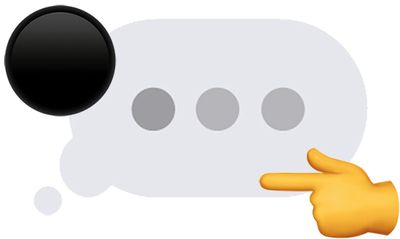
imessage unicode bug
Simply put, this particular Unicode string cannot be rendered properly and leads to system crashing. In general, when the bug affects iMessage, the issue can be resolved by deleting the conversation containing the problematic message. The following steps work on iPhone 6s and newer, excluding the iPhone SE:

  • Force close the Messages app.

  • Ask Siri to send a reply to the sender of the message so that the Unicode string is no longer the most recent bubble in the conversation.

  • 3D Touch on the Messages app icon from the home screen and tap New Message in the menu that pops open.

  • Tap on Cancel in the top-right corner of the New Message screen.

  • Tap on Edit in the top-left corner of the conversation list.

  • Tap the circle to the left of the conversation containing the problematic message. A blue checkmark will appear.

  • Tap on Delete in the bottom-right corner.

If you have an iPhone with Siri but not 3D Touch, ranging from the iPhone 4s to the iPhone 6 Plus, and iPhone SE, the steps are slightly different:

  • Force close the Messages app.

  • Ask Siri to send a reply to the sender of the message as many times as necessary until the bubble containing the Unicode string is bumped off the visible part of the conversation.

  • Open the Messages app.

  • Tap on the back arrow in the top-left corner to return to the conversation list.

  • Tap on Edit in the top-left corner of the conversation list.

  • Tap the circle to the left of the conversation containing the problematic message. A blue checkmark will appear.

  • Tap on Delete in the bottom-right corner.

It may also be possible to delete the problematic message on another device running the iOS 11.4 or macOS 10.13.5 betas via Messages on iCloud.

While this latest Unicode bug was discovered last week, it is only now beginning to receive widespread attention in the Apple community, after it was highlighted on a few popular YouTube channels. We've elected not to provide any links, but the specific string is easily Google-able for those interested.

The bug affects both iOS 11.3 and iOS 11.4 beta, and many other software versions, platforms, and devices. Apple has yet to issue a fix, but it will likely release software updates to address the problem soon.


Popular Stories

Apple Event Logo

Apple Working on All-New Operating System

Wednesday July 29, 2026 11:39 am PDT by
Apple is developing an all-new operating system that is essentially a mix of tvOS, watchOS, and iOS, according to Bloomberg's Mark Gurman. In a report this week, he said the operating system will feature a grid of icons, widgets, and apps, along with customizable clock faces. The new software platform is intended for Apple's long-rumored smart home hub. With built-in facial recognition,...
imac video apple feature

Apple Made Its Second-Biggest Acquisition Ever This Year

Wednesday July 29, 2026 12:03 pm PDT by
Apple this year acquired Israeli startup Q.ai for close to $2 billion, according to the Financial Times. That would make this Apple's second-biggest acquisition ever, after it paid $3 billion for the popular headphone maker Beats in 2014. This is also the largest known Apple acquisition since the company purchased Intel's smartphone modem business and patents for $1 billion in 2019. Q.ai...
Dynamic Island iPhone 18 Pro Feature

iPhone 18 Pro: Twelve Changes Coming to Apple's Next Flagship

Thursday July 30, 2026 3:43 am PDT by
We're less than two months out from the launch of Apple's premium next-generation smartphone lineup, and while we're not expecting a dramatic change in terms of functionality, there are still several enhancements rumored to be coming to the iPhone 18 Pro and iPhone 18 Pro Max. One thing worth noting is that Apple is reportedly planning a major change to its iPhone release cycle this year,...

Top Rated Comments

107 months ago
Or just use another messaging app.
At this point, just throw the whole iOS 11 out the window! It was a compete dumpster fire.
Yet another Unicode bug has been discovered that is capable of crashing apps and operating systems, ranging from WhatsApp on Android to iMessage on iOS. We won't share the exact string, to prevent it from spreading further, but it includes "black dot" and "pointing left" emojis and other characters.
Literally the first paragraph in the article people. Take the time to read the article before posting your hate messages.
Score: 20 Votes (Like | Disagree)

107 months ago
At this point, just throw the whole iOS 11 out the window! It was a compete dumpster fire.
The article says that Android is also impacted…
Score: 18 Votes (Like | Disagree)

TimUSCA Avatar
107 months ago
Or just use another messaging app.
iMessage is the best messaging platform though, especially from a security standpoint. Glitches happen sometimes. The better solution is to wait for the fix (which is usually fast) and not have terrible friends who would send this to you to begin with.
Score: 10 Votes (Like | Disagree)
107 months ago
At this point, just throw the whole iOS 11 out the window! It was a compete dumpster fire.
Score: 10 Votes (Like | Disagree)
PBG4 Dude Avatar
107 months ago
It's like no one at Apple or Google has ever met Little Bobby Tables.

how to fix black dot imessage crashing bug image
Score: 7 Votes (Like | Disagree)
107 months ago
iPhone 4 with iOS 7 here, immune to this problem. ;)
Score: 7 Votes (Like | Disagree)

🔗 Related Apple News & Rumors

Stay updated with the latest Apple ecosystem news and verified rumors










































