

Darkroom 3.5 Update Adds Depth Editing Features, Depth-Aware Filters, and More - MacRumorsOpen MenuShow RoundupsShow Forums menuVisit ForumsOpen Sidebar
Skip to Content

Darkroom 3.5 Update Adds Depth Editing Features, Depth-Aware Filters, and More

by

Popular photo editing app Darkroom reached version 3.5 today, introducing the ability to edit Depth shots taken on supporting iPhone cameras, along with several other notable new features.

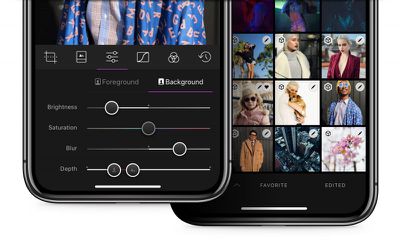
After updating to v3.5, Darkroom will automatically load the depth map for Portrait photos encountered in the library and recreate applied blur from scratch, handing control of its strength and location back to the user. Thanks to a new depth range selector, it's now possible to define exactly where the foreground and the background are.
Darkroom 3 5 depth
Meanwhile, in what the developers are calling an industry first, Darkroom 3.5 now features Depth-Aware filters. These come premium Portrait Filter pack to be depth-aware. Each filter will automatically adjust foreground and background settings to optimize the focal point of the image on the face, not on the background. User-created filters with depth settings also now carry over those settings to the filter itself.

Additionally in this release, Darkroom's RAW engine has been rebuilt to take full advantage of the Extended-Range color space of Raw files, which should enable photographers to dramatically improve the amount of detail that's recoverable from shadows and highlights. Similarly, the brightness, contrast, highlights and shadows sliders have been rebuilt to operate in the extended space, offering finer-grain tone control.
35 halide
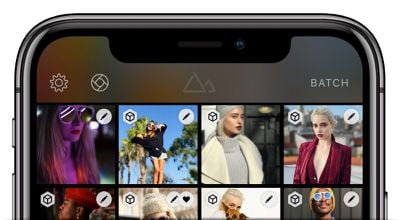
Elsewhere, the developers have undertaken app-wide performance refinements in an effort to make photo editing in Darkroom as fast as photo browsing. There's also now a dedicated button at the top of the library view for accessing popular third-party camera app Halide, ready for when the announced Darkroom X Halide integration goes live.

Darkroom is a free download from the App Store and includes in-app purchases for some tools. [Direct Link].


Top Rated Comments

112 months ago
I enjoy using this app. But one thing I’ve struggled with is the best use off all the options in the app. Individually they make sense: contrast, highlights, shadows, plus the curves you can drag. But put them all together and it’s a challenge to know when you should adjust one feature vs another. Every picture is different and there’s always going to be some trial and error, but I’d love to get pointers on a holistic approach to editing my pictures that takes advantage of the features without the overkill of trying to use every option.

Great point. We're going to be releasing educational material inside the app and our blog later this year. Just need to fine the time somewhere....
[doublepost=1522347311][/doublepost]
Cool! I've never heard of Darkroom before today, but as soon as my phone and iPad finish updating to 11.3 I'll be giving it a spin :)

I currently use Lightroom for most iOS photo editing since I like its raw capture support, its basic functionality as compared to the desktop version, and the great jpeg exporting. But (afaik) it can't natively work with the iOS camera effects, so that sounds like fun!
Lightroom is a fantastic app, but it's locked within the Adobe CC ecosystem. What you'll find different (and we hope, amazing) in Darkroom, is how tightly integrated we are to the native photo library. We call it Library Sync: No import, all actions are automatically mapped back to the photo library (except export, that's an explicit step).
Score: 5 Votes (Like | Disagree)
112 months ago
first time user for the app...(i had previously downloaded it but never opened)
-Is the app OK for JPEG or more for iPhone RAW 'images' (I just have a iP6...but will upgrade later this year)
-Does the $7.99 in-app purchase knock everything...there are quite a few in-app purchase options and a bit confusing to me.


Thanks
Yes, the $7.99 purchase unlocks everything in the app :)

Darkroom handles most kinds of images you send its way: JPEG, RAW, Portrait, Live, etc. Try it with your DSLR photos as well!
Score: 4 Votes (Like | Disagree)
112 months ago
Then answer the question above your post....;)
Haha fair.

From a capture perspective, Apple calls depth-capture "Portrait Mode" because it's ideally suited for capturing portraits of people (We can't guess what they're potentially doing under the hood as far as ML-backed detection and manipulation of depth data). The native camera app enforces this by setting distance limits and light-limits to ensure the quality of the depth map is high. When you use portrait mode in non-portrait contexts, you may very well have an excellent depth map, but often you end up with artifacts.

From an editing perspective, the use of depth-editing is much more obvious and the benefit you get from it as a photographer is much more prevalent when used to add contrast between foreground and background, in portrait settings.

tl;dr- It's a better context for explaining the feature and why it's useful, though it can certainly be used in other contexts.
[doublepost=1522339872][/doublepost]
Is denoise something you guys are working on? I'd much rather do my editing in one app than have to bounce out to Light Room to denoise my .raw files.

The notes specifically mention "the face" when talking about depth. What's that mean for those of us who use portrait mode on things other than people?
Denoise is currently not high on our priority list. We're a two-man company, so we're resource limited on what we can do at one time, but it's on our radar. Just have to get through some of the very high priority items first.
Score: 4 Votes (Like | Disagree)
112 months ago
Hello all, I'm the co-founder of Darkroom, happy to answer any questions you may have!
Score: 4 Votes (Like | Disagree)
112 months ago
No questions, just to say “thank you”. Love the app. A lot of attention to detail here, from the design to the haptics when you move sliders around. Personally, I like using curves the most.

I rarely use photo editing apps outside built in ones, but Darkroom is the exception. The only thing missing, I guess, is some kind of context-aware fix brush (to remove smudges and blemishes), but even without it, it’s worth the IAP price. Thanks.
Thank you very much for the kind words, it's very much appreciated
Score: 2 Votes (Like | Disagree)
aevan Avatar
112 months ago
Hello all, I'm the co-founder of Darkroom, happy to answer any questions you may have!
No questions, just to say “thank you”. Love the app. A lot of attention to detail here, from the design to the haptics when you move sliders around. Personally, I like using curves the most.

I rarely use photo editing apps outside built in ones, but Darkroom is the exception. The only thing missing, I guess, is some kind of context-aware fix brush (to remove smudges and blemishes), but even without it, it’s worth the IAP price. Thanks.
Score: 2 Votes (Like | Disagree)

Popular Stories

iPhone Duo Display Cracking

Apple Alerts Stores to iPhone Duo's Display Cracking Issue

Friday October 30, 2026 3:20 pm PDT by
In a memo shared with Apple Stores and Apple Authorized Service Providers this week, and later obtained by MacRumors, Apple provided technicians with guidance on how to diagnose and address the iPhone Duo's inner display cracking issue. If a customer reports the issue, Apple advised technicians to inspect the iPhone Duo and repair or replace it in accordance with their standard procedures....
iPad mini OLED feature 1

Apple Executive Comments on New iPad Mini Lacking 120Hz Display

Thursday October 29, 2026 1:47 pm PDT by
While the new iPad mini has an OLED display, the device does not support ProMotion, meaning the display's refresh rate is limited to 60Hz instead of 120Hz. ProMotion support would have allowed for the iPad mini's refresh rate to automatically adjust from 10Hz to 120Hz depending on the content being displayed, but evidently Apple has kept the feature exclusive to the iPad Pro among iPad...
Pinched iPad Mini

Apple Avoids Showing Pinched Fingers on iPad Mini Page in South Korea

Thursday October 29, 2026 11:52 am PDT by
In the U.S. and most other countries, Apple's website shows the new iPad mini being held by pinched fingers, but this is not the case in South Korea. The new iPad mini shown with pinched fingers on Apple's website in the U.S. On its South Korean website, Apple simply shows an image of the iPad mini on its own. The new iPad mini shown without pinched fingers on Apple's website in South Korea ...
Latest Stories
Apple Watch Ultra 4 Hits All-Time Low Price With Amazon's $99 Discount
15 hours ago
Reminder: Apple's Big Discount on Beats 360 Ear Cushions Ends Today
15 hours ago
Here's a New Tour of Apple's HomeView Software
15 hours ago
Apple Reveals New iPad Mini's Battery Capacity
16 hours ago
Top Stories: Apple's Big MacBook Pro, iPad mini and iMac Updates
17 hours ago
'Pluribus' Season 2 Reportedly Starts Production Today
1 day ago
iPhone 18 Pro Sales Surge in China, Offsetting Decline in U.S. and Japan
1 day ago
HomeView Software 27.2: Wallpapers, Control Center, and More
1 day ago
Apple Alerts Stores to iPhone Duo's Display Cracking Issue
1 day ago
iOS 27.3 Will Enable These Apple Intelligence Features in China
1 day ago
Apple Says iOS 27.3 Beta Coming Next Week
1 day ago
Apple's Flash Storage Suppliers Are Finally 'Getting Their Revenge'
1 day ago
14 New Things Your iPhone Can Do in iOS 27.2
1 day ago
iPhone Duo Review: One Week Later
2 days ago
Samsung Mocks iPhone Duo Display Cracks in New Ad Campaign
2 days ago
The MacRumors Show: OLED MacBook Pro, iPad Mini 8, and More
2 days ago
MacBook Pro With Touch Display: 15 More Details Revealed
2 days ago
Russia Places Apple on State Surveillance Registry
2 days ago
Halloween Weekend Brings Discounts on Apple Accessories and Pre-Orders
2 days ago
Apple Has Released More Than 25 New Products in the Past Two Months
2 days ago
Local Code Launches as Free, Private AI Assistant Tool for Mac
2 days ago
Apple Acquires Ascend.io
2 days ago
HomePod Mini 2 Launches Today: All the New Features
2 days ago
AirTag 2 4-Pack Drops to New Low Price of $69.99
2 days ago
Rian Johnson's iPhone Camera App Goes Viral
2 days ago
Where Did All the iPhone Duos Go? Mostly to Apple's Stores
2 days ago
Apple's Touchscreen MacBook Pro Could Ship 1.5M Units in 2027
2 days ago
New Apple TV 4K and iPad Mini: RAM Amounts Revealed
2 days ago
Apple Executive Comments on New iPad Mini Lacking 120Hz Display
2 days ago
Here's a Hands-On Look at HomePod Mini 2's New Two-Tone Colors
2 days ago

🔗 Related Apple News & Rumors

Stay updated with the latest Apple ecosystem news and verified rumors











































