

 Password management app 1Password this week got a new feature on the web, and developer AgileBits described it as a way for users to check and make sure that their passwords aren't "pwned passwords," or passwords that have been leaked online. While the launch is web-only right now, AgileBits said it will be coming to 1Password apps in the future.
1Password's new feature integrates with a newly updated service by Troy Hunt -- who previously created a breach notification service called Have I Been Pwned -- and securely and privately checks your passwords against more than 500 million passwords collected from various breaches.
This way, users can further ensure that their passwords saved within 1Password are as secure as possible, and if Hunt's new service surfaces a warning about compromised data, they can change to a new one without leaving 1Password.
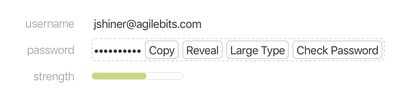
Pwned Passwords originally launched as a feature within Have I Been Pwned last August, but Hunt has now updated it to version two and greatly expanded the amount of passwords indexed, originally starting with 320 million. For 1Password's integration, which is still just a proof of concept as of now, AgileBits said the feature is available today to everyone with a 1Password membership, and shared the following steps:
- Sign in to your account on 1Password.com.
- Click Open Vault to view the items in a vault, then click an item to see its details.
- Enter the magic keyboard sequence Shift-Control-Option-C (or Shift+Ctrl+Alt+C on Windows) to unlock the proof of concept.
- Click the Check Password button that appears next to your password.
Once you click "Check Password," 1Password will communicate with Hunt's service of indexed passwords, letting you know if yours exists in his database. As AgileBits pointed out, "If your password is found, it doesn't necessarily mean that your account was breached. Someone else could have been using the same password." Still, the company encouraged immediate action for any user who sees a confirmation of a password matching to Hunt's service.
Watch on YouTube

















































Top Rated Comments
There is no difference between our standalone version of the app and the subscription version in terms of downloads. They're the same identical app. Bug fixes, improvements, and new features are added all the time. Some of those features may only be available for our subscription customers as they piggy back on features that are only possible due to our servers on the subscription side. But where possible we add features for both standalone customers and subscription customers.
You missed the important bit. Your password is hashed.
Then we take the first 5 characters of the hash and send that over.
The Have I Been Pwned server takes these first 5 characters, compares to the database, finds all hashed passwords that match the first 5 characters and send those back to the client (1Password) which then checks the returned hashes to see if a match is made.
Your fully hashed password is never sent to the server, only the first 5 characters. Troy Hunt, the creator of Have I Been Pwned has stated that pretty much every 5 character prefix hash has ~500 results, and it's entirely possible that password isn't even in the results and is safe. So it really doesn't help much at all, combined with the fact no username or URL is sent.
So up until recently I was using the iCloud standalone app and want to voice my opinion that I was never forced or even slightly encouraged to upgrade via the application.