

Portrait Camera App 'Focos' Gains Real Lens Optical Effects and Improved Shooting Mode - MacRumorsOpen MenuShow RoundupsShow Forums menuVisit ForumsOpen Sidebar
Skip to Content

Portrait Camera App 'Focos' Gains Real Lens Optical Effects and Improved Shooting Mode

by

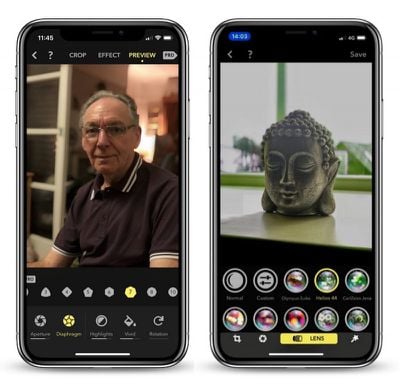
Portrait Mode photo editor Focos received an update today that should pique the interest of dual-lens camera iPhone owners. The app recently made our end-of-year best iOS app list for its impressive granular aperture and bokeh adjustment tools, but version 1.2 builds on the existing feature set by adding the ability to apply real lens optical effects to depth images.

The update introduces a redesigned interface layout to accommodate the new preset lenses, which include Olympus Zuiko, Helios 44, CarlZeiss Jena, CarlZeiss Otus, Leica Noctilux, Minolta STF, Minolta RF250, A1, A2, A3, and A4.
Screen Shot 2 2
In addition to the above lenses, users can create custom presets for images with depth information by combining multiple lens settings and saving them under a recognizable name. Fotos' library of presets can also be re-organized for easy access from the editing menu.

Elsewhere in this update, a tilt-shift effect has been added to the app's range of filters, offering users another level of control over the plane of focus when widening aperture, while a new ratio of 2.25:1 can be found in the cropping menu.

A torchlight has also been added to Focus' built-in camera mode, which should help when taking Portrait Mode photos in low light, and the app now supports Bluetooth for taking photos remotely.

Lastly, a look at the general settings screen reveals an added ability to choose between JPEG, HEIC, and TIFF export formats, as well as a simple language selector, which now includes Persian.

Focos supports iPhone 7 Plus, iPhone 8 Plus, and iPhone X, and is a free download from the App Store, although many pro features are behind a paywall. It costs $0.99 per month or $5.99 per year to unlock them, but there's also a $9.99 lifetime access purchase option. [Direct Link]


Top Rated Comments

113 months ago
Is it better than the default camera app for portrait?
Yes, absolutely.

Focos allows depth capture for portrait shots beyond Apple's 8-foot maximum range. Photos will simply be a non-portrait 2x shot if you try and take pictures like mine below with the stock camera app.

This is the absolute game changer here. This is honestly the best app in years - here's some shots from the past couple months. Without a doubt the biggest step in mobile photography in the last decade.

focos portrait mode editing app new lens effects image
focos portrait mode editing app new lens effects image focos portrait mode editing app new lens effects image focos portrait mode editing app new lens effects image focos portrait mode editing app new lens effects image focos portrait mode editing app new lens effects image focos portrait mode editing app new lens effects image focos portrait mode editing app new lens effects image focos portrait mode editing app new lens effects image focos portrait mode editing app new lens effects image focos portrait mode editing app new lens effects image
Score: 6 Votes (Like | Disagree)
GabrielMoro Avatar
113 months ago
This app is flawless. Best way to edit Portrait Pictures.
Score: 6 Votes (Like | Disagree)
GabrielMoro Avatar
113 months ago
Is it better than the default camera app for portrait?
For sure. You can adjust just about anything in there. You can separate the background and edit saturation, hue, brightness etc and edit the front in a different way. You can set up lenses for various effects and tweak them as well.

There's also way to select the exact point that the background is blurred (so you won't cut ears off or hair). Great great app.

Example of a quick selfie edited there with some of those effects:


Attachment Image
Score: 5 Votes (Like | Disagree)
PaulRustad007 Avatar
113 months ago
The image on the left is stock from Apple. IPX 256 G version. The image on the right is from FOCOS. You have tremendous control on focus plane and adding in a better bokeh. You can scale the blur as much as you want.

Attachment Image

Attachment Image
Score: 4 Votes (Like | Disagree)
MartinAppleGuy Avatar
113 months ago
Is it better than the default camera app for portrait?
For taking the photo; up to you (although it lets you use the torch which makes low light shots better).

For editing; it’s a must. Can alter the focus point after taking a photo in either the app or default camera, increase the blur...
Score: 4 Votes (Like | Disagree)
ErikGrim Avatar
113 months ago
Bought the lifetime subscription within 30 seconds of using this app. It’s that good.
Score: 3 Votes (Like | Disagree)

Popular Stories

iPhone 18 Pro Burgundy

New Texture and Grain Controls Coming to Photographic Styles With iPhone 18 Pro

Wednesday September 9, 2026 12:45 pm PDT by
Apple today announced new texture and grain controls for Photographic Styles with the iPhone 18 Pro and iPhone 18 Pro Max. Photographic Styles are tone presets that adjust the color and warmth of a photo as it is captured, rather than as a filter applied afterward, while preserving skin tones. The iPhone 18 Pro and iPhone 18 Pro Max gain a redesigned computational imaging pipeline for the ...
iOS 27 Next to iPhone

Here's When iOS 27 Rolls Out Today in Every Time Zone [Update: It's Out]

Sunday September 13, 2026 3:00 am PDT by
Update 10:04 a.m.: iOS 27 is rolling out now, though it may take a bit for all users to see it, so keep checking! Apple is about to release iOS 27, which will finally deliver more advanced Siri AI capabilities as well as a variety of other refinements, improvements, and new features to iPhones. It's Apple's biggest software update of the year, and Apple announced at Wednesday's iPhone event...
iOS 27 Icon iPhone

iOS 27 Available Now With These 8 New Features

Monday September 14, 2026 9:00 am PDT by
Update — 10 a.m. Pacific Time: Apple has released iOS 27. During its iPhone 18 Pro and iPhone Duo event last week, Apple announced that iOS 27 will be released widely on Monday, September 14. iOS 27 should be available around 10 a.m. Pacific Time / 1 p.m. Eastern Time today via the Settings app, under General → Software Update. Below, we have highlighted eight new features and...

🔗 Related Apple News & Rumors

Stay updated with the latest Apple ecosystem news and verified rumors











































