

iOS 11.2 Beta 3 Introduces Pop-up to Explain Control Center Wi-Fi/Bluetooth Functionality - MacRumorsOpen MenuShow RoundupsShow Forums menuVisit ForumsOpen Sidebar
Skip to Content

iOS 11.2 Beta 3 Introduces Pop-up to Explain Control Center Wi-Fi/Bluetooth Functionality

With iOS 11, Apple changed the way the Bluetooth and Wi-Fi toggles in Control Center work. The two buttons are no longer standard on/off switches, and instead disable Bluetooth and Wi-Fi only for a set period of time.

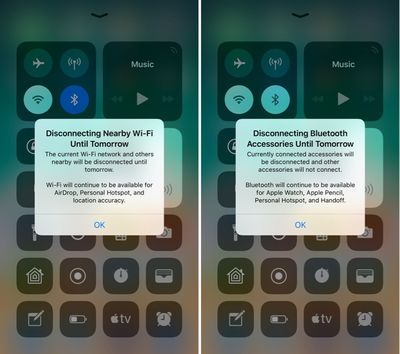
In the new iOS 11.2 beta released this morning, Apple has added new informational pop-ups to let users know exactly how these toggles work. The new pop-ups explain that Bluetooth and Wi-Fi will be disabled temporarily rather than permanently.
controlcenterwifitoggles
Prior to today's update, the Control Center toggles for Wi-Fi and Bluetooth could be somewhat confusing, because there was no on-device explanation. Apple outlined how the toggles work in a support document, but if you didn't see it, you might wonder why Wi-Fi or Bluetooth were turning themselves back on after being disabled via Control Center.

These new messages will appear the first time the Control Center toggles are used. Subsequent uses will show a message at the top that reads "Disconnecting Nearby Wi-Fi Networks Until Tomorrow" or "Disconnecting Bluetooth Devices Until Tomorrow."

bluetoothwifidisconnectingmessage
While Apple's new pop-ups offer a better explanation than was previously available, there are other situations where Wi-Fi or Bluetooth might be turned back on sooner than one day. When you use the Wi-Fi toggle in Control Center, Wi-Fi is disabled until one of the following conditions occurs:

- Wi-Fi is reactivated using Control Center
- You connect to a Wi-Fi network using Settings > Wi-Fi
- You walk or drive to a new location
- It's 5:00 a.m. local time
- Your iOS device is restarted

When you use the Bluetooth toggle in Control Center, Bluetooth is disabled until one of the following conditions occurs:

- Bluetooth is reactivated using control Center
- You connect to a Bluetooth accessory in Settings > Bluetooth
- It's 5:00 a.m. local time
- Your iOS device is restarted

To more permanently disable Bluetooth and Wi-Fi on an iOS device running iOS 11, it's necessary to go to the Settings app and toggle these features off in the Wi-Fi and Bluetooth sections. Apple likely made the change to Control Center in iOS 11 for a better overall user experience, as some iPhone and iPad owners might not realize the impact that turning Wi-Fi and Bluetooth off can have when it comes to iOS features like GPS directions, Continuity, and more.

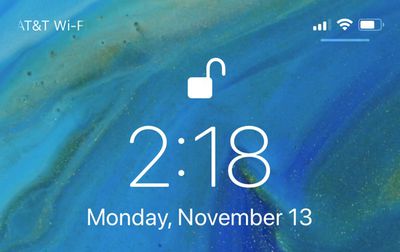
In addition to introducing a message to let users know how Bluetooth and Wi-Fi work in Control Center, on the iPhone X, there's also a small UI change designed to make the Control Center gesture more obvious. Whenever you're on the Lock screen, there's a small bar underneath the icons on the right side of the device, letting you know there's more to see there. The bar is not displayed on the Home screen of an unlocked iPhone X, nor is it displayed within apps.
lockscreencontrolcenterbar
For those unfamiliar, accessing the Control Center on the iPhone X is done from a swipe down on the top right side of the device rather than a swipe upwards from the bottom.


Related Forum: iOS 11

Popular Stories

Apple Event Logo

Apple Working on All-New Operating System

Wednesday July 29, 2026 11:39 am PDT by
Apple is developing an all-new operating system that is essentially a mix of tvOS, watchOS, and iOS, according to Bloomberg's Mark Gurman. In a report this week, he said the operating system will feature a grid of icons, widgets, and apps, along with customizable clock faces. The new software platform is intended for Apple's long-rumored smart home hub. With built-in facial recognition,...

imac video apple feature

Apple Made Its Second-Biggest Acquisition Ever This Year

Wednesday July 29, 2026 12:03 pm PDT by
Apple this year acquired Israeli startup Q.ai for close to $2 billion, according to the Financial Times. That would make this Apple's second-biggest acquisition ever, after it paid $3 billion for the popular headphone maker Beats in 2014. This is also the largest known Apple acquisition since the company purchased Intel's smartphone modem business and patents for $1 billion in 2019. Q.ai...
Dynamic Island iPhone 18 Pro Feature

iPhone 18 Pro: Twelve Changes Coming to Apple's Next Flagship

Thursday July 30, 2026 3:43 am PDT by
We're less than two months out from the launch of Apple's premium next-generation smartphone lineup, and while we're not expecting a dramatic change in terms of functionality, there are still several enhancements rumored to be coming to the iPhone 18 Pro and iPhone 18 Pro Max. One thing worth noting is that Apple is reportedly planning a major change to its iPhone release cycle this year,...

Top Rated Comments

114 months ago
I understand what they’re trying to do, but I believe it’s unnecessary.

Off should be off, on should be on.

Keep it simple stupid.
Score: 134 Votes (Like | Disagree)
Scottsoapbox Avatar
114 months ago
Why keep it an intuitive on/off when you can add a pop up explaining it? :rolleyes:
Score: 76 Votes (Like | Disagree)
114 months ago
Why not long press for the option to turn it off completely?...
Score: 61 Votes (Like | Disagree)
theelysium Avatar
114 months ago
They are turned off to SAVE BATTERY DURPA-DURRRR Apple!

I want my OFF toggles back. I understand how to manage my antennas I don't need to be antenna coddled by Apple's OS.

We should be able to swap the toggles out or HOLD on the WiFi Bluetooth to switch them OFF!

So STUPID.
Score: 42 Votes (Like | Disagree)
114 months ago
iOS used to be such an elegant, simple and clear way of accessing a device.
That was a long time ago.
Score: 30 Votes (Like | Disagree)
spazzcat Avatar
114 months ago
I understand what they’re trying to do, but I believe it’s unnecessary.

Off should be off, on should be on.

Keep it simple stupid.
The new way is much better. When I get to my car for example at work, it has a very weak connection to wifi. I don't want to turn off wifi, I want to just disconnect from work. The old way I would forget to turn wifi back on.
Score: 29 Votes (Like | Disagree)

🔗 Related Apple News & Rumors

Stay updated with the latest Apple ecosystem news and verified rumors











































