

Apple Community Envisions Better Ways to Activate Control Center on iPhone X - MacRumorsOpen MenuShow RoundupsShow Forums menuVisit ForumsOpen Sidebar
Skip to Content

Apple Community Envisions Better Ways to Activate Control Center on iPhone X

One of the biggest software changes on Apple's new iPhone X is the location of Control Center, the useful user interface that provides you with quick access to music playback controls, Bluetooth and Wi-Fi toggles, the flashlight, calculator, and much more thanks to iOS 11's customizable layout. On pre-iPhone X devices, the Control Center is awoken by swiping up from the bottom edge of the device. Because that action is now the default "go home" gesture on iPhone X, Apple has moved Control Center to the top right edge of the smartphone.

This location change has removed the simplicity and ease-of-access to Control Center for many iPhone X users -- particularly those who are left handed -- who have been posting about the iPhone X-specific issue in the MacRumors forums, Twitter, and on Reddit. Some of these users have also provided interesting alternative locations and invoking gestures that Apple could potentially implement in future iOS updates, but it should be reiterated that these are simply community ideas and not in any way an indication that we'll see them added to the iPhone X.
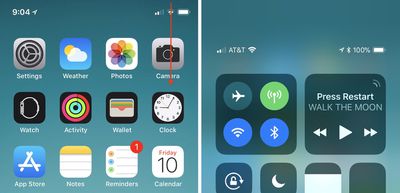
iphone x control center

How to activate Control Center on iPhone X

Reddit has been the source of multiple ideas for new Control Center gestures on the iPhone X, with a few that replace existing gestures (so you'd have to choose between two options in Settings) and some that are new. One user theorized that the iPhone X's new Reachability gesture (swiping down on the Home indicator, which must be activated in Settings) could have an alternate option for invoking Control Center.

Further threads provided variations on this idea: 3D Touch on the Home indicator for Reachability and pulling down on the indicator for Control Center, or keeping Reachability as it is and using 3D Touch on the Home indicator for Control Center. The 3D Touch solution has been put forward by multiple people over the last few days and appears to be a favorite, particularly because Reachability's new swipe-down gesture on the Home indicator can be difficult to execute and could potentially be an even more frustrating location for Control Center.

Other ideas have been shared on the MacRumors forums, including one that could be an additional option for the swipe-down gesture that enacts Search anywhere on the Home Screen, but that would make Control Center impossible to call up within apps. iOS developer Guilherme Rambo posted his own idea on Twitter this week, suggesting that a 3D Touch edge swipe could house Control Center. Currently, this is used as an app switching gesture, which Apple at first removed from iOS 11 and then brought back in a later update, so it's another idea where you'd have to pick one setting over another.

While Rambo's idea appears to be focused on Control Center replacing an app switcher gesture, a few users have also had ideas where Control Center is added into the app switcher. In these, you'd swipe up and hold to access other apps as normal, and Control Center would potentially be the first app you see instead of the last-used app. Or, Apple could place it on the right side of the app switcher, as one Redditor posited. Another mockup by Twitter user @jwangARK placed buttons under the app switcher for easy access to both Notifications and Control Center.

Another iOS developer, Riley Testut, theorized a simple solution that would place Control Center at the bottom right edge of the iPhone X display instead of the top right edge, while swiping up from the center would still go Home. A few iPhone X users have also pointed towards Assistive Touch in Accessibility as a workaround for easier Control Center activation, but that comes with a permanent, virtual Home Button on your iPhone screen, which will be a hard trade-off for some iPhone X owners.

With the iPhone X out in the wild for one full week as of today, November 10, the location of Control Center is one of a few gripes that early adopters have had with Apple's newest smartphone. Another notable point of contention focused on the iPhone X keyboard's "wasted space", with users presenting a few potential solutions to that as well, including placing recently used emoji or punctuation in the empty field below the space bar.

Make sure to check out our iPhone X Roundup for more details on the smartphone's new features.

Related Forums: iOS 11, iPhone

Popular Stories

Apple MacBook Pro with PROLED XDR Display family lineup feature

Apple Announces OLED MacBook Pro With Touch Display

Wednesday October 28, 2026 10:11 am PDT by
Apple today announced a new high-end MacBook Pro, which is available in 14-inch and 16-inch sizes. The new device has a PROLED XDR display that supports touch gestures, and a glowing rear Apple logo. Pricing on the MacBook Pro starts at $2,899 for the 14-inch model and $3,399 for the 16-inch model. Apple says the MacBook Pro has the "world's best display in a pro laptop." The PROLED...

iPhone Duo Display Cracking

Apple Alerts Stores to iPhone Duo's Display Cracking Issue

Friday October 30, 2026 3:20 pm PDT by
In a memo shared with Apple Stores and Apple Authorized Service Providers this week, and later obtained by MacRumors, Apple provided technicians with guidance on how to diagnose and address the iPhone Duo's inner display cracking issue. If a customer reports the issue, Apple advised technicians to inspect the iPhone Duo and repair or replace it in accordance with their standard procedures....
iPad mini OLED feature 1

Apple Executive Comments on New iPad Mini Lacking 120Hz Display

Thursday October 29, 2026 1:47 pm PDT by
While the new iPad mini has an OLED display, the device does not support ProMotion, meaning the display's refresh rate is limited to 60Hz instead of 120Hz. ProMotion support would have allowed for the iPad mini's refresh rate to automatically adjust from 10Hz to 120Hz depending on the content being displayed, but evidently Apple has kept the feature exclusive to the iPad Pro among iPad...

Top Rated Comments

Patriks7 Avatar
117 months ago
Am I the only one slightly ticked off with the way apps are closed on the X? Feels like a completely unnecessary step to press and hold the app instead of just swiping up.
Score: 75 Votes (Like | Disagree)
117 months ago
No. A 3D Touch swipe from the edge would be a horrid idea for invoking control center.
Score: 46 Votes (Like | Disagree)
117 months ago
They are not gonna change this soon, that would be admitting it was a wrong first choice. Apple doesn't make mistakes.

[doublepost=1510329398][/doublepost]
Am I the only one slightly ticked off with the way apps are closed on the X? Feels like a completely unnecessary step to press and hold the app instead of just swiping up.

Yes, more people dislike this just like all of this:
[LIST=1]
* Bring up the status bar information so it fits better next to the notch, if needed make the font of it smaller.
* Add an option to unlock the phone without swiping up.
* Add control center to the multitasking screen instead of stretching your thumb every time.
* Force close apps by swiping up instead of holding one down first. One can simply swipe from bottom to get back.
* Get back battery percentage in the status bar.
* Make safari landscape mode wider on the iPhone X.
* Customize lock screen force touch buttons.
* Hide the "home" bar.
* Dark mode is even more important for the X due to OLED burn-ins.
* Lower the keyboard or add useful function to the wasted space below the keyboard.
Score: 41 Votes (Like | Disagree)
117 months ago
Why not add it to the multi taking page like iPads???
Score: 18 Votes (Like | Disagree)
117 months ago
Am I the only one slightly ticked off with the way apps are closed on the X? Feels like a completely unnecessary step to press and hold the app instead of just swiping up.
It's probably because other then an app that has gotten stuck/crashed there really is no reason to close an app because it doesn't really make a difference.
Score: 15 Votes (Like | Disagree)
117 months ago
Personally I like where it is. Then again I don't mind the notch either...
Score: 11 Votes (Like | Disagree)
Latest Stories
Apple Watch Ultra 4 Hits All-Time Low Price With Amazon's $99 Discount
4 hours ago
Reminder: Apple's Big Discount on Beats 360 Ear Cushions Ends Today
4 hours ago
Here's a New Tour of Apple's HomeView Software
4 hours ago
Apple Reveals New iPad Mini's Battery Capacity
5 hours ago
Top Stories: Apple's Big MacBook Pro, iPad mini and iMac Updates
7 hours ago
'Pluribus' Season 2 Reportedly Starts Production Today
13 hours ago
iPhone 18 Pro Sales Surge in China, Offsetting Decline in U.S. and Japan
14 hours ago
HomeView Software 27.2: Wallpapers, Control Center, and More
20 hours ago
Apple Alerts Stores to iPhone Duo's Display Cracking Issue
21 hours ago
iOS 27.3 Will Enable These Apple Intelligence Features in China
22 hours ago
Apple Says iOS 27.3 Beta Coming Next Week
22 hours ago
Apple's Flash Storage Suppliers Are Finally 'Getting Their Revenge'
23 hours ago
14 New Things Your iPhone Can Do in iOS 27.2
1 day ago
iPhone Duo Review: One Week Later
1 day ago
Samsung Mocks iPhone Duo Display Cracks in New Ad Campaign
1 day ago
The MacRumors Show: OLED MacBook Pro, iPad Mini 8, and More
1 day ago
MacBook Pro With Touch Display: 15 More Details Revealed
1 day ago
Russia Places Apple on State Surveillance Registry
1 day ago
Halloween Weekend Brings Discounts on Apple Accessories and Pre-Orders
1 day ago
Apple Has Released More Than 25 New Products in the Past Two Months
1 day ago
Local Code Launches as Free, Private AI Assistant Tool for Mac
1 day ago
Apple Acquires Ascend.io
1 day ago
HomePod Mini 2 Launches Today: All the New Features
1 day ago
AirTag 2 4-Pack Drops to New Low Price of $69.99
1 day ago
Rian Johnson's iPhone Camera App Goes Viral
1 day ago
Where Did All the iPhone Duos Go? Mostly to Apple's Stores
1 day ago
Apple's Touchscreen MacBook Pro Could Ship 1.5M Units in 2027
1 day ago
New Apple TV 4K and iPad Mini: RAM Amounts Revealed
2 days ago
Apple Executive Comments on New iPad Mini Lacking 120Hz Display
2 days ago
Here's a Hands-On Look at HomePod Mini 2's New Two-Tone Colors
2 days ago

🔗 Related Apple News & Rumors

Stay updated with the latest Apple ecosystem news and verified rumors










































