

Developer Demonstrates iOS Phishing Attack That Uses Apple-Style Password Request - MacRumorsOpen MenuShow RoundupsShow Forums menuVisit ForumsOpen Sidebar
Skip to Content

Developer Demonstrates iOS Phishing Attack That Uses Apple-Style Password Request

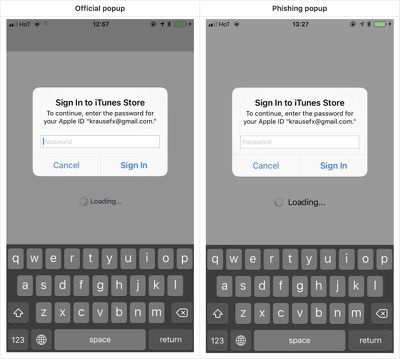
Developer Felix Krause today shared a proof of concept phishing attack that's gaining some traction as it clearly demonstrates how app developers can use Apple-style popups to gain access to an iPhone user's Apple ID and password.

As Krause explains, iPhone and iPad users are accustomed to official Apple requests for their Apple ID and password for making purchases and accessing iCloud, even when not in the App Store or iTunes app.
phishingconcept1
Using a UIAlertController that emulates the design of the system request for a password, developers can create an identical interface as a phishing tool that can fool many iOS users.

Showing a dialog that looks just like a system popup is super easy, there is no magic or secret code involved, it's literally the examples provided in the Apple docs, with a custom text.

I decided not to open source the actual popup code, however, note that it's less than 30 lines of code and every iOS engineer will be able to quickly build their own phishing code.

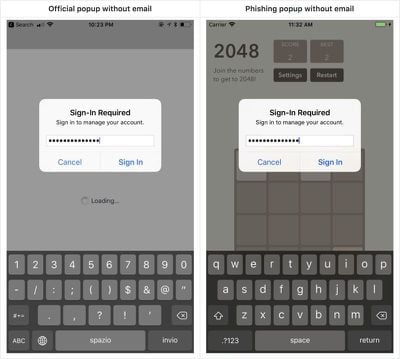
Though some of the system alerts would require a developer to have a user's Apple ID email address, there are also popup alerts that do not require an email and can recover a password.
phishingconcept2
The phishing method that Krause describes is not new, and Apple vets apps that are accepted to the App Store, but it's worth highlighting for iOS users who may not be aware that such a phishing attempt is possible.

As Krause says, users can protect themselves by being wary of these popup dialogues. If one pops up, press the Home button to close the app. If the popup goes away, it's tied to the app and is a phishing attack. If it remains, it's a system request from Apple.

Krause also recommends users dismiss popups and enter their credentials directly within the Settings app.

Krause has reported the issue to Apple and recommends a fix that would include Apple asking customers to enter their credentials into the Settings app rather than directly through a popup that can be easily mimicked. Alternatively, he suggests credential requests could include an app icon to indicate that an app is asking rather than the system.

As extra protection from attacks like this, Apple customers should enable two-factor authentication as it prevents attackers from being able to log into an Apple ID account without a code from a verified device.


Popular Stories

Apple Event Logo

Apple Working on All-New Operating System

Wednesday July 29, 2026 11:39 am PDT by
Apple is developing an all-new operating system that is essentially a mix of tvOS, watchOS, and iOS, according to Bloomberg's Mark Gurman. In a report this week, he said the operating system will feature a grid of icons, widgets, and apps, along with customizable clock faces. The new software platform is intended for Apple's long-rumored smart home hub. With built-in facial recognition,...
imac video apple feature

Apple Made Its Second-Biggest Acquisition Ever This Year

Wednesday July 29, 2026 12:03 pm PDT by
Apple this year acquired Israeli startup Q.ai for close to $2 billion, according to the Financial Times. That would make this Apple's second-biggest acquisition ever, after it paid $3 billion for the popular headphone maker Beats in 2014. This is also the largest known Apple acquisition since the company purchased Intel's smartphone modem business and patents for $1 billion in 2019. Q.ai...
Dynamic Island iPhone 18 Pro Feature

iPhone 18 Pro: Twelve Changes Coming to Apple's Next Flagship

Thursday July 30, 2026 3:43 am PDT by
We're less than two months out from the launch of Apple's premium next-generation smartphone lineup, and while we're not expecting a dramatic change in terms of functionality, there are still several enhancements rumored to be coming to the iPhone 18 Pro and iPhone 18 Pro Max. One thing worth noting is that Apple is reportedly planning a major change to its iPhone release cycle this year,...

Top Rated Comments

b11051973 Avatar
115 months ago
Always enter an incorrect password first. If it doesn't complain you entered the wrong password, you know it is a phishing thingie.
Score: 47 Votes (Like | Disagree)

nutmac Avatar
115 months ago
Similarly, macOS's Authorization Service dialog box is also easily spoofed.
apple ios phishing attack concept image
Similar to Windows' Control-Alt-Delete, Apple's iOS and macOS should make it impossible to spoof these dialog boxes.
Score: 28 Votes (Like | Disagree)
115 months ago
This is very smart actually... I'm surprised this isn't massively used by shady apps already.
Score: 15 Votes (Like | Disagree)
BMcCoy Avatar
115 months ago
Yup, I’d fall for this.
And I’m paranoid.

Cunning.
And a bit frightening.
Score: 11 Votes (Like | Disagree)
115 months ago
I just transferred to a new iPhone and it asked many times for my apple id password at seemingly random times. Sometimes I'm never sure if I mistyped the password or it was a new request for something else. Apple needs to get more organized and at least let the user know why they have to enter the password.
Score: 10 Votes (Like | Disagree)
115 months ago
Fair point about our social conditioning on these dialogs. I don't know of a good way to address this though.
I think this one is on Apple. A user gets legitimately asked for his/her password enough times and fatigue sets in, and they stop really thinking about it.

Ultimately it's a UX problem that needs to be solved so that entering one's iCloud password is 1) hard to fake and 2) doesn't happen any more often than necessary.
Score: 10 Votes (Like | Disagree)

🔗 Related Apple News & Rumors

Stay updated with the latest Apple ecosystem news and verified rumors











































