

macOS High Sierra and iOS 11 May Fix Long-Standing Sync Issues With iCloud Text Replacements [Update: Soon] - MacRumorsOpen MenuShow RoundupsShow Forums menuVisit ForumsOpen Sidebar
Skip to Content

macOS High Sierra and iOS 11 May Fix Long-Standing Sync Issues With iCloud Text Replacements [Update: Soon]

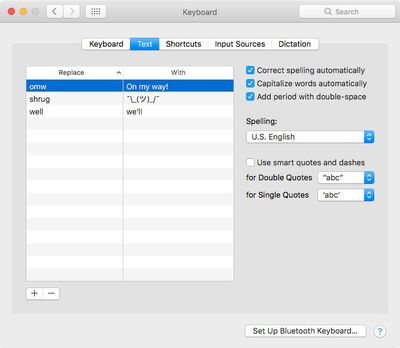
Apple appears to have resolved long-running iCloud sync issues linked to its text replacement feature with the release of iOS 11 and macOS High Sierra. Originally introduced in Snow Leopard and iOS 5, text replacements let users create shortcut text that, when typed, expands to something longer, thus saving input time.

The feature can be found on iOS devices in Settings -> General -> Keyboards -> Text Replacement, and in System Preferences -> Keyboard on Macs. Ideally, changes to the text snippets list on one device should sync to all devices logged in using the same Apple ID, but that hasn't always been the case, as MacStadium's Brian Stucki attests:
Screen Shot 8

Text replacement syncing is completely broken. Sometimes it works, sometimes it doesn't. Sometimes it will only sync back old snippets that you have deleted. Sometimes the sync will work one direction, but not the other. Every time I ask about this on Twitter, it brings a strong response of similar experiences.

After years of struggling to get text replacement syncing to work properly, Stucki recently decided to set up a weeks-long experiment to test the reliability of the feature across hundreds of Apple devices running various versions of iOS and OS X/macOS. In short, Stucki's results suggested that the text replacement syncing service was "a complete mess" and routinely failed to sync text snippets across devices.

Following the experiment, Stucki wondered why the syncing had remained so poor across several generations of OS, given that other iCloud syncing features such as Apple Notes had improved in recent years. As noted by Daring Fireball's John Gruber, these improvements corresponded with the introduction of the CloudKit API in 2014, suggesting that text replacements had not been upgraded to run on the newer syncing framework.

However, in an update to his experiment posted on Tuesday, Stucki reported that when he made text replacement changes on a Mac running macOS High Sierra, surprisingly his edits were recognized and synced across nearly every device on the same Apple ID, regardless of OS. "Perhaps a clean install of High Sierra is now saving snippets correctly?" he wondered.


Since then, iOS developer Guilherme Rambo has claimed that text replacements do sync through CloudKit on iOS 11 and macOS High Sierra, suggesting Apple has got around to updating the feature to run on the more reliable API. So if you're having trouble syncing text snippets, updating your devices to Apple's latest operating systems might be the best course of action.

Update: An Apple spokesperson informed John Gruber later on Wednesday that an update to move text replacement syncing to CloudKit should be rolling out to iOS 11 and macOS High Sierra 10.13 "in the next month or so".


Popular Stories

iCloud General Feature Redux

Apple Won't Change Hide My Email Domain After Backlash

Monday August 24, 2026 1:17 pm PDT by
Apple today said it is reversing its decision and will not change the email domain used for the iCloud+ Hide My Email feature. Emails sent using Hide My Email will continue to use the same icloud.com domain that Apple uses for standard iCloud emails. In June, Apple said it would unify the email domains used by Sign in with Apple and Hide My Email under a single private.icloud.com domain....
Apple iCloud Plus expansion hero

iCloud+ Now Includes Apple TV, Apple Arcade, and Curated Apple Music Stations in Over 100 Countries

Tuesday September 15, 2026 1:43 am PDT by
Apple today announced a new subscription initiative that turns paid iCloud+ subscriptions into a broader services bundle in more than 100 countries. In select countries, Apple says every paid iCloud+ plan, including the cheapest 50GB tier, now includes Apple TV and Apple Arcade "at no additional cost," while family sharing extends the storage, TV and Arcade access to up to five people....
iOS 27 Next to iPhone

Here's When iOS 27 Rolls Out Today in Every Time Zone [Update: It's Out]

Sunday September 13, 2026 3:00 am PDT by
Update 10:04 a.m.: iOS 27 is rolling out now, though it may take a bit for all users to see it, so keep checking! Apple is about to release iOS 27, which will finally deliver more advanced Siri AI capabilities as well as a variety of other refinements, improvements, and new features to iPhones. It's Apple's biggest software update of the year, and Apple announced at Wednesday's iPhone event...

Top Rated Comments

Pagemakers Avatar
117 months ago
100% NO.

Synching between my iPad Pro, iPhone 7 + (both running iOS 11.01) and my Mac Pro and MacBook (both running High Sierra) are as hit and miss as they’ve always been.

Created a shortcut on my iPhone - only syncs to MacBook
Created a shortbust on my iPad - synchs nowhere
Created a shortcut on my MacBook syncs to iPhone and iPad (but not always)

Text replacement is still a heap of *****.
Score: 4 Votes (Like | Disagree)
timmyh Avatar
117 months ago
Added to article:

Update: An Apple spokesperson informed John Gruber later on Wednesday that an update to move text replacement syncing to CloudKit should be rolling out to iOS 11 and macOS High Sierra 10.13 "in the next month or so ('https://daringfireball.net/linked/2017/09/27/text-replacements-moving-to-cloudkit')".

Score: 3 Votes (Like | Disagree)
117 months ago
I didn't even know these text replacements were supposed to sync! :p
Score: 3 Votes (Like | Disagree)
Traverse Avatar
117 months ago
While I’m glad, I just read posts in the iOS 11.0.1 update article commenting that it wiped their snippets on some devices and not others.

Personally, I find it maddening. After a clean install sometimes only half my snippets would appear, I’d manually redo them in that device and then 2 months later have 3+ copies of the same snippet on each device.
Score: 3 Votes (Like | Disagree)
adrianlondon Avatar
117 months ago
I .... I'm in shock! I don't know what happened but I imagine aliens are involved.

My text replacements have synced! They're THE SAME on my Macbook and my phone. I just deleted one that was a test and the deletion replicated within a few seconds. I'm too scared to turn my iPad on in case the aliens get stressed out and stop syncing them.

Edit: Turned iPad on this morning. It's still being fiercely independent. iOS9 is giving the finger to iOS11 and High Sierra.
Score: 2 Votes (Like | Disagree)
Traverse Avatar
117 months ago
Actually I just realized yesterday that after a clean install of High Sierra and updating to iOS 11.0.1, my snippets were gone from all my devices.
[doublepost=1506774336][/doublepost]
This.

Ironic given that Apple used to be master of synching.

Personally I'd love to just disable text snippet synching. I don't add or change them all that much and I'd much rather invest 10 minutes of my time now rather than repeatedly moan in despair how iCloud yet again ****ed up some snippets...

It may be fixed now, but code can always break again and why send something across the globe for no reason?

Glassed Silver:mac
I keep a table in Notes of all my snippets. Can’t believe how many times I’ve had to use that.
Score: 2 Votes (Like | Disagree)

🔗 Related Apple News & Rumors

Stay updated with the latest Apple ecosystem news and verified rumors









































