

Logitech Resurrects the Trackball Device With the Wireless MX ERGO - MacRumorsOpen MenuShow RoundupsShow Forums menuVisit ForumsOpen Sidebar
Skip to Content

Logitech Resurrects the Trackball Device With the Wireless MX ERGO

by

Logitech resurrected the trackball device today with its announcement of the MX ERGO, which the company is calling its "first new innovative trackball in nearly a decade".

Pitched to consumers looking for alternatives to mice and touchpads, the Bluetooth-based MX ERGO features an adjustable metal hinge with angle options at either zero or 20 degrees for personalizing the comfort level, which improves wrist posture and pronation, according to Logitech.
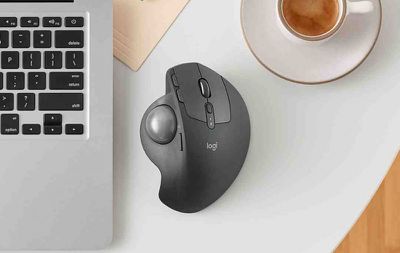
mx ergo instagram

"We are so excited by this new trackball. It is back, better than ever and the idea for this trackball innovation was inspired by our users, who invented creative ways to achieve their desired level of comfort, sometimes adding additional wedges under their trackball for elevated angles," said Anatoliy Polyanker, global portfolio and brand director at Logitech. "The MX ERGO is our first adjustable trackball that delivers on the need for elevated comfort in a beautiful design."

The sculpted shape is designed to offer full palm and finger support, with a soft rubber on top for a comfortable grip over many hours of work. An LED light indicates when "precision mode" is activated using the dedicated button on the side of the MX ERGO. This special mode is said to allow the user to instantly change cursor speed and accuracy.

The device also supports multi-device connectivity through Logitech's Easy-Switch and Logitech Flow software, which allows users to seamlessly switch between two computers with one mouse, as well as copy and paste content, images and documents between them.


The rechargeable battery lasts up to four months on a full charge, depending on usage, and Logitech reckons the MX ERGO can give a complete day of work with just one minute of charge if the device is low on power.

The Logitech MX ERGO is priced at $99.99 and should be available to buy on the Logitech website and select retail stores throughout the U.S. in September.


Top Rated Comments

120 months ago
I had one of those about 20 years ago.

It was really fantastic. It was so much better compared to a mouse! So comfortable to use and precision was great.

I had to remove the ball once every couple of weeks to clean it up, and to clean up the sensors, but it then went back to being buttery smooth and extremely precise.

If it weren't for the multitouch gestures that I have grown accustomed to using a trackpad, I would buy one of these without hesitation.
Score: 5 Votes (Like | Disagree)
120 months ago
This is awesome news. Trackballs oblivates my RSI/CTS issues and Logitech m570 was the first one I bought. I’ve switched to CST’s L-Trac 2545w trackball and it’s the best one so far with an actual smooth wheel that no trackball had.
Score: 4 Votes (Like | Disagree)
pdaholic Avatar
120 months ago
This makes me wanna play a game of Missle Command. Or centipede.
Score: 4 Votes (Like | Disagree)
120 months ago
I LOVE my Logitech M570 and when the scroll wheel button dies (again) I will upgrade to this.

For those who don't know, here's what's awesome about this beloved device, which I hope the new controller lives up to:
[LIST=1]
* Superior ergonomics. Vastly better than mice or trackpads. It's the only thing that keeps my right-hand RSI at bay. Once you learn to use a thumb trackball, you will not go back to anything else.
* Amazing connectivity. At least in the M570, it uses a custom Logitech dongle that is far better than Bluetooth. Connects instantly, stays connected. (Incidentally the same dongle also connects to my Logitech solar-powered Mac keyboard, with its number keypad. Never needs charging, always a full battery even in part shade.)
* Amazing battery life. One AA is good for many months' use.
* Flexibility: I map the forward & back buttons to Mission Control & Dashboard, with BetterTouchTool. For good measure I keep an older Apple trackpad for my left hand to use for gestures.

Logitech's keyboards & controllers are the best on the market, bar none. Looking forward to this!
Score: 3 Votes (Like | Disagree)
120 months ago
I know plenty of creatives that swear by trackballs. I don't get it, either, but choice is a great thing. ‍♂️
For a good reason, creatives like trackballs due to precision when creating paths on Adobe Illustrator ( or any other vector app ), page layout, image editing, etc. You can't do that with a Magic Trackpad from Apple which feels weird. With a trackball mouse, you have analog control using your fingers and can program any custom buttons on it ( if any ) to your whim for shortcuts. And trackball mice keeps your hand rested while using your thumb as you use the other finger for 'right click' functions, or scrolling.

I had the original Magic Mouse when it came with my iMac and it broke down eventually. I stopped using it after getting hand cramps trying to do page layout and design-related projects. I switched to a full trackball mice and it was a godsend. My cramps and RSI went away since then.

I will never, ever touch an Apple produced mice or trackpad again unless they get their act together and go back to proper ergonomic design. They may look nice in appearance but how they function isn't really practical. It may be a lot of fun to use multi-touch on the trackpad for iMac but in the end, using, say, Photoshop with it doesn't seem effective at all. You have to use an ergonomic mice/trackball and/or a Wacom tablet for precision work.
Score: 3 Votes (Like | Disagree)
kycophpd Avatar
120 months ago
Yup!

I still use an M570 after switching to trackballs due to the start of wrist issues. None since.
The only complaint is that the bluetooth connectivity is wonky. I have stuttering issues or a real connection loss for a few seconds. I'm on Yosemite so maybe that's the problem. I do notice more after my Mac goes to sleep.

I keep wanting to switch to my trackpad which I rarely use, but i don't like how my wrist sits with it. I should give it a shot.

Cheers,
Brian

The M570 is exactly what I am using for my office PC. I switched to this when I had carpal tunnel and even after the surgery I find it much easier to use than a mouse. I still prefer my trackpad on my Mac but for my PC the M570 is still my favorite option.
Score: 3 Votes (Like | Disagree)

Popular Stories

iPhone Duo Display Cracking

Apple Alerts Stores to iPhone Duo's Display Cracking Issue

Friday October 30, 2026 3:20 pm PDT by
In a memo shared with Apple Stores and Apple Authorized Service Providers this week, and later obtained by MacRumors, Apple provided technicians with guidance on how to diagnose and address the iPhone Duo's inner display cracking issue. If a customer reports the issue, Apple advised technicians to inspect the iPhone Duo and repair or replace it in accordance with their standard procedures....
iPad mini OLED feature 1

Apple Executive Comments on New iPad Mini Lacking 120Hz Display

Thursday October 29, 2026 1:47 pm PDT by
While the new iPad mini has an OLED display, the device does not support ProMotion, meaning the display's refresh rate is limited to 60Hz instead of 120Hz. ProMotion support would have allowed for the iPad mini's refresh rate to automatically adjust from 10Hz to 120Hz depending on the content being displayed, but evidently Apple has kept the feature exclusive to the iPad Pro among iPad...
Pinched iPad Mini

Apple Avoids Showing Pinched Fingers on iPad Mini Page in South Korea

Thursday October 29, 2026 11:52 am PDT by
In the U.S. and most other countries, Apple's website shows the new iPad mini being held by pinched fingers, but this is not the case in South Korea. The new iPad mini shown with pinched fingers on Apple's website in the U.S. On its South Korean website, Apple simply shows an image of the iPad mini on its own. The new iPad mini shown without pinched fingers on Apple's website in South Korea ...
Latest Stories
Apple Watch Ultra 4 Hits All-Time Low Price With Amazon's $99 Discount
15 hours ago
Reminder: Apple's Big Discount on Beats 360 Ear Cushions Ends Today
15 hours ago
Here's a New Tour of Apple's HomeView Software
15 hours ago
Apple Reveals New iPad Mini's Battery Capacity
16 hours ago
Top Stories: Apple's Big MacBook Pro, iPad mini and iMac Updates
18 hours ago
'Pluribus' Season 2 Reportedly Starts Production Today
1 day ago
iPhone 18 Pro Sales Surge in China, Offsetting Decline in U.S. and Japan
1 day ago
HomeView Software 27.2: Wallpapers, Control Center, and More
1 day ago
Apple Alerts Stores to iPhone Duo's Display Cracking Issue
1 day ago
iOS 27.3 Will Enable These Apple Intelligence Features in China
1 day ago
Apple Says iOS 27.3 Beta Coming Next Week
1 day ago
Apple's Flash Storage Suppliers Are Finally 'Getting Their Revenge'
1 day ago
14 New Things Your iPhone Can Do in iOS 27.2
1 day ago
iPhone Duo Review: One Week Later
2 days ago
Samsung Mocks iPhone Duo Display Cracks in New Ad Campaign
2 days ago
The MacRumors Show: OLED MacBook Pro, iPad Mini 8, and More
2 days ago
MacBook Pro With Touch Display: 15 More Details Revealed
2 days ago
Russia Places Apple on State Surveillance Registry
2 days ago
Halloween Weekend Brings Discounts on Apple Accessories and Pre-Orders
2 days ago
Apple Has Released More Than 25 New Products in the Past Two Months
2 days ago
Local Code Launches as Free, Private AI Assistant Tool for Mac
2 days ago
Apple Acquires Ascend.io
2 days ago
HomePod Mini 2 Launches Today: All the New Features
2 days ago
AirTag 2 4-Pack Drops to New Low Price of $69.99
2 days ago
Rian Johnson's iPhone Camera App Goes Viral
2 days ago
Where Did All the iPhone Duos Go? Mostly to Apple's Stores
2 days ago
Apple's Touchscreen MacBook Pro Could Ship 1.5M Units in 2027
2 days ago
New Apple TV 4K and iPad Mini: RAM Amounts Revealed
2 days ago
Apple Executive Comments on New iPad Mini Lacking 120Hz Display
2 days ago
Here's a Hands-On Look at HomePod Mini 2's New Two-Tone Colors
2 days ago

🔗 Related Apple News & Rumors

Stay updated with the latest Apple ecosystem news and verified rumors











































