

iOS 11's SOS Feature Allows You to Temporarily Disable Touch ID and Require Passcode - MacRumorsOpen MenuShow RoundupsShow Forums menuVisit ForumsOpen Sidebar
Skip to Content

iOS 11's SOS Feature Allows You to Temporarily Disable Touch ID and Require Passcode

In iOS 11, Apple has added an "Emergency SOS" feature that's designed to give users a quick and easy way to summon emergency services should the need arise. As it turns out, there's a secondary benefit to Emergency SOS - it's also a way to quickly and discreetly disable Touch ID.

Emergency SOS is activated by pressing on the sleep/wake button of an iPhone five times in rapid succession. When the requisite number of presses is complete, it brings up a screen that offers buttons to power off the iPhone, bring up your Medical ID (if filled out) and make an emergency 911 call.
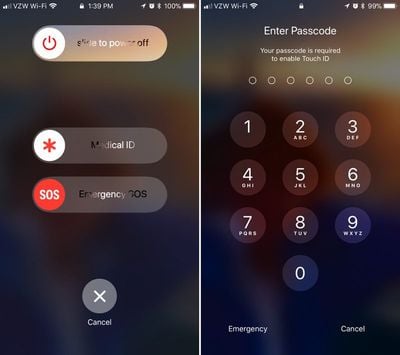
touchiddisabled
Along with these options, there's also a cancel button. If you hit the sleep/wake button five times and then hit cancel, it disables Touch ID and requires a passcode before Touch ID can be re-enabled. Touch ID is also disabled if you actually make an emergency call.

This is a handy hidden feature because it allows Touch ID to be disabled discreetly in situations where someone might be able to force a phone to be unlocked with a fingerprint, such as a robbery or an arrest. With Touch ID disabled in this way, there is no way to physically unlock an iPhone with a finger without the device's passcode.

It's also worth noting that there's no real way to tell that Touch ID has been disabled in this manner. Once you hit the sleep/wake button and then tap cancel, it's locked in the same way and with the same message that the iPhone uses when it's been more than 48 hours since a device was last unlocked with a fingerprint.

Apple's Emergency SOS feature will be available on all iPhones that run iOS 11. Along with disabling Touch ID, SOS can also be used to summon emergency services and alert your emergency contacts when an accident occurs.

iOS 11 is available to developers and public beta testers at the current time and will be released to the public in September alongside new iPhones.


Related Forum: iOS 11

Popular Stories

Apple Event Logo

Apple Working on All-New Operating System

Wednesday July 29, 2026 11:39 am PDT by
Apple is developing an all-new operating system that is essentially a mix of tvOS, watchOS, and iOS, according to Bloomberg's Mark Gurman. In a report this week, he said the operating system will feature a grid of icons, widgets, and apps, along with customizable clock faces. The new software platform is intended for Apple's long-rumored smart home hub. With built-in facial recognition,...

imac video apple feature

Apple Made Its Second-Biggest Acquisition Ever This Year

Wednesday July 29, 2026 12:03 pm PDT by
Apple this year acquired Israeli startup Q.ai for close to $2 billion, according to the Financial Times. That would make this Apple's second-biggest acquisition ever, after it paid $3 billion for the popular headphone maker Beats in 2014. This is also the largest known Apple acquisition since the company purchased Intel's smartphone modem business and patents for $1 billion in 2019. Q.ai...


Dynamic Island iPhone 18 Pro Feature

iPhone 18 Pro: Twelve Changes Coming to Apple's Next Flagship

Thursday July 30, 2026 3:43 am PDT by
We're less than two months out from the launch of Apple's premium next-generation smartphone lineup, and while we're not expecting a dramatic change in terms of functionality, there are still several enhancements rumored to be coming to the iPhone 18 Pro and iPhone 18 Pro Max. One thing worth noting is that Apple is reportedly planning a major change to its iPhone release cycle this year,...

Top Rated Comments

happydude Avatar
117 months ago
not that i plan on getting arrested any time soon, but good to know you can disable touch id. with the courts having ruled the police can compel a finger print but not you to give your passcode, it's a level of privacy that i like to see in there.
Score: 20 Votes (Like | Disagree)
fokmik Avatar
117 months ago
This is a great idea, but why pressing 5 times?
Surely 3 times would have been more than sufficient while making this action quicker and ultimately more usable.
in an emergency situation, believe me, you dont count, you will press that button 10 times in 3-4 seconds
So this is great 5 times allows us not to bring this by mistake
Score: 20 Votes (Like | Disagree)
btrach144 Avatar
117 months ago
keeps the cops out :cool:
Score: 18 Votes (Like | Disagree)
117 months ago
This is a great idea, but why pressing 5 times?
Surely 3 times would have been more than sufficient while making this action quicker and ultimately more usable.
I think the five times is to prevent any inadvertent actions. It's a rather fast Motion pressing five times to toggle the function if you think about it.
Score: 14 Votes (Like | Disagree)
117 months ago
ZERO people will recall this feature exists, or how to activate it, when a situation arises. Utterly convoluted.
Score: 12 Votes (Like | Disagree)
Wando64 Avatar
117 months ago
This is a great idea, but why pressing 5 times?
Surely 3 times would have been more than sufficient while making this action quicker and ultimately more usable.
Score: 12 Votes (Like | Disagree)

🔗 Related Apple News & Rumors

Stay updated with the latest Apple ecosystem news and verified rumors









































