

AgileBits recently introduced a new 1Password feature called Travel Mode, which is designed to protect password vaults from unwarranted searches when traveling.
When activated, Travel Mode will remove every password vault from all of a user's iOS and Mac devices except for vaults that have been earmarked as "safe for travel," effectively hiding a user's most sensitive information. Travel Mode is available to all customers who have a 1Password membership.
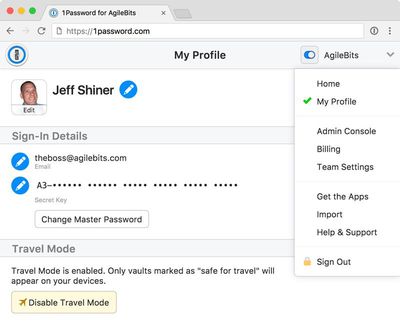
Before Travel Mode, I would have had to sign out of all my 1Password accounts on all my devices. If I needed certain passwords with me, I had to create a temporary travel account. It was a lot of work and not worth it for most people.
Now all I have to do is make sure any of the items I need for travel are in a single vault. I then sign in to my account on 1Password.com, mark that vault as "safe for travel," and turn on Travel Mode in my profile. I unlock 1Password on my devices so the vaults are removed, and I'm now ready for my trip.
Once a user arrives at their destination, Travel Mode can be toggled off and the vaults return to all of a user's devices. AgileBits has a detailed support document outlining how to use Travel Mode.
Vaults are not hidden with Travel Mode, but instead are completely removed from all devices as long as Travel Mode is turned on. AgileBits says that there are no traces left for anyone to find, and there are no signs that a special mode has been enabled.
With 1Password for Teams, Travel Mode allows the team administrator to turn Travel Mode on and off for employees, giving companies a way to make sure their data stays safe.
1Password can be downloaded from the App Store for free, but there is an in-app fee to access the service. A standard 1Password account is priced at $2.99 per month and a multi-user family account is priced at $4.99 per month. There is an additional fee when purchasing a subscription through the App Store, and there are separate subscription options for teams. 1Password also offers a one-time purchase option in the Mac App Store.






















Top Rated Comments
If they 'suspect' that you are involved in terrorist activities then they pretty much have carte blanche to whatever the hell they want. Especially if you are not an American citizen.
(I put suspect in quotes as I believe the law allows them a large leeway in their definition..I certainly wouldn't want to be on the wrong side of them.)
If this helps relieve a potential problem for people then it is a great thing to have.
Their move to a subscription service has received a lot of flak (myself included) but the software is top notch.
Kyle and Ben (I think) try hard to help people on the forums, and it is good to see they are continuing to develop their product.
Although they de-emphasize it, AgileBits still sells the app as a standalone solution, i.e. you don't need a subscription. I just confirmed this with AgileBits and can post the email if asked.
They claim that they don't recommend it because it's a "much more technical" solution than their subscription service. My take? Baloney. It's simple to sync via iCloud or Dropbox, which they're actively developing, and I don't care if my data is encrypted locally vs on their servers (I actually prefer the former). They tout that the app is "free" with a subscription. Fine, but at $3/month, you're buying the equivalent of the 1P app every year, and syncing is crippled if your subscription lapses.
No thanks. I just hope they continue to support the standalone app with 3rd party syncing (2nd party in the case of iCloud). We'll see but I sense the sunset coming. They're really pushing hard for people to "upgrade" to the subscription-based hosted service.