

A new update to the popular GIF-finding service Giphy this week has introduced Apple's Live Photo support into the iOS app, letting users convert any GIF they want into a Live Photo (via Mac4Ever). This allows users to more easily see what is a GIF in their camera roll, since GIFs saved as images still don't move when looked at in Photos. Giphy said the main point of the new update is to allow for custom animated iPhone lock screen wallpapers.

To create a Live Photo, users will need to first find a GIF they want in Giphy, tap on it, then tap the ellipses button underneath it to expand the sharing options. From there, Live Photos are represented by the same circular icon that Apple uses in the main Photos app, and tapping it will bring up two options: Save as Live Photo in Full Screen or Fit to Screen. In the Photos app, users can tap the image, tap the share sheet, and choose "use as wallpaper."
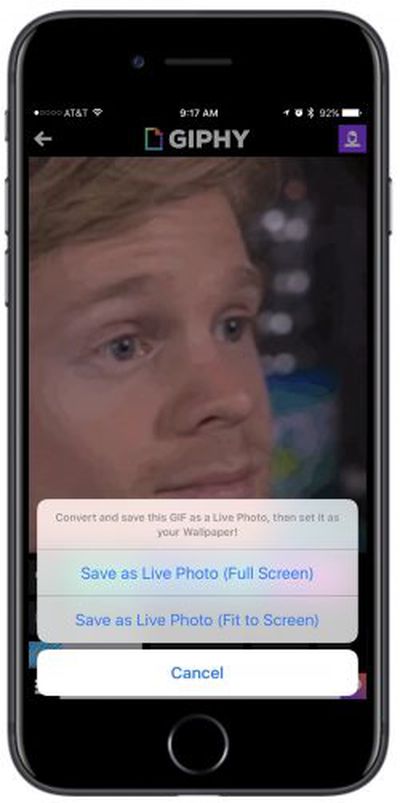
giphy live photo
There are a few compromises to using and saving GIFs as Live Photos, mainly including the low-quality nature of many of the GIFs on Giphy's service, which won't result in the best-looking iPhone wallpapers. Saving a GIF as a Live Photo also prevents it from being used natively as a GIF in Messages, where it would normally play on repeat. As a Live Photo, the image will move but only when pressed upon, as with any other Live Photo.

For those interested, Giphy is free to download on the iOS App Store [Direct Link], and anyone with an iPhone 6s or later can try out the new Live Photos feature.


Tag: Giphy

Top Rated Comments

Flytrap21 Avatar
114 months ago
I want an app that lets me convert my videos into live photos for use as wallpaper.

Does anyone know if it's possible to make a live photo, but have it be 30 or 60fps and play for longer than three seconds so you could have a more advanced motion lock screen wallpaper?
I use intoLive Pro (https://itunes.apple.com/us/app/intolive-pro-turn-your-video-into-live-photos/id1083468087?mt=8). It converts gifs and videos into Live Photos and allows some simple editing of the Live Photo, such as setting the default image that one sees before the photo comes alive, cropping to fit the iPhone or Apple Watch screen, etc.
Score: 1 Votes (Like | Disagree)

Popular Stories

Aston Martin CarPlay Ultra Screen

Apple's CarPlay Ultra to Expand to These Vehicle Brands Later This Year

Sunday February 1, 2026 10:08 am PST by
Last year, Apple launched CarPlay Ultra, the long-awaited next-generation version of its CarPlay software system for vehicles. Nearly nine months later, CarPlay Ultra is still limited to Aston Martin's latest luxury vehicles, but that should change fairly soon. In May 2025, Apple said many other vehicle brands planned to offer CarPlay Ultra, including Hyundai, Kia, and Genesis. In his Powe...
Apple Logo Black

Apple's Next Launch is 'Imminent'

Sunday February 1, 2026 12:31 pm PST by
The calendar has turned to February, and a new report indicates that Apple's next product launch is "imminent," in the form of new MacBook Pro models. "All signs point to an imminent launch of next-generation MacBook Pros that retain the current form factor but deliver faster chips," Bloomberg's Mark Gurman said on Sunday. "I'm told the new models — code-named J714 and J716 — are slated...
iOS 26

iOS 26.3 and iOS 26.4 Will Add These New Features to Your iPhone

Tuesday February 3, 2026 7:47 am PST by
We are still waiting for the iOS 26.3 Release Candidate to come out, so the first iOS 26.4 beta is likely still at least a week or two away. Following beta testing, iOS 26.4 will likely be released to the general public in March or April. Below, we have recapped known or rumored iOS 26.3 and iOS 26.4 features so far. iOS 26.3 iPhone to Android Transfer Tool iOS 26.3 makes it easier...
Apple MacBook Pro M4 hero

New MacBook Pros Reportedly Launching Alongside macOS 26.3

Sunday February 1, 2026 5:42 am PST by
Apple is planning to launch new MacBook Pro models with M5 Pro and M5 Max chips alongside macOS 26.3, according to Bloomberg's Mark Gurman. "Apple's faster MacBook Pros are planned for the macOS 26.3 release cycle," wrote Gurman, in his Power On newsletter today. "I'm told the new models — code-named J714 and J716 — are slated for the macOS 26.3 software cycle, which runs from...
iOS 26 Home Feature

Apple Gives Final Warning to Home App Users

Tuesday February 3, 2026 8:55 am PST by
In 2022, Apple introduced a new Apple Home architecture that is "more reliable and efficient," and the deadline to upgrade and avoid issues is fast approaching. In an email this week, Apple gave customers a final reminder to upgrade their Home app by February 10, 2026. Apple says users who do not upgrade may experience issues with accessories and automations, or lose access to their smart...














