

Logitech Announces HomeKit-Compatible POP Smart Button For Controlling Smart Devices - MacRumorsOpen MenuShow RoundupsShow Forums menuVisit ForumsOpen Sidebar
Skip to Content

Logitech Announces HomeKit-Compatible POP Smart Button For Controlling Smart Devices

by

Logitech today announced a new POP Smart Button, its first Apple HomeKit compatible programmable smart button for controlling connected devices around the home.

The idea behind the original POP is to free up control of smart devices so that anyone in the home can operate them regardless of whether they have a smartphone and the associated app for each device. The latest POP builds on that premise by introducing HomeKit support, enabling it to be customized through the Apple Home app and integrate with other iOS smart home accessories.
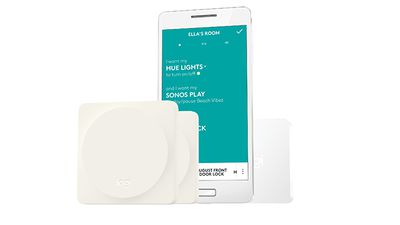
JPG 300 dpi RGB Pop FamilyThe Logitech POP Smart Button Kit includes one smart button with three customizable gestures and a POP bridge to connect the button onto a WiFi network. Users can then extend control throughout their home with additional POP Add-on Smart Buttons, which are available in four colors. Each POP bridge can connect to an unlimited number of buttons.

Using POP Smart Button with Apple HomeKit is easy when paired with Apple’s Home app—POP already comes pre-paired, so discovering the device with the Home app is simple and secure. Just configure the scenes you want and let POP do the rest. Whether turning down the lights to get ready for bed or opening your smart blinds to expose some daylight, POP gives easy control to the whole family.

The POP Smart Button can also be used with non-HomeKit devices, like Sonos wireless music systems, or Logitech Harmony hub-based remote controls by using the companion Logitech POP app. In addition to compatibility with Apple HomeKit, the Logitech POP Smart Button offers the ability to control Osram lighting, Hunter Douglas and Lutron blinds, and more, extending interoperability beyond existing integrations including August, Philips Hue, and Logitech Harmony.

The POP Smart Button will be sold in four colors: White, Alloy, Coral, and Teal. According to Logitech, the POP Smart Button Kit ($59.95) and POP Add-on Smart Button ($39.95) will be available exclusively at Apple stores and Apple.com soon, while availability in other retailers will come later this year. Owners of first generation POP Home Switches can update their software to take advantage of the new integrations, but not the HomeKit support.


Top Rated Comments

gsmornot Avatar
125 months ago
No HomeKit, no deal.

"Using POP Smart Button with Apple HomeKit is easy when paired with Apple's Home app--POP already comes pre-paired, so discovering the device with the Home app is simple and secure."
Score: 3 Votes (Like | Disagree)
ryanwarsaw Avatar
125 months ago
I don't understand exactly what these things do? I read the explanation in the article and still not sure what function they achieve? Is it meant so your kids who don't have smart phones can activate devices or something?
Score: 3 Votes (Like | Disagree)
CarlJ Avatar
125 months ago
No HomeKit, no deal.
The article title and the first two paragraphs all say HomeKit-Compatible. Has the article changed that much since you commented? Or are you just guessing the article relates to home automation somehow and complaining without reading?
Score: 2 Votes (Like | Disagree)
gsmornot Avatar
125 months ago
I don't understand exactly what these things do? I read the explanation in the article and still not sure what function they achieve? Is it meant so your kids who don't have smart phones can activate devices or something?
It appears it is meant for anyone that is near a smart device without a smartphone. I have two Hue dimmers that I use with a pair of lamps which makes it easy. I don't see how I would use this device here though since the examples named each have something already and for about the same price, like the Lutron shades control.
Score: 2 Votes (Like | Disagree)
gsmornot Avatar
125 months ago
Is it just an on/off button? How does it physically work?
If you're asking about the subject of the article I'm not sure. It looks like it would be a CR battery powered single function button that does whatever you trigger it to do. If its like the Hue Tap then each button can be one of many different functions like a scene or an action or just on/off. I don't see myself with one.
Score: 1 Votes (Like | Disagree)
125 months ago
Is it just an on/off button? How does it physically work?
I know, eh? $40 for a button. This world is getting crazy.
Score: 1 Votes (Like | Disagree)

Popular Stories

iPhone Duo Display Cracking

Apple Alerts Stores to iPhone Duo's Display Cracking Issue

Friday October 30, 2026 3:20 pm PDT by
In a memo shared with Apple Stores and Apple Authorized Service Providers this week, and later obtained by MacRumors, Apple provided technicians with guidance on how to diagnose and address the iPhone Duo's inner display cracking issue. If a customer reports the issue, Apple advised technicians to inspect the iPhone Duo and repair or replace it in accordance with their standard procedures....
iPad mini OLED feature 1

Apple Executive Comments on New iPad Mini Lacking 120Hz Display

Thursday October 29, 2026 1:47 pm PDT by
While the new iPad mini has an OLED display, the device does not support ProMotion, meaning the display's refresh rate is limited to 60Hz instead of 120Hz. ProMotion support would have allowed for the iPad mini's refresh rate to automatically adjust from 10Hz to 120Hz depending on the content being displayed, but evidently Apple has kept the feature exclusive to the iPad Pro among iPad...
Pinched iPad Mini

Apple Avoids Showing Pinched Fingers on iPad Mini Page in South Korea

Thursday October 29, 2026 11:52 am PDT by
In the U.S. and most other countries, Apple's website shows the new iPad mini being held by pinched fingers, but this is not the case in South Korea. The new iPad mini shown with pinched fingers on Apple's website in the U.S. On its South Korean website, Apple simply shows an image of the iPad mini on its own. The new iPad mini shown without pinched fingers on Apple's website in South Korea ...
Latest Stories
Apple Watch Ultra 4 Hits All-Time Low Price With Amazon's $99 Discount
15 hours ago
Reminder: Apple's Big Discount on Beats 360 Ear Cushions Ends Today
15 hours ago
Here's a New Tour of Apple's HomeView Software
15 hours ago
Apple Reveals New iPad Mini's Battery Capacity
17 hours ago
Top Stories: Apple's Big MacBook Pro, iPad mini and iMac Updates
18 hours ago
'Pluribus' Season 2 Reportedly Starts Production Today
1 day ago
iPhone 18 Pro Sales Surge in China, Offsetting Decline in U.S. and Japan
1 day ago
HomeView Software 27.2: Wallpapers, Control Center, and More
1 day ago
Apple Alerts Stores to iPhone Duo's Display Cracking Issue
1 day ago
iOS 27.3 Will Enable These Apple Intelligence Features in China
1 day ago
Apple Says iOS 27.3 Beta Coming Next Week
1 day ago
Apple's Flash Storage Suppliers Are Finally 'Getting Their Revenge'
1 day ago
14 New Things Your iPhone Can Do in iOS 27.2
1 day ago
iPhone Duo Review: One Week Later
2 days ago
Samsung Mocks iPhone Duo Display Cracks in New Ad Campaign
2 days ago
The MacRumors Show: OLED MacBook Pro, iPad Mini 8, and More
2 days ago
MacBook Pro With Touch Display: 15 More Details Revealed
2 days ago
Russia Places Apple on State Surveillance Registry
2 days ago
Halloween Weekend Brings Discounts on Apple Accessories and Pre-Orders
2 days ago
Apple Has Released More Than 25 New Products in the Past Two Months
2 days ago
Local Code Launches as Free, Private AI Assistant Tool for Mac
2 days ago
Apple Acquires Ascend.io
2 days ago
HomePod Mini 2 Launches Today: All the New Features
2 days ago
AirTag 2 4-Pack Drops to New Low Price of $69.99
2 days ago
Rian Johnson's iPhone Camera App Goes Viral
2 days ago
Where Did All the iPhone Duos Go? Mostly to Apple's Stores
2 days ago
Apple's Touchscreen MacBook Pro Could Ship 1.5M Units in 2027
2 days ago
New Apple TV 4K and iPad Mini: RAM Amounts Revealed
2 days ago
Apple Executive Comments on New iPad Mini Lacking 120Hz Display
2 days ago
Here's a Hands-On Look at HomePod Mini 2's New Two-Tone Colors
2 days ago

🔗 Related Apple News & Rumors

Stay updated with the latest Apple ecosystem news and verified rumors











































