

Touch Bar Support in Microsoft Office for Mac Rolls Out to All Users - MacRumorsOpen MenuShow RoundupsShow Forums menuVisit ForumsOpen Sidebar
Skip to Content

Touch Bar Support in Microsoft Office for Mac Rolls Out to All Users

by

Starting today, Microsoft Office users who own one of Apple's new 2016 MacBook Pro models can update their Word, Excel, and PowerPoint software to gain new Touch Bar integrations.

Touch Bar support for Microsoft Office was first announced at Apple's October keynote event where the updated MacBook Pro with Touch Bar debuted. At that time, Microsoft outlined the Touch Bar's capabilities, highlighting unique capabilities for Word, Excel, PowerPoint, and Outlook.

In Microsoft Word, the Touch Bar can be used with Word Focus Mode, which hides all on-screen ribbons and commands to put the focus on your work. The Touch Bar puts "the most relevant Word features" at a user's fingertips, allowing for quick style changes.
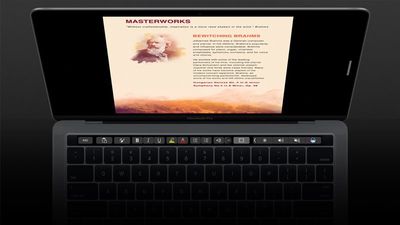
wordtouchbar
In PowerPoint, the Touch Bar makes it easier to manipulate graphic elements. A Reorder Objects button creates a graphical map of all the layers, so users can quickly find an object and move its position. There are also special controls that are available in Slideshow View.
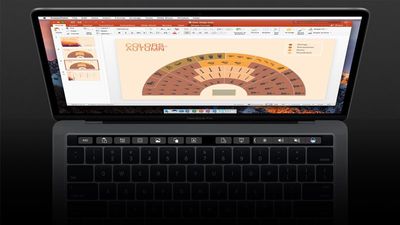
powerpointtouchbar
With Excel, the Touch Bar displays the most recently used functions when the equals sign is typed into a cell, so it's quicker to do things like sum a range of numbers. The Touch Bar also provides access to borders, cell colors, and recommended charts.
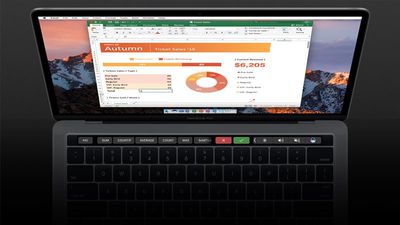
exceltouchbar
Microsoft has also added new capabilities to the Touch Bar during its testing period. The Touch Bar can also be used to insert comments, photos, and hyperlinks into Word, it includes view-specific controls in PowerPoint, and there's an object rotation slider for Word, Excel, and PowerPoint.

Last week, Microsoft previewed Touch Bar support, providing it to its "Office Insider" beta testers, but now the service is ready to roll out to all Office users.

Touch Bar support is currently only available for Word, Excel, and PowerPoint, but Microsoft also plans expand it to Outlook and Skype for Business in the near future.

Top Rated Comments

Mascots Avatar
127 months ago
I'm probably one of the few people thrilled to have contextual controls brought to the Mac's hardware.

Score: 7 Votes (Like | Disagree)
127 months ago
It's good to see a major developer support Touch Bar.
Score: 4 Votes (Like | Disagree)
127 months ago
Really, office 355? :)
Mac version, the missing 10 represents the difference in features that MS gives Windows and not us ;) :D
Score: 3 Votes (Like | Disagree)
127 months ago
I'm probably one of the few people thrilled to have contextual controls brought to the Mac's hardware.

I love the touchbar. Some applications are so so in their use, but others Make the user experience incredible.

I usually get chastised on here when I say that. Will wait a year till everyone catches up to realising how good it really is.
[doublepost=1487278792][/doublepost]
Glad to hear people are finding the Touch Bar implementations are useful. I have Office 365, now I'm just waiting on the 2017 MBP to be released! (really hoping they can cram in a larger battery this year, otherwise I'll keep my 2014 which is still going strong)
Tall guy the 2016 MacBook Pro is awesome !
Score: 2 Votes (Like | Disagree)
MartiNZ Avatar
127 months ago
Wow really good to see MS doing this, would never before have described them as quick with the Mac office products.
Score: 2 Votes (Like | Disagree)
127 months ago
umm.. nothing. Really, nothing. Please send a screen grab if you are getting something! I may just reinstall the entire suite, then.
On my Touch Bar Mac with yesterdays update installed, when I click on either the To or CC field (and only these two fields) the Touch Bar shows the emoji icon directly to the right of the Esc. Then on the far right of the Touch Bar next to the Screen Brightness is the <keyboard that does the word fill in. Both of these are totally useless in those two fields since you only are going to be entering an email address or part of a name to before clicking on the Check Names toolbar icon. The Subject field loses the emoji icon, keeps the <keyboard and in the message body the Touch Bar is empty other than Esc and Screen Brightness, Volume and Siri. Outlook is the application I use the most in Office so I'm looking forward to a future update so it matches Apple Mail & Calendar.
Score: 1 Votes (Like | Disagree)

Popular Stories

surface laptop ultra

Microsoft Launches $2,599 Surface Laptop Ultra to Take on MacBook Pro

Wednesday October 7, 2026 5:45 pm PDT by
Microsoft today announced launch timing and pricing for the Surface Laptop Ultra that it unveiled earlier this year. The 15-inch Surface Laptop Ultra is priced starting at $2,599, undercutting Apple's $2,999 16-inch MacBook Pro, and it targets the same creator and developer market. Microsoft says it is built for "demanding creative, software development, AI, engineering, and 3D workloads." ...
Black Apple Event Logo

Russia Places Apple on State Surveillance Registry

Friday October 30, 2026 7:58 am PDT by
Apple faces Russian data retention and disclosure requirements after being added to the country's state surveillance registry, Bloomberg reports. Russia's communications regulator, Roskomnadzor, listed Apple and Microsoft on October 2 as "organizers of information dissemination," a classification that carries obligations to preserve communications and make data available to Russian security...
Apple MacBook Pro with PROLED XDR Display family lineup feature

Apple Announces OLED MacBook Pro With Touch Display

Wednesday October 28, 2026 10:11 am PDT by
Apple today announced a new high-end MacBook Pro, which is available in 14-inch and 16-inch sizes. The new device has a PROLED XDR display that supports touch gestures, and a glowing rear Apple logo. Pricing on the MacBook Pro starts at $2,899 for the 14-inch model and $3,399 for the 16-inch model. Apple says the MacBook Pro has the "world's best display in a pro laptop." The PROLED...
Latest Stories
Apple Watch Ultra 4 Hits All-Time Low Price With Amazon's $99 Discount
4 hours ago
Reminder: Apple's Big Discount on Beats 360 Ear Cushions Ends Today
4 hours ago
Here's a New Tour of Apple's HomeView Software
4 hours ago
Apple Reveals New iPad Mini's Battery Capacity
6 hours ago
Top Stories: Apple's Big MacBook Pro, iPad mini and iMac Updates
7 hours ago
'Pluribus' Season 2 Reportedly Starts Production Today
13 hours ago
iPhone 18 Pro Sales Surge in China, Offsetting Decline in U.S. and Japan
14 hours ago
HomeView Software 27.2: Wallpapers, Control Center, and More
21 hours ago
Apple Alerts Stores to iPhone Duo's Display Cracking Issue
22 hours ago
iOS 27.3 Will Enable These Apple Intelligence Features in China
22 hours ago
Apple Says iOS 27.3 Beta Coming Next Week
22 hours ago
Apple's Flash Storage Suppliers Are Finally 'Getting Their Revenge'
1 day ago
14 New Things Your iPhone Can Do in iOS 27.2
1 day ago
iPhone Duo Review: One Week Later
1 day ago
Samsung Mocks iPhone Duo Display Cracks in New Ad Campaign
1 day ago
The MacRumors Show: OLED MacBook Pro, iPad Mini 8, and More
1 day ago
MacBook Pro With Touch Display: 15 More Details Revealed
1 day ago
Russia Places Apple on State Surveillance Registry
1 day ago
Halloween Weekend Brings Discounts on Apple Accessories and Pre-Orders
1 day ago
Apple Has Released More Than 25 New Products in the Past Two Months
1 day ago
Local Code Launches as Free, Private AI Assistant Tool for Mac
1 day ago
Apple Acquires Ascend.io
1 day ago
HomePod Mini 2 Launches Today: All the New Features
1 day ago
AirTag 2 4-Pack Drops to New Low Price of $69.99
1 day ago
Rian Johnson's iPhone Camera App Goes Viral
1 day ago
Where Did All the iPhone Duos Go? Mostly to Apple's Stores
1 day ago
Apple's Touchscreen MacBook Pro Could Ship 1.5M Units in 2027
1 day ago
New Apple TV 4K and iPad Mini: RAM Amounts Revealed
2 days ago
Apple Executive Comments on New iPad Mini Lacking 120Hz Display
2 days ago
Here's a Hands-On Look at HomePod Mini 2's New Two-Tone Colors
2 days ago

🔗 Related Apple News & Rumors

Stay updated with the latest Apple ecosystem news and verified rumors









































