

Banktivity 6 for Mac Adds Workspace, Tags, Quick Reports, and More - MacRumorsOpen MenuShow RoundupsShow Forums menuVisit ForumsOpen Sidebar
Skip to Content

Banktivity 6 for Mac Adds Workspace, Tags, Quick Reports, and More

by

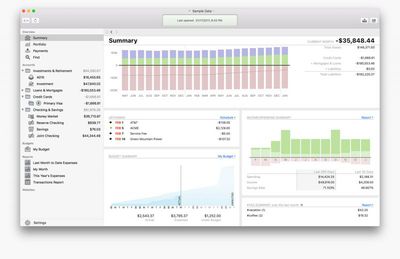
IGG Software today announced the upcoming launch of Banktivity 6, the latest version of the popular personal finance app for Mac. The software, previously known as iBank, has been redesigned for macOS Sierra and updated with several new features, including Workspace, Tags, Quick Reports, Find, and more.
banktivity-6
Banktivity 6 introduces Workspace, a new feature that enables customers to view any account, budget, report, or other view side by side. "For example, users can put transactions for an account next to a budget to see how recent spending affects the budget," the company said.

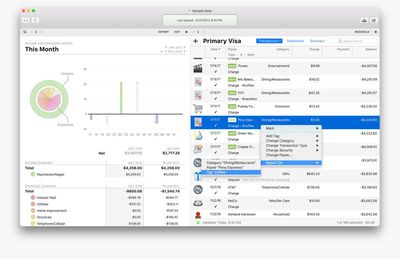
Tags have also been added, allowing individuals and small business owners to see and analyze their income and spending habits across categories. "Now when a person goes on vacation and spends money on dining out, gas, air fare and hotels they can tag all those transactions as a 'vacation,'" said IGG.

A new Quick Reports feature lets users select transactions and then quickly bring up a detailed report based on the selection. "For example, if a customer were wondering how much money was donated to a specific charity last year, a Quick Report answers that question with one click," the company said.
banktivity-6-duo
Find is a new document-wide search feature that enables customers to search "almost any part of any transaction" within an entire Banktivity document.

The app's sidebar has a new feature called Portfolio that provides quick access to the performance of investments. Portfolio's customizable view shows high-level information such as cost basis, value, gain/loss, security price, and IRR, and clicking on a security brings up a complete analysis of that holding.

Banktivity 6 features over 100 changes and enhancements, including more flexible report grouping, new transaction editor with improved keyboard support, new reconciliation process, a new summary view, improved transaction downloads, more flexible budgeting, easier in-app navigation, redesigned reports, and more.

IGG said Banktivity 6 will be released in the Spring for $64.99. Users upgrading from Banktivity 5 will qualify for upgrade pricing of $29.99. Customers who purchased Banktivity 5 from the IGG Store between January 23 and Banktivity 6's launch will receive a free registration code to unlock the new version.
banktivity-iphone-ipad
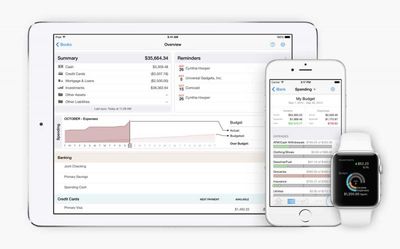
The app will sync with Banktivity for iPhone ($9.99) and Banktivity for iPad ($19.99).

Top Rated Comments

urnotl33t Avatar
127 months ago
Thanks for the description. In you opinion, what makes this better than Mint? I ask because Mint is free and this has a cost associated with it. Therefore, I would expect some extra features that make the price of admission worth while. Thanks for any insight you can provide.
My wife can have the iOS app on her iPhone (I just login with my IGG account and tell it to pull that data file for sync), and she has all the same stuff. I do the free-sync-method rather than Direct Access. When they did the name change and major app update (wonderful improvements!) the app now auto-syncs when it opens, so all she has to do is just open it now. If she makes a change, it auto-syncs again.

Honestly, I haven't used Mint in ages... I never liked their way of inspecting my info just to show me an ad or credit card referral. Long ago, the web app was unstable and took forever to update when I logged in. If they have an iOS app now, I don't know about it, because it's been *that long* since I used it. :)

For Banktivity, I like the "double-entry accounting" method they use: A charge on Account A is recorded as an expense to the Expense Account B:

01/26 Starbucks withdrawal $6.52 [a made-up number]
Expenses - Coffee
memo: muffin and tall coffee

Loans and credit cards are listed as such (the liabilities they are) and payments are recorded as transfers:

In the checking account:
01/26 Chase Card payment transfer -$100
[to:] Chase Card 1234

In the Chase card account I then see:
01/26 Chase Card payment transfer +$100
[from:] My Checking Account

Modifying that value affects the same on the other account because they are linked entries. It can also auto-calculate and keep up with installment loans like car payments (principle and interest) and even mortgage payments with combination of escrow, taxes, principle, interest, and your optional surplus payments.


They do have a 30-day free trial you can use. The article should have mentioned that. Go to their web site and just download the app. It's fully-functional for 30 days. Then you buy and enter a license key to keep going. Sadly, I don't think the iOS app has any similar free trial feature, tho. :( So you can't play with the sync service.

[no i don't work for them; i just like the product]
Score: 2 Votes (Like | Disagree)
urnotl33t Avatar
127 months ago
Is this a pseudo-self hosted alternative to Mint? Are bank transactions downloaded locally or do they go through an intermediate processor like what happens with Mint? (I hope to understand both technologies, so correct me if I'm wrong on either)
Yep, you can configure the app to pull from your financial institutions via OFX. Everything comes to your Mac directly. You can then sync that to their own custom sync service to get the info to the iOS app, but that isn't via iCloud or anything. They rolled their own sync, which works very very well. In this case, your Mac app is the main head end of everything; you have to download transactions from all of your institutions, you generally want to review it for any edits or tweaks you want to make (renaming the transaction, most often), or adding memo lines, then issue a sync to their end. Then, open the iOS app, pull the sync data and it's there. You can make changes on the iOS app as you wish, and it will re-sync back to their end, but you'll have to open the Mac app again to get the changes. Regardless, the data always ends up residing on your devices locally (kinda like Dropbox behavior, rather than iCloud behavior). In this scenario, the iOS app can't get new transaction data directly; iOS apps are only fed info from the Mac app. This sync service is free to you. The data is still encrypted by the devices before the sync is sent.


Alternatively, they do offer an optional "Direct Access" service where *everything* resides on their end, including transactions. In this case, the iOS apps *can* get new/updated transaction data directly, as would the Mac app. But you don't have to sync between the two inherently. This is more of the iCloud behavior rather than the Dropbox behavior. The Direct Access service is a subscription you pay to IGG to run all that.

No, they don't have any "web front end" service (and I consider that a feature, not a bug).

They have a ton of institutions they can work with, but if yours isn't on the list, you can always do a manual download-OFX-from-the-bank and import the file.
Score: 2 Votes (Like | Disagree)
Kaibelf Avatar
127 months ago
Looks interesting. Does anyone know how suitable this app is for tracking investments, etc., or is it really just for personal budgeting and the like?
I was curious about this too so looked it up. From what I understand it has some interesting investment tracking functionality, based on the description from the last version:

Investments

* Investment types: Track stocks, bonds, mutual funds, ETFs, CDs, money market funds, precious metals, commodities, and stock options with ease. You can also enter watchlist items and indices for quick reference.
* Quote downloading: Automatically retrieve up-to-date quotes from Yahoo! Finance at the click of a button. International exchanges are supported too.
* Security management: Check the current market value and price history for each of your securities at a glance, adjust security names and ticker symbols, and check the performance of indices.
* Investment reports: Easily generate reports to analyze your capital gains (realized and unrealized), security income, portfolio diversity, and return on investment (ROI). Check the current market value of your portfolio and drill down into any security to view details of your investment activity over time.
* Expert trading: Banktivity 5 now lets you categorize investment transactions. Banktivity also supports short and long puts and calls, stock option trading, bonds and more.

I'm curious if there are any users in the house who can speak to how well it works?
Score: 2 Votes (Like | Disagree)
123 months ago
I've been using it since April with no problems.
Thanks. I ended up downloading B6. Nice that I can run it parallel to B5 until I am comfortable switching. Spent a couple of hours checking out B6, all good so far.
Score: 1 Votes (Like | Disagree)
Weaselboy Avatar
123 months ago
Is B6 stable? I see it is now offered on the Canadian Mac App Store, but no reviews posted there. Thanks.
I've been using it since April with no problems.
Score: 1 Votes (Like | Disagree)
127 months ago
Maybe my accounting needs are simple.
After Quicken gave up I tried several others, money dance, mint, quickbooks and some open source stuff.

Using it since iBank 4 and I keep posting that the UI is somewhat non Mac intuitive and too many clicks needed for a Mac program. They claim they run their entire company finances with their own program, makes me wonder.

Once one learns the program, it's keyboard short cuts and workarounds for what is annoying it is very good, not excellent!
They wrestle with screen resolutions (No pinch and zoom, so I have to switch my display resolution)
I manually download my bank info, as I try not to pay for anything per month. Works just fine, but needs to be hand refined.
Mint is free, but inflexible and I believe it can't be free forever, plus advertising is a no go.
Don't really care who has my info, but I prefer it on my computer.

As for customer service they run hot and cold.
If you are suggesting changes for the better they send you to a requested features list, which doesn't solve your problem.
I once had a corrupted database and somebody worked with me tirelessly over a week to fix it.

Since everybody has different accounting needs it is unfair to criticize it for what it cannot do.

From what I see, I don't need any of the new features, but if some annoyances are gone in version 6
I will upgrade. It already has a lot of bells and whistles I don't use right now.

Maybe my problem is that I don't have enough money to require a super financial program.

BTW: There is a guy on Amazon who wrote the best neutral review about the original app.
Score: 1 Votes (Like | Disagree)

Popular Stories

Apple MacBook Pro with PROLED XDR Display family lineup feature

Apple Announces OLED MacBook Pro With Touch Display

Wednesday October 28, 2026 10:11 am PDT by
Apple today announced a new high-end MacBook Pro, which is available in 14-inch and 16-inch sizes. The new device has a PROLED XDR display that supports touch gestures, and a glowing rear Apple logo. Pricing on the MacBook Pro starts at $2,899 for the 14-inch model and $3,399 for the 16-inch model. Apple says the MacBook Pro has the "world's best display in a pro laptop." The PROLED...
iPhone Duo Display Cracking

Apple Alerts Stores to iPhone Duo's Display Cracking Issue

Friday October 30, 2026 3:20 pm PDT by
In a memo shared with Apple Stores and Apple Authorized Service Providers this week, and later obtained by MacRumors, Apple provided technicians with guidance on how to diagnose and address the iPhone Duo's inner display cracking issue. If a customer reports the issue, Apple advised technicians to inspect the iPhone Duo and repair or replace it in accordance with their standard procedures....
iPad mini OLED feature 1

Apple Executive Comments on New iPad Mini Lacking 120Hz Display

Thursday October 29, 2026 1:47 pm PDT by
While the new iPad mini has an OLED display, the device does not support ProMotion, meaning the display's refresh rate is limited to 60Hz instead of 120Hz. ProMotion support would have allowed for the iPad mini's refresh rate to automatically adjust from 10Hz to 120Hz depending on the content being displayed, but evidently Apple has kept the feature exclusive to the iPad Pro among iPad...
Latest Stories
Apple Watch Ultra 4 Hits All-Time Low Price With Amazon's $99 Discount
4 hours ago
Reminder: Apple's Big Discount on Beats 360 Ear Cushions Ends Today
4 hours ago
Here's a New Tour of Apple's HomeView Software
4 hours ago
Apple Reveals New iPad Mini's Battery Capacity
6 hours ago
Top Stories: Apple's Big MacBook Pro, iPad mini and iMac Updates
7 hours ago
'Pluribus' Season 2 Reportedly Starts Production Today
14 hours ago
iPhone 18 Pro Sales Surge in China, Offsetting Decline in U.S. and Japan
14 hours ago
HomeView Software 27.2: Wallpapers, Control Center, and More
21 hours ago
Apple Alerts Stores to iPhone Duo's Display Cracking Issue
22 hours ago
iOS 27.3 Will Enable These Apple Intelligence Features in China
22 hours ago
Apple Says iOS 27.3 Beta Coming Next Week
22 hours ago
Apple's Flash Storage Suppliers Are Finally 'Getting Their Revenge'
1 day ago
14 New Things Your iPhone Can Do in iOS 27.2
1 day ago
iPhone Duo Review: One Week Later
1 day ago
Samsung Mocks iPhone Duo Display Cracks in New Ad Campaign
1 day ago
The MacRumors Show: OLED MacBook Pro, iPad Mini 8, and More
1 day ago
MacBook Pro With Touch Display: 15 More Details Revealed
1 day ago
Russia Places Apple on State Surveillance Registry
1 day ago
Halloween Weekend Brings Discounts on Apple Accessories and Pre-Orders
1 day ago
Apple Has Released More Than 25 New Products in the Past Two Months
1 day ago
Local Code Launches as Free, Private AI Assistant Tool for Mac
1 day ago
Apple Acquires Ascend.io
1 day ago
HomePod Mini 2 Launches Today: All the New Features
1 day ago
AirTag 2 4-Pack Drops to New Low Price of $69.99
1 day ago
Rian Johnson's iPhone Camera App Goes Viral
1 day ago
Where Did All the iPhone Duos Go? Mostly to Apple's Stores
1 day ago
Apple's Touchscreen MacBook Pro Could Ship 1.5M Units in 2027
1 day ago
New Apple TV 4K and iPad Mini: RAM Amounts Revealed
2 days ago
Apple Executive Comments on New iPad Mini Lacking 120Hz Display
2 days ago
Here's a Hands-On Look at HomePod Mini 2's New Two-Tone Colors
2 days ago

🔗 Related Apple News & Rumors

Stay updated with the latest Apple ecosystem news and verified rumors











































