

Apple Warns You When Your Display is Using Significant Energy in Latest macOS Beta

Apple advertises that the latest MacBook Pro models provide up to 10 hours of battery life on a single charge for web browsing and iTunes movie playback, but a user's mileage may vary based upon factors such as display brightness, which apps are running, and external devices connected.

For this reason, Apple lists apps using a significant amount of energy under the battery menu in the macOS menu bar. The feature enables users to monitor which apps are drawing a lot of power and impacting battery life, whether it be the built-in Spotlight tool or a power-hungry web browser with several tabs open.
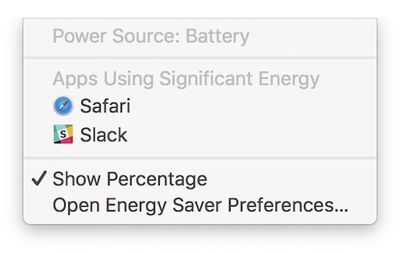
mac-apps-using-significant-energy
Now, Apple has gone one step further and expanded the feature to include display brightness. On the latest macOS Sierra beta, when a Mac's display is set above 75% brightness—or at least 13 out of 16 notches—a new item called "Display Brightness" is listed under the battery menu.

Clicking on "Display Brightness" lowers the Mac's brightness to 75%. Likewise, when we updated a new MacBook Pro to the fourth beta of macOS Sierra 10.12.3, the display's brightness was automatically lowered to 75%. This is the same brightness level as Apple used during its latest MacBook Pro battery tests.
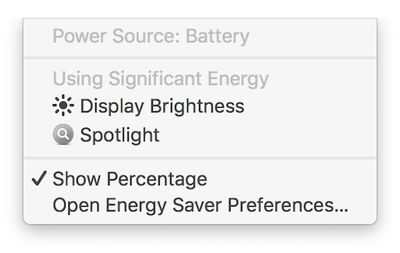
mac-significant-energy-display-brightness

New: "Display Brightness" is now listed and "Apps" has been dropped from the title

Battery life on the latest MacBook Pro models has been a controversial topic since the notebooks launched in October. A subset of users have reported getting as little as three to six hours of battery life on a single charge, sometimes even with only basic web browsing and other non-intensive tasks.

Apple has consistently stood by its advertised battery life for the latest MacBook Pro. It did, however, remove the "time remaining" battery life indicator on macOS Sierra 10.12.2, noting the estimates "couldn't accurately keep up with what users were doing" because of the "dynamic ways" people use their Macs.

Consumer Reports initially failed to recommend the latest MacBook Pro because of battery life inconsistencies, but it later worked with Apple and learned that a Safari bug triggered by its own testing configuration was to blame for the mixed results. Apple fixed that bug in macOS 10.12.3, and Consumer Reports has since reversed course and now recommends the latest MacBook Pro after retesting.

The new feature is currently limited to beta testers. It will be widely available when macOS 10.12.3 is officially released over the coming days.


Related Roundup: MacBook Pro
Buyer's Guide: MacBook Pro (Caution)
Related Forums: MacBook Pro, macOS Sierra

Popular Stories

Aston Martin CarPlay Ultra Screen

Apple's CarPlay Ultra to Expand to These Vehicle Brands Later This Year

Sunday February 1, 2026 10:08 am PST by
Last year, Apple launched CarPlay Ultra, the long-awaited next-generation version of its CarPlay software system for vehicles. Nearly nine months later, CarPlay Ultra is still limited to Aston Martin's latest luxury vehicles, but that should change fairly soon. In May 2025, Apple said many other vehicle brands planned to offer CarPlay Ultra, including Hyundai, Kia, and Genesis. In his Powe...
Apple Logo Black

Apple's Next Launch is 'Imminent'

Sunday February 1, 2026 12:31 pm PST by
The calendar has turned to February, and a new report indicates that Apple's next product launch is "imminent," in the form of new MacBook Pro models. "All signs point to an imminent launch of next-generation MacBook Pros that retain the current form factor but deliver faster chips," Bloomberg's Mark Gurman said on Sunday. "I'm told the new models — code-named J714 and J716 — are slated...
Apple MacBook Pro M4 hero

New MacBook Pros Reportedly Launching Alongside macOS 26.3

Sunday February 1, 2026 5:42 am PST by
Apple is planning to launch new MacBook Pro models with M5 Pro and M5 Max chips alongside macOS 26.3, according to Bloomberg's Mark Gurman. "Apple's faster MacBook Pros are planned for the macOS 26.3 release cycle," wrote Gurman, in his Power On newsletter today. "I'm told the new models — code-named J714 and J716 — are slated for the macOS 26.3 software cycle, which runs from...
iOS 26

iOS 26.3 and iOS 26.4 Will Add These New Features to Your iPhone

Tuesday February 3, 2026 7:47 am PST by
We are still waiting for the iOS 26.3 Release Candidate to come out, so the first iOS 26.4 beta is likely still at least a week or two away. Following beta testing, iOS 26.4 will likely be released to the general public in March or April. Below, we have recapped known or rumored iOS 26.3 and iOS 26.4 features so far. iOS 26.3 iPhone to Android Transfer Tool iOS 26.3 makes it easier...
iOS 26 Home Feature

Apple Gives Final Warning to Home App Users

Tuesday February 3, 2026 8:55 am PST by
In 2022, Apple introduced a new Apple Home architecture that is "more reliable and efficient," and the deadline to upgrade and avoid issues is fast approaching. In an email this week, Apple gave customers a final reminder to upgrade their Home app by February 10, 2026. Apple says users who do not upgrade may experience issues with accessories and automations, or lose access to their smart...

Top Rated Comments

McTaste Avatar
118 months ago
Battery life of ten hours if you cripple performance and dim the screen.

Battery life of three hours under normal usage.
Score: 59 Votes (Like | Disagree)
jerry16 Avatar
118 months ago
Leave the MBP a few mm thicker and battery life wouldn't even be a conversation. Foolish obsession with thin.
Score: 59 Votes (Like | Disagree)
gpat Avatar
118 months ago
It takes a lot of courage to tell me I chose an excessive screen brightness.
Score: 27 Votes (Like | Disagree)
ryanwarsaw Avatar
118 months ago
I will refrain from saying anything. The normal comments should be dumb enough.
Score: 21 Votes (Like | Disagree)
MNWildFan Avatar
118 months ago
Interesting... Now if Apple could bring back the time remaining section back to the battery menu, that would be great. Yes, I know it can be seen in the activity monitor, but it's much more convenient to have it right in the menu bar.
Score: 16 Votes (Like | Disagree)
ArtOfWarfare Avatar
118 months ago
I don't like setting my display to less than 100% bright most of the time. I think most people feel the same way. Using 100% just seems good.

Apple should rename 100% as 130% and scale accordingly. It sends the message that, though your screen can go that bright, you shouldn't set it that bright unless you really need to.
Score: 15 Votes (Like | Disagree)














