

Quicken for Mac 2017 Gains Auto Backup and Other Features in New Update - MacRumorsOpen MenuShow RoundupsShow Forums menuVisit ForumsOpen Sidebar
Skip to Content

Quicken for Mac 2017 Gains Auto Backup and Other Features in New Update

by

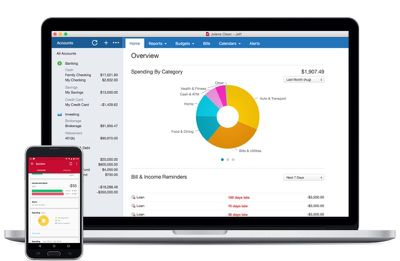
Finance and budgeting software Quicken for Mac was updated to version 4.4 this week, adding a handful of useful new features ranging from auto backup to improvements to summary reports.

With Auto-Backup, Quicken will back up five files at a time to a user-set location whenever someone logs out of the app, preventing data from being accidentally lost. A new Transaction Sidebar indicator has been added, which highlights all accounts that have new transactions when connected accounts are refreshed.
quickenformac2017
Comparison and summary reports can be exported or copied to a spreadsheet for printing or data analysis, and there's a new Total column in the summary report. New report comparison customization options make it easier to compare the current period with previous periods on a quarterly or monthly basis.

First released in October, Quicken 2017 features a new interface, a range of custom report options, and Quicken Bill Pay for paying for bills directly within the app.

Quicken for Mac 2017 can be downloaded from the Quicken website or from the Mac App Store for $74.99. [Direct Link]


Tag: Quicken

Top Rated Comments

veggiespam Avatar
125 months ago
Cool. Quicken added that "five-file-backup" thing like my copy of Quicken '97 currently does. Awesome.
Score: 6 Votes (Like | Disagree)
blue22 Avatar
125 months ago
No thanks Quicken, I'll stick with Banktivity (formerly "iBank"), they've been doing great by me for years.

Sure, it's may not be "perfect" in every way (and what personal finance app truly is?) but unlike with Quicken for the Mac, I can at least trust Banktivity to not ditch the platform for a decade, then come back with some weak-sauce port of their PC version and claim like "all is good for Mac users" while charging a premium for a half-featured product. Sooooo, I'll pass...
Score: 3 Votes (Like | Disagree)
rtrueman Avatar
125 months ago
I stayed on Quicken for Windows for years, running Parallels. I decided to become a beta tester for Quicken 2016 for Mac and really started liking the new product (strictly volunteering my time - there's no compensation for beta testing, although I did "win" a copy of 2016). I can tell you, the (formerly) Intuit Mac team was VERY committed to the product and I started using 2016 Mac as my only version of Quicken. I've no regrets making the switch. Quicken 2017 for Mac is even better and I gladly paid for the upgrade. It may not be for everyone, but they do have a decent return policy that I've used after purchasing a previous version years back.
Score: 3 Votes (Like | Disagree)
3587 Avatar
125 months ago
This or iBank? I'm a pretty big fan of iBank after Quicken deserted us back in the day.
Score: 3 Votes (Like | Disagree)
thisisnotmyname Avatar
125 months ago
Paid posting?
Score: 3 Votes (Like | Disagree)
125 months ago
It's not as bad as you might think. I was able to export as a QIF out of Banktivity, then import that into Quicken. The export and import took minutes to complete.

I then chose to clean up the categories (and switch them over to Quicken's default categories), but that's optional. That's the only part that took quite a while, but that's also because the person that I was helping was lousy at categorizing stuff (and iBank/Banktivity didn't help in the least... it screwed up payee names and assigned stupid categories all over the place.)
I couldn't agree more. I tried Banktivity for 1.5 years. It just never worked right. I spent more time fighting it than using it, and their customer service was... well, lets just say they just were not a viable option. I switched to Quicken 17 a few months back -- it took all of 10 minutes to x-fer all info -- and it has been one of the best decisions. It is SOOOO much better to the point that I'm embarrassed I didn't do this sooner. I too, decided to clean up all the weird categories Banktivity generated (as previous poster noted, this is optional... for the "clean data" freaks out there like me). Took some time, but now all my reports and data from Quicken is clean, concise, and accurate. I can account for every penny that moves anywhere.
Score: 2 Votes (Like | Disagree)

Popular Stories

Apple Event Logo

Apple Working on All-New Operating System

Wednesday July 29, 2026 11:39 am PDT by
Apple is developing an all-new operating system that is essentially a mix of tvOS, watchOS, and iOS, according to Bloomberg's Mark Gurman. In a report this week, he said the operating system will feature a grid of icons, widgets, and apps, along with customizable clock faces. The new software platform is intended for Apple's long-rumored smart home hub. With built-in facial recognition,...
Four iPhone 18 Pro Colors Mock Feature

iPhone 18 Pro and iPhone Ultra: Pre-Orders and Release Date

Thursday July 30, 2026 6:12 am PDT by
Apple has yet to reveal when the iPhone 18 Pro and iPhone Ultra will be announced and released, but the dates usually follow a familiar pattern. Labor Day is September 7 this year. The last time the holiday fell on that day was in 2020, but the iPhone event that year was delayed until October due to the COVID-19 pandemic. So, the last time Labor Day was on September 7 in a normal year was in ...
Dynamic Island iPhone 18 Pro Feature

iPhone 18 Pro: Twelve Changes Coming to Apple's Next Flagship

Thursday July 30, 2026 3:43 am PDT by
We're less than two months out from the launch of Apple's premium next-generation smartphone lineup, and while we're not expecting a dramatic change in terms of functionality, there are still several enhancements rumored to be coming to the iPhone 18 Pro and iPhone 18 Pro Max. One thing worth noting is that Apple is reportedly planning a major change to its iPhone release cycle this year,...

🔗 Related Apple News & Rumors

Stay updated with the latest Apple ecosystem news and verified rumors












































