

Apple Addresses iCloud Calendar Spam With New 'Report Junk' Option - MacRumorsOpen MenuShow RoundupsShow Forums menuVisit ForumsOpen Sidebar
Skip to Content

Apple Addresses iCloud Calendar Spam With New 'Report Junk' Option

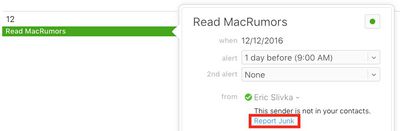
Apple has added a "Report Junk" option to iCloud.com to help combat a recent increase in calendar spam, as noticed by a Reddit user over the weekend.

Now, when an iCloud user receives an unsolicited calendar invite from a sender who is not a contact, the event can be double clicked on and reported as junk.
icloud-calendar-spam-report-junk
Clicking on "Report Junk" opens a window confirming the invitation has been reported as junk. Junk invitations are automatically deleted from the calendar, and the sender's details are presumably reported to Apple for further investigation. There is also a "Not Junk" option if users make a mistake.

The option is currently only available on iCloud.com, but a Reddit user claims an Apple Support representative informed him it will be rolling out to the Calendar app on iOS, and presumably Mac, soon—which would make sense.

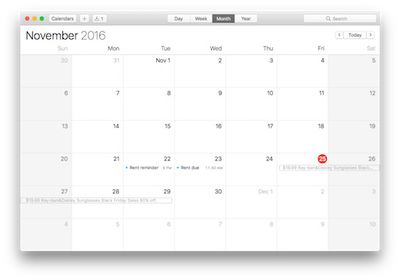
iCloud calendar spam is nothing new, but there was a major uptick in spam leading up to the Black Friday shopping holiday in November. The spam invites appear to originate mainly from Chinese email addresses, advertising questionable discounts on products such as Ray-Ban and Oakley sunglasses.
icloud-calendar-spam-joe
Late last month, an Apple spokesperson apologized and said the company is working to block spam calendar invites.

We are sorry that some of our users are receiving spam calendar invitations. We are actively working to address this issue by identifying and blocking suspicious senders and spam in the invites being sent.

iCloud users should not click on Accept, Decline, or Maybe if they receive a spam calendar invite, as choosing any of these options simply notifies the spammer that the account is active and ready for more unsolicited offers.

Instead, there are two workarounds. First, users can navigate to the iCloud.com settings and choose to receive all event invitations as email. Second, users can create a new calendar, name it Spam, move the spam invitation to the Spam calendar, and then delete the calendar entirely. Follow these step-by-step instructions.


Tag: iCloud

Popular Stories

iCloud General Feature Redux

Apple Raises iCloud+ Prices in 8 Countries

Friday July 17, 2026 11:56 am PDT by
Apple has increased the price of iCloud+ in Nigeria, Türkiye, Vietnam, Japan, Egypt, New Zealand, the Philippines, and Indonesia, according to an updated version of its iCloud support document. Price increases range from 11 percent to 55 percent depending on the plan and the country. Nigeria saw the biggest hike, and a 50GB plan is now ₦1,300, up from ₦900. Türkiye saw the next largest...
General iCloud App Feature

Apple Plans Paid iCloud+ Upgrades for Heavy AI Users

Thursday July 30, 2026 4:11 pm PDT by
Apple is planning to let users pay to increase their AI limits, with upgrade possibilities available through iCloud+. During today's earnings call for the third fiscal quarter of 2026, Apple CEO Tim Cook said it's early, but the company expects to offer options for people who want to make heavy use of AI services. In terms of what it means for compute cost, it's obviously early going for...


Apple Event Logo

Apple Working on All-New Operating System

Wednesday July 29, 2026 11:39 am PDT by
Apple is developing an all-new operating system that is essentially a mix of tvOS, watchOS, and iOS, according to Bloomberg's Mark Gurman. In a report this week, he said the operating system will feature a grid of icons, widgets, and apps, along with customizable clock faces. The new software platform is intended for Apple's long-rumored smart home hub. With built-in facial recognition,...

Top Rated Comments

larrytang Avatar
126 months ago
Still a work around. My poor mom in China called me many times to ask me how to block these spams popping up everyday. I don't think reporting them one by one is a good solution. Maybe add an option "Only allow invitations from contacts"?
Score: 7 Votes (Like | Disagree)
Analog Kid Avatar
126 months ago
What's standing in the way of the obvious, simple fix: delete the event without notifying the sender?

I also need that capability for things that aren't junk...
Score: 6 Votes (Like | Disagree)
126 months ago
Glad to see things are moving quickly in Cupertino on such an annoying issue!


Not fixes, work arounds.
And only one at that, some iOS users have only an iPhone, so going to iCloud.com isn't really an option.
Score: 3 Votes (Like | Disagree)
jerry16 Avatar
126 months ago
Glad to see things are moving quickly in Cupertino on such an annoying issue!

Instead, there are two fixes ('https://www.macrumors.com/2016/11/28/delete-icloud-calendar-spam/').
Not fixes, work arounds.
Score: 3 Votes (Like | Disagree)
keithjfuller Avatar
126 months ago
the easiest way to address it is to not use that garbage software. use google calendars which works across every platform.
Score: 2 Votes (Like | Disagree)
126 months ago
I don't get this statement. Having only an iPhone and going to a webpage not possible?
You have a web browser on your phone...
icloud.com doesn't really work well in iPhone browsers. Go figure.
[doublepost=1481553534][/doublepost]
How did busy people manage their time 8 years ago pre iPhone ?
Is that kind of like how people watched small black and white TV sets without a remote control?
Score: 2 Votes (Like | Disagree)

🔗 Related Apple News & Rumors

Stay updated with the latest Apple ecosystem news and verified rumors









































