

Adobe Updates Lightroom for iPhone With One-Handed Editing Interface - MacRumorsOpen MenuShow RoundupsShow Forums menuVisit ForumsOpen Sidebar
Skip to Content

Adobe Updates Lightroom for iPhone With One-Handed Editing Interface

by

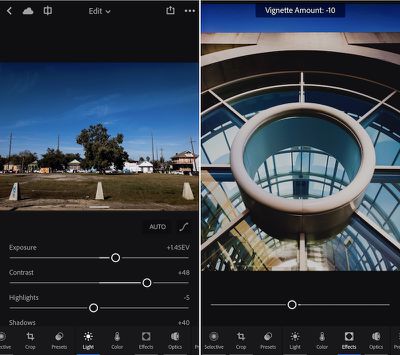
Adobe today announced a new update out now for its Lightroom iOS and Android apps, bringing an all-new photo editing experience to mobile that improves the app's ease of use thanks to a new one-handed interface. To create an improved editing experience Adobe talked to professional and casual photographers, who helped hone Lightroom's new toolset.

First, the company has organized similar tools into relevant categories so it's faster and easier to find tools that are normally used together. The company's biggest priority was to introduce a system that was functional to operate with just one hand. As such, users can now see the entire image while editing it and have access to "often used tools," such as viewing before and after iterations of a photo, without needing a second hand.
lightroom-ios-update

Lightroom mobile 2.6 represents a significant evolution of editing on mobile devices. We wanted to improve the ability to quickly find and access tools and ensure the fastest way to enhance and edit images on a phone. Our design team reached out to photographers of all skill levels to help us figure out how people edit with Lightroom mobile, what’s missing, and how we could make it even better. This update represents our first release taking advantage of this research.

Lightroom for iPhone is also gaining a new info section so users can add in titles, captions, and copyright onto an image. A "professional mode" within the app's capture interface will let users set more granular controls over an image's exposure and focus so it's easier "to capture the shot you want." Lightroom for iPad is getting all of the iPhone app's updates except the new editing and info sections, but the company hopes to update the tablet app with these features "soon."

On the Mac, Lightroom is gaining a "reference view" in the Develop Module that makes it simpler to compare two images side-by-side so you can make them visually consistent with one another. The company said this should help when trying to make a large amount of images from a single event aesthetically similar, or could help with "setting the white balance appropriately in mixed lighting conditions."

Adobe Photoshop Lightroom for iPhone is available to download from the iOS App Store for free [Direct Link]. Users can find the update for Lightroom on the Mac in the Help > Updates section of Adobe's Creative Cloud app.


Top Rated Comments

dannys1 Avatar
129 months ago
I was thinking iPhone only. I could imagine a 12.9" iPad Pro w/ Pencil and a keyboard would be perfectly competent at basic review & deletion of photos on the train / plane home from an on-location shoot. Eventually, pros will have to use LR + PS for Mac.

On an iPhone, I still don't see a use case.
i guess not, but you know if they didn't do an iPhone app, everyone would ask for one.
Score: 1 Votes (Like | Disagree)
129 months ago
It's the world we live in now but I edit thousands of photos a year in Lightroom on my iMac and MacBook Pro opting to buy a license for Lightroom instead of a recurring monthly fee to Adobe which means Lightroom Mobile is basically useless as I miss out on photo sync features only available to Creative Cloud members....

and I had to read through 4 paragraphs about iOS improvements and only one about Mac improvements.

How many Lightroom customers actually have iOS as a part of their workflow? Case in point, I have a 256GB iPhone 7 w/ iCloud Photo Library turned on. I export all of my Canon RAW images from the 5DMIII from my Lightroom library to full-size JPEG and upload to iCloud on my Mac (I have the 1TB iCloud plan).

Loading photos on iOS or within Lightroom or Instagram takes 30 seconds just to bring up the photos viewer. To actually retrieve the JPEG to edit / post it takes another 90 seconds on my WiFi connection. I'm a casual amateur photographer. Guys shooting thousands of wedding images, are they even installing Lightroom Mobile? The phone is not powerful enough for a professional's workflow yet.
Score: 1 Votes (Like | Disagree)
Scottsoapbox Avatar
129 months ago
Arg. It's still syncing on LTE - what does the 'Sync only over WiFi' toggle actually do Adobe?! :mad::mad::mad:

Something just lost data privileges in Apple Settings.
Score: 1 Votes (Like | Disagree)
129 months ago
Can you geotag photos with this app or do I need to keep using the Desktop app?
No way to update location from the mobile app.

Score: 1 Votes (Like | Disagree)

Popular Stories

Apple MacBook Pro with PROLED XDR Display family lineup feature

Apple Announces OLED MacBook Pro With Touch Display

Wednesday October 28, 2026 10:11 am PDT by
Apple today announced a new high-end MacBook Pro, which is available in 14-inch and 16-inch sizes. The new device has a PROLED XDR display that supports touch gestures, and a glowing rear Apple logo. Pricing on the MacBook Pro starts at $2,899 for the 14-inch model and $3,399 for the 16-inch model. Apple says the MacBook Pro has the "world's best display in a pro laptop." The PROLED...

iPhone Duo Display Cracking

Apple Alerts Stores to iPhone Duo's Display Cracking Issue

Friday October 30, 2026 3:20 pm PDT by
In a memo shared with Apple Stores and Apple Authorized Service Providers this week, and later obtained by MacRumors, Apple provided technicians with guidance on how to diagnose and address the iPhone Duo's inner display cracking issue. If a customer reports the issue, Apple advised technicians to inspect the iPhone Duo and repair or replace it in accordance with their standard procedures....
iPad mini OLED feature 1

Apple Executive Comments on New iPad Mini Lacking 120Hz Display

Thursday October 29, 2026 1:47 pm PDT by
While the new iPad mini has an OLED display, the device does not support ProMotion, meaning the display's refresh rate is limited to 60Hz instead of 120Hz. ProMotion support would have allowed for the iPad mini's refresh rate to automatically adjust from 10Hz to 120Hz depending on the content being displayed, but evidently Apple has kept the feature exclusive to the iPad Pro among iPad...
Latest Stories
Apple Watch Ultra 4 Hits All-Time Low Price With Amazon's $99 Discount
4 hours ago
Reminder: Apple's Big Discount on Beats 360 Ear Cushions Ends Today
4 hours ago
Here's a New Tour of Apple's HomeView Software
5 hours ago
Apple Reveals New iPad Mini's Battery Capacity
6 hours ago
Top Stories: Apple's Big MacBook Pro, iPad mini and iMac Updates
7 hours ago
'Pluribus' Season 2 Reportedly Starts Production Today
14 hours ago
iPhone 18 Pro Sales Surge in China, Offsetting Decline in U.S. and Japan
14 hours ago
HomeView Software 27.2: Wallpapers, Control Center, and More
21 hours ago
Apple Alerts Stores to iPhone Duo's Display Cracking Issue
22 hours ago
iOS 27.3 Will Enable These Apple Intelligence Features in China
23 hours ago
Apple Says iOS 27.3 Beta Coming Next Week
23 hours ago
Apple's Flash Storage Suppliers Are Finally 'Getting Their Revenge'
1 day ago
14 New Things Your iPhone Can Do in iOS 27.2
1 day ago
iPhone Duo Review: One Week Later
1 day ago
Samsung Mocks iPhone Duo Display Cracks in New Ad Campaign
1 day ago
The MacRumors Show: OLED MacBook Pro, iPad Mini 8, and More
1 day ago
MacBook Pro With Touch Display: 15 More Details Revealed
1 day ago
Russia Places Apple on State Surveillance Registry
1 day ago
Halloween Weekend Brings Discounts on Apple Accessories and Pre-Orders
1 day ago
Apple Has Released More Than 25 New Products in the Past Two Months
1 day ago
Local Code Launches as Free, Private AI Assistant Tool for Mac
1 day ago
Apple Acquires Ascend.io
1 day ago
HomePod Mini 2 Launches Today: All the New Features
1 day ago
AirTag 2 4-Pack Drops to New Low Price of $69.99
1 day ago
Rian Johnson's iPhone Camera App Goes Viral
1 day ago
Where Did All the iPhone Duos Go? Mostly to Apple's Stores
1 day ago
Apple's Touchscreen MacBook Pro Could Ship 1.5M Units in 2027
1 day ago
New Apple TV 4K and iPad Mini: RAM Amounts Revealed
2 days ago
Apple Executive Comments on New iPad Mini Lacking 120Hz Display
2 days ago
Here's a Hands-On Look at HomePod Mini 2's New Two-Tone Colors
2 days ago

🔗 Related Apple News & Rumors

Stay updated with the latest Apple ecosystem news and verified rumors










































