

Microsoft Explains How Word, PowerPoint, Excel, and Outlook Work With Touch Bar - MacRumorsOpen MenuShow RoundupsShow Forums menuVisit ForumsOpen Sidebar
Skip to Content

Microsoft Explains How Word, PowerPoint, Excel, and Outlook Work With Touch Bar

by

Yesterday during its Hello Again event, Apple confirmed that the Microsoft Office suite of apps will be gaining support for Touch Bar on the new MacBook Pro, and now Microsoft has detailed what that will look like for each app. The company said that with Touch Bar support on Word, PowerPoint, Excel, and Outlook, it's "continually evolving Office to take advantage of the latest and greatest hardware innovations across the industry."

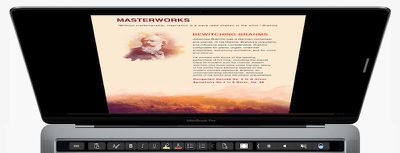
In Word, users will be able to use "Word Focus Mode," which eliminates the clutter of on-screen ribbons and commands "so you can simply focus on your work." All of the relevant UI is then moved down onto Touch Bar, with classic buttons like copy/paste, bold, italics, underline, list, indent, and more found on Apple's new multi-touch panel.
office-word-mac
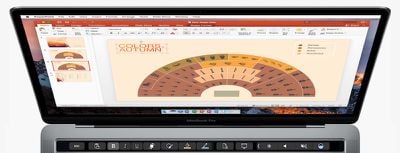
Microsoft said PowerPoint's addition of Touch Bar support lets users "easily manipulate graphic elements." Buttons like "Reorder Objects" make it easy to find the exact object users are looking for and move it to a new location, thanks to an easy-to-read graphical map of a slide's layers. Object manipulation and slides can also be rotated and tracked by sliding a finger across the Touch Bar.
office-powerpoint-mac
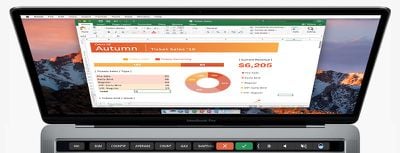
Excel's Touch Bar integration makes it quicker to write functions into rows of the program. By typing an equals sign into a cell, Excel will immediately pull up the most recently used functions and display them on the Touch Bar. As the company explained, "for example, with a tap (for the formula) and another tap (for a named range) in the Touch Bar, you can quickly sum a range in your spreadsheet." Easy spreadsheet organization is also available through the Touch Bar, with borders, cell colors and recommended charts propagating on the panel.
office-excel-mac
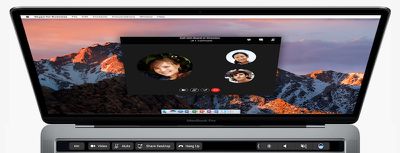
The last program detailed was Outlook, and Microsoft said that here the Touch Bar will provide "the most commonly used commands" whenever a user is working in its calendar and email programs. This means when composing an email, an add file prompt appears, along with a list of recent documents that users can one-tap to attach as a full attachment or a link. While in Outlook's calendar, users will be able to see their events for the day, and even jump into a Skype for Business video meeting.
office-outlook-mac
Before Apple's event, Microsoft held its own presentation on Wednesday, where it announced a new Surface Book and all-in-one desktop Surface Studio, as well as a "Creators Update" coming to Windows 10. Microsoft's new computers are up for pre-order now, the Surface Book starting at $2,399 and Surface Studio at $2,999, and are expected to ship in November and December, respectively.


Related Roundup: MacBook Pro
Buyer's Guide: MacBook Pro (Buy Now)
Related Forum: MacBook Pro

Top Rated Comments

miknos Avatar
131 months ago
we have to measure which option is faster:
a) to press button on your touch bar
b) to click hot-made button above your ribbon in excel using mouse
Just having to look down (keyboard) and back to the screen is a step backwards.
Score: 8 Votes (Like | Disagree)
131 months ago
They position the MBP as a business computer, a Pro's computer. Most businesses use...

...the answer is not iWork.:p:D
The industry and consumers are just sticking to what they're 'used to' and Apple's finally playing along (which contradicts a lot of their core values in my opinion). When instead they should be working to make programs like Numbers even more robust and showcase the value behind their product.

Actually, "The answer" is not MS Office. iWork is by far a superior product to Office in a great deal of ways. Microsoft Office for Mac is pure garbage and half-baked. Just my two cents and personal opinion.
Score: 5 Votes (Like | Disagree)
131 months ago
we have to measure which option is faster:
a) to press button on your touch bar
b) to click hot-made button above your ribbon in excel using mouse
c) Press CTRL + C/V/B/I/U etc... without needing to look down from screen or locating and having to move the mouse - unless it is of course a more specific activity.

Score: 5 Votes (Like | Disagree)
131 months ago
Funny how Microsoft is early out of the gate supporting new Mac hardware with Office... And they also have been impressively on top of their app updates for iOS... But at the same time they run Surface commercials that basically say "Macs are crap! Buy a Surface!" ;)

Score: 5 Votes (Like | Disagree)
131 months ago
we have to measure which option is faster:
a) to press button on your touch bar
b) to click hot-made button above your ribbon in excel using mouse
Score: 5 Votes (Like | Disagree)
131 months ago
In Excel the F keys are incredibly useful:
F1: Help
F2: EDIT
F4: Fix cells
F5: Go to.

So, adding a button to start a formula (from what is seen in the picture) is useless.

The MacBook Pro is turning into the less Pro of all Macs.

Enjoy your emoji toolbar.
Score: 4 Votes (Like | Disagree)

Popular Stories

M5 MacBook Pro

RIP, MacBook Ultra

Monday October 19, 2026 9:37 am PDT by
Apple today sent out invites for an experience in Los Angeles on Wednesday, October 28, and the "Pro and tell" tagline on the invitation likely means that the rumored MacBook models with touch-enabled OLED displays will stick with MacBook Pro branding instead of the once-rumored "MacBook Ultra" name. The long-rumored "iPhone Ultra" ended up being named iPhone Duo, so speculation that Apple...
Apple MacBook Pro with PROLED XDR Display family lineup feature

Apple Announces OLED MacBook Pro With Touch Display

Wednesday October 28, 2026 10:11 am PDT by
Apple today announced a new high-end MacBook Pro, which is available in 14-inch and 16-inch sizes. The new device has a PROLED XDR display that supports touch gestures, and a glowing rear Apple logo. Pricing on the MacBook Pro starts at $2,899 for the 14-inch model and $3,399 for the 16-inch model. Apple says the MacBook Pro has the "world's best display in a pro laptop." The PROLED...
MacBook Pro Ultra Feature 1

Apple to Launch Touchscreen OLED MacBook Pro and OLED iPad mini on October 27

Thursday October 8, 2026 1:31 pm PDT by
Apple will introduce new OLED touchscreen MacBook Pro models and an OLED iPad mini "on or around" Tuesday, October 27, reports Bloomberg. The launch will also include an M6 14-inch MacBook Pro and an M6 iMac. The October 27 follows Apple's October 13 debut of a new smart home hub, a revamped Apple TV 4K, and a refreshed HomePod mini. Earlier this month, MacRumors reported that Apple would do ...
Latest Stories
Apple Watch Ultra 4 Hits All-Time Low Price With Amazon's $99 Discount
16 hours ago
Reminder: Apple's Big Discount on Beats 360 Ear Cushions Ends Today
16 hours ago
Here's a New Tour of Apple's HomeView Software
16 hours ago
Apple Reveals New iPad Mini's Battery Capacity
17 hours ago
Top Stories: Apple's Big MacBook Pro, iPad mini and iMac Updates
18 hours ago
'Pluribus' Season 2 Reportedly Starts Production Today
1 day ago
iPhone 18 Pro Sales Surge in China, Offsetting Decline in U.S. and Japan
1 day ago
HomeView Software 27.2: Wallpapers, Control Center, and More
1 day ago
Apple Alerts Stores to iPhone Duo's Display Cracking Issue
1 day ago
iOS 27.3 Will Enable These Apple Intelligence Features in China
1 day ago
Apple Says iOS 27.3 Beta Coming Next Week
1 day ago
Apple's Flash Storage Suppliers Are Finally 'Getting Their Revenge'
1 day ago
14 New Things Your iPhone Can Do in iOS 27.2
2 days ago
iPhone Duo Review: One Week Later
2 days ago
Samsung Mocks iPhone Duo Display Cracks in New Ad Campaign
2 days ago
The MacRumors Show: OLED MacBook Pro, iPad Mini 8, and More
2 days ago
MacBook Pro With Touch Display: 15 More Details Revealed
2 days ago
Russia Places Apple on State Surveillance Registry
2 days ago
Halloween Weekend Brings Discounts on Apple Accessories and Pre-Orders
2 days ago
Apple Has Released More Than 25 New Products in the Past Two Months
2 days ago
Local Code Launches as Free, Private AI Assistant Tool for Mac
2 days ago
Apple Acquires Ascend.io
2 days ago
HomePod Mini 2 Launches Today: All the New Features
2 days ago
AirTag 2 4-Pack Drops to New Low Price of $69.99
2 days ago
Rian Johnson's iPhone Camera App Goes Viral
2 days ago
Where Did All the iPhone Duos Go? Mostly to Apple's Stores
2 days ago
Apple's Touchscreen MacBook Pro Could Ship 1.5M Units in 2027
2 days ago
New Apple TV 4K and iPad Mini: RAM Amounts Revealed
2 days ago
Apple Executive Comments on New iPad Mini Lacking 120Hz Display
2 days ago
Here's a Hands-On Look at HomePod Mini 2's New Two-Tone Colors
2 days ago

🔗 Related Apple News & Rumors

Stay updated with the latest Apple ecosystem news and verified rumors










































