

Users Reporting 'Wrecked Scrolling' on Logitech Mice After macOS Sierra Update [Updated] - MacRumorsOpen MenuShow RoundupsShow Forums menuVisit ForumsOpen Sidebar
Skip to Content

Users Reporting 'Wrecked Scrolling' on Logitech Mice After macOS Sierra Update [Updated]

by

Some users are reporting performance issues with Logitech's mice accessories after updating to macOS Sierra, mostly citing problems centered around "laggy" scrolling and some unresponsive customized buttons. Users have specifically mentioned that the M705 Marathon Laser Mouse and Performance Mouse MX are among products affected, but a wider swath of Logitech's mice lineup is likely included.

The reason behind the problems, and how wide it could reach, is because of an incompatibility issue between the Logitech Control Center app and macOS Sierra. As mentioned by a poster on the Logitech forums, on the latest 3.9.4 software for LCC, the M705's forward and back buttons were reported as "not working," while scrolling was being problematic as well.
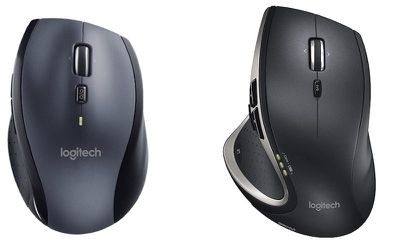
logitech-mice

The M705 Marathon Laser Mouse (left) and Performance Mouse MX (right)

A separate report, posted on StackExchange, detailed a similar issue with Logitech's mice on macOS Sierra. The user described their mouse as having "soggy inertia" scrolling in native Apple apps, and "choppy" scrolling in third-party apps. Ultimately, they found that updating to macOS Sierra "wrecked scrolling" on the Logitech mouse.

The scrolling behaviour is erratic because I'm actually assaulted by two issues:

In native macOS applications, like Apple Calendar, there is an ”inertia-ish” effect that slows down the scroll and introduces some sort of acceleration-like movement akin to the worst nightmares from Windows 10.

In third-party applications, like Google Chrome, the scrolling is quite fast but not fluid; it's choppy and non-linear with sudden jumps and stops. Because of this, it feels like the computer is laggy when scrolling a page, but it's probably due to the way the software scrolls.

The Logitech Control Center Mac app allows users to customize the features of their Logitech accessories -- mainly mice and keyboards -- along with basic features like notifications for low battery life and when each device has a firmware update. Its incompatibility with Sierra appears to be the source of the problem users are describing online. Unfortunately, Logitech has confirmed that "LCC is not available on Mac Sierra," and that "there is no release date known" for when it might launch.

Hello all!
Thank you for your feedback. Your comments will be transferred to the appropriate department.

As of right now, LCC is not available on Mac Sierra. And there is no release date known.
Once it is available, it will be posted.

Thank you all.

The same user who mentioned "wrecked scrolling" did appear to find some solutions to the problem, although they noted that everything was just "temporary band-aid tweaks" in the face of Logitech's lack of support. The user noted that messing around with the scroll and zoom settings in System Preferences > Mouse could help slightly, as well as checking out System Preferences > Logitech Control Center > Vertical Scrolling.

Update: Logitech has released a new version of its Logitech Control Center that's designed for macOS Sierra.


Top Rated Comments

iamMacPerson Avatar
132 months ago
Why would anyone use this atrocity of a thing on a beautiful Mac?
Because it's way more ergonomic then the atrocity that is the Magic Mouse. Plus I can charge and use my MX Master at the same time.
Score: 36 Votes (Like | Disagree)
venom600 Avatar
132 months ago
I have an MX Master with LCC on Sierra and haven't noticed any scrolling issues.

Why would anyone use this atrocity of a thing on a beautiful Mac?
The sad part is that you aren't joking, are you?
Score: 20 Votes (Like | Disagree)
venom600 Avatar
132 months ago
If you bought a peripheral that needs a control panel to interface with it...you're doing mac wrong
So using that logic no one should use a graphics tablet or anything that offers features that aren't directly supported by the OS. You couldn't sound more ludicrous if you tried. Did you actually think that through before you posted it?

If I need a specific app or a specific piece of hardware and that equipment doesn't work after an extensive and long beta period before an OS release, I would stop buying software or hardware from that company.
Show me a better, more functional mouse than the MX Master and I'll switch. You won't. I waited years to get a mouse like this. A driver hiccup is worth the positives.
Score: 13 Votes (Like | Disagree)
132 months ago
Haven't used a Logitech mouse in years, but I remember the LCC app being hot garbage.
Score: 9 Votes (Like | Disagree)
132 months ago
If you bought a peripheral that needs a control panel to interface with it...you're doing mac wrong
Score: 7 Votes (Like | Disagree)
Feenician Avatar
132 months ago
No offense to all you rodent lovers, but try the trackpad! Go to settings and turn all features ON, and goto accessibility Mouse and trackpad, trackpad, turn on enable dragging - three finger drag.

This is super touch without smearing your display or having to reach awkwardly across the screen.

I didn't believe it at first, but after being encouraged to try it, I'll never miss a mouse!

But, each to their own.
Apple trackpads are great but certain applications. Photoshop, gaming etc. demand a level of precision that is difficult or impossible to replicate without a decent mouse.
Score: 6 Votes (Like | Disagree)

Popular Stories

iPhone Duo Display Cracking

Apple Alerts Stores to iPhone Duo's Display Cracking Issue

Friday October 30, 2026 3:20 pm PDT by
In a memo shared with Apple Stores and Apple Authorized Service Providers this week, and later obtained by MacRumors, Apple provided technicians with guidance on how to diagnose and address the iPhone Duo's inner display cracking issue. If a customer reports the issue, Apple advised technicians to inspect the iPhone Duo and repair or replace it in accordance with their standard procedures....
iPad mini OLED feature 1

Apple Executive Comments on New iPad Mini Lacking 120Hz Display

Thursday October 29, 2026 1:47 pm PDT by
While the new iPad mini has an OLED display, the device does not support ProMotion, meaning the display's refresh rate is limited to 60Hz instead of 120Hz. ProMotion support would have allowed for the iPad mini's refresh rate to automatically adjust from 10Hz to 120Hz depending on the content being displayed, but evidently Apple has kept the feature exclusive to the iPad Pro among iPad...
Pinched iPad Mini

Apple Avoids Showing Pinched Fingers on iPad Mini Page in South Korea

Thursday October 29, 2026 11:52 am PDT by
In the U.S. and most other countries, Apple's website shows the new iPad mini being held by pinched fingers, but this is not the case in South Korea. The new iPad mini shown with pinched fingers on Apple's website in the U.S. On its South Korean website, Apple simply shows an image of the iPad mini on its own. The new iPad mini shown without pinched fingers on Apple's website in South Korea ...


Latest Stories
Apple Watch Ultra 4 Hits All-Time Low Price With Amazon's $99 Discount
16 hours ago
Reminder: Apple's Big Discount on Beats 360 Ear Cushions Ends Today
16 hours ago
Here's a New Tour of Apple's HomeView Software
16 hours ago
Apple Reveals New iPad Mini's Battery Capacity
17 hours ago
Top Stories: Apple's Big MacBook Pro, iPad mini and iMac Updates
19 hours ago
'Pluribus' Season 2 Reportedly Starts Production Today
1 day ago
iPhone 18 Pro Sales Surge in China, Offsetting Decline in U.S. and Japan
1 day ago
HomeView Software 27.2: Wallpapers, Control Center, and More
1 day ago
Apple Alerts Stores to iPhone Duo's Display Cracking Issue
1 day ago
iOS 27.3 Will Enable These Apple Intelligence Features in China
1 day ago
Apple Says iOS 27.3 Beta Coming Next Week
1 day ago
Apple's Flash Storage Suppliers Are Finally 'Getting Their Revenge'
1 day ago
14 New Things Your iPhone Can Do in iOS 27.2
2 days ago
iPhone Duo Review: One Week Later
2 days ago
Samsung Mocks iPhone Duo Display Cracks in New Ad Campaign
2 days ago
The MacRumors Show: OLED MacBook Pro, iPad Mini 8, and More
2 days ago
MacBook Pro With Touch Display: 15 More Details Revealed
2 days ago
Russia Places Apple on State Surveillance Registry
2 days ago
Halloween Weekend Brings Discounts on Apple Accessories and Pre-Orders
2 days ago
Apple Has Released More Than 25 New Products in the Past Two Months
2 days ago
Local Code Launches as Free, Private AI Assistant Tool for Mac
2 days ago
Apple Acquires Ascend.io
2 days ago
HomePod Mini 2 Launches Today: All the New Features
2 days ago
AirTag 2 4-Pack Drops to New Low Price of $69.99
2 days ago
Rian Johnson's iPhone Camera App Goes Viral
2 days ago
Where Did All the iPhone Duos Go? Mostly to Apple's Stores
2 days ago
Apple's Touchscreen MacBook Pro Could Ship 1.5M Units in 2027
2 days ago
New Apple TV 4K and iPad Mini: RAM Amounts Revealed
2 days ago
Apple Executive Comments on New iPad Mini Lacking 120Hz Display
2 days ago
Here's a Hands-On Look at HomePod Mini 2's New Two-Tone Colors
2 days ago

🔗 Related Apple News & Rumors

Stay updated with the latest Apple ecosystem news and verified rumors










































