

macOS Sierra: iCloud Drive Syncs Desktop Files and Documents Across Devices - MacRumorsOpen MenuShow RoundupsShow Forums menuVisit ForumsOpen Sidebar
Skip to Content

macOS Sierra: iCloud Drive Syncs Desktop Files and Documents Across Devices

by

With macOS Sierra, Apple is aiming to make it easier to access all of your content across multiple devices, expanding iCloud Drive to encompass the desktop and documents folder of every Mac.

This feature puts all of the files stored either on the desktop or in the documents folder in iCloud, making them available on iOS devices, Macs, and iCloud.com for easy access to your most recent files wherever you are.
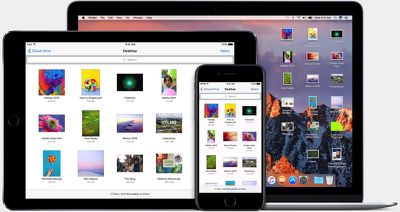
iclouddrivemacosierra
Turning on the new iCloud feature is done when setting up macOS Sierra. When you install the new operating system, Apple will ask if you want to enable iCloud storage for the desktop and documents folder and will let you know how much iCloud storage space it will take up.

If you have a lot of files on your desktop or in the documents folder, it can take up a significant amount of space, so you might need to do some file cleanup before enabling it.

If you want to enable the feature later or turn it off at some point, you can do so by going to System Preferences --> iCloud --> iCloud Drive --> Options ---> and checking or unchecking "Desktop & Documents Folders" in the list of apps allowed to upload data to iCloud Drive.
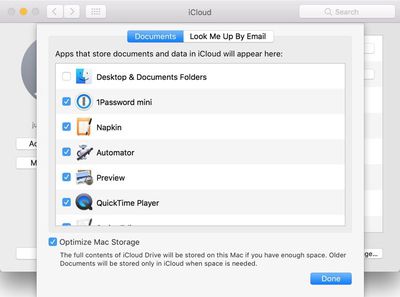
icloudoptions
On Macs and iOS devices, the contents of the desktop and documents folder can be accessed through the iCloud Drive app. On iCloud.com, the files can be accessed through the iCloud Drive folder that's available once you're signed in. If you have a Windows machine, your Mac files will be able to be downloaded through the iCloud for Windows app.
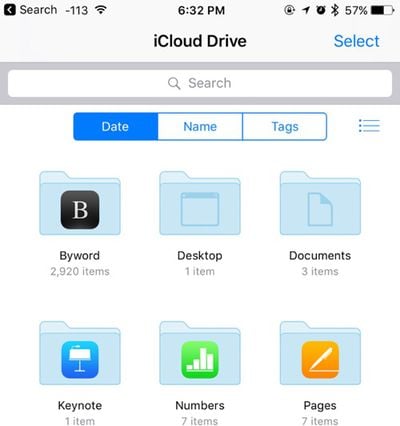
iclouddrive
The new iCloud storage options in Sierra bring Macs more in line with iOS devices, which use iCloud Drive for all file storage purposes. macOS Sierra is available for free starting today.


Related Forum: macOS Sierra

Top Rated Comments

zorinlynx Avatar
130 months ago
I strongly suggest NOT using the optimize storage feature! Not only will this remove the files from your Mac, but it'll keep the files from being backed up with Time Machine.

You will literally be trusting iCloud *completely* to store your important files. Definitely NOT a good idea!

Keep Optimize Storage off. Back up your data. It's only a matter of time before someone gets bitten by this.
Score: 14 Votes (Like | Disagree)
CamiMR Avatar
130 months ago
How about an option to sync Desktop only, and not Documents, does that exist?
Score: 4 Votes (Like | Disagree)
130 months ago
i find it incredibly pushy on apple's part to have Optimization turned on by default (see original post screen shot bottom).
installing macOS Sierra has this on by default.
Score: 3 Votes (Like | Disagree)
130 months ago
Need more macOS articles
Score: 3 Votes (Like | Disagree)
rGiskard Avatar
130 months ago
Sigh. I wish Apple would just create a way to copy files directly to my iPad. Say I have a directory of PDFs, txts, and epubs, and I want to read them on my iPad. I will be on my iPad away from wifi. So I want them ALL on my iPad. Not off on a server in a desert somewhere, but on my iPad, you know, that thing Apple sold me that is supposedly owned by me?

This is a trivial thing to do on my Nexus 7. Why must it require so much extra effort on my iPad? Just stop holding my hand and include a Finder in iOS already!
Score: 2 Votes (Like | Disagree)
Traverse Avatar
130 months ago
I strongly suggest NOT using the optimize storage feature! Not only will this remove the files from your Mac, but it'll keep the files from being backed up with Time Machine.

You will literally be trusting iCloud *completely* to store your important files. Definitely NOT a good idea!

Keep Optimize Storage off. Back up your data. It's only a matter of time before someone gets bitten by this.
I wouldn't even trust Dropbox with this kind of feature, let alone Apple with their less than stellar record. The idea behind this is great, but not realistic. The casual user with only 128GB of storage may benefit, but someone like me who likes to have at least 2 local copies and a cloud copy will not be satisfied with it.

I don't even like that it's baked into the OS. I just hope they never enable it by default without somehow informing the user. I like iCloud and Dropbox confined to syncing some app data and specific files that i manually place in their folder.
[doublepost=1474416973][/doublepost]
Untrue. Files are downloaded, then backed up, then optimized.
After they're optimized, they're not affect by your local time machine backups because they're not on your computer, they're in iCloud. Your computer only has a few kb placeholder.
Score: 2 Votes (Like | Disagree)

Popular Stories

iOS 27 Next to iPhone

Here's When iOS 27 Rolls Out Today in Every Time Zone [Update: It's Out]

Sunday September 13, 2026 3:00 am PDT by
Update 10:04 a.m.: iOS 27 is rolling out now, though it may take a bit for all users to see it, so keep checking! Apple is about to release iOS 27, which will finally deliver more advanced Siri AI capabilities as well as a variety of other refinements, improvements, and new features to iPhones. It's Apple's biggest software update of the year, and Apple announced at Wednesday's iPhone event...
iOS 27 Icon iPhone

iOS 27 Available Today With These 8 New Features

Monday September 14, 2026 9:00 am PDT by
Update: Apple has released iOS 27. During its iPhone 18 Pro and iPhone Duo event last week, Apple announced that iOS 27 will be released widely on Monday, September 14. iOS 27 should be available around 10 a.m. Pacific Time / 1 p.m. Eastern Time today via the Settings app, under General → Software Update. Below, we have highlighted eight new features and changes coming with iOS...
deep black iphone 18 pro

Apple Says iPhone 18 Pro Max Sold in U.S. Differs in One Way

Saturday September 12, 2026 3:27 pm PDT by
As noted by Nicolas Lellouche, who writes for the French tech website Numerama, Apple has updated its tech specs pages for the iPhone 18 Pro and iPhone 18 Pro Max to clarify which models are equipped with its new C2 cellular modem and where. Apple now says the iPhone 18 Pro has a C2 modem worldwide, while the iPhone 18 Pro Max uses the chip in every country except for the U.S. According...

🔗 Related Apple News & Rumors

Stay updated with the latest Apple ecosystem news and verified rumors











































