

macOS Sierra Addresses Dropbox Security Concerns by Explicitly Asking for Accessibility User Permission - MacRumorsOpen MenuShow RoundupsShow Forums menuVisit ForumsOpen Sidebar
Skip to Content

macOS Sierra Addresses Dropbox Security Concerns by Explicitly Asking for Accessibility User Permission

by

Following Dropbox-related security concerns that surfaced earlier this month, developer Phil Stokes has confirmed that macOS Sierra now explicitly requires apps to ask for user permission to access Accessibility (via Daring Fireball). Users can give access to an app, or click "not now" to deny the request.
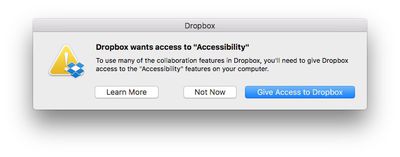
dropbox-accessibility-permission
Concerns were raised after it was demonstrated that Dropbox appears in System Preferences > Security & Privacy under Accessibility, despite the fact that users were never prompted to grant access to the features. More details can be found in our previous coverage and in a Dropbox support document.

Let’s assume for the sake of argument that Dropbox never does any evil on your computer. It remains the fact that the Dropbox process has that ability. And that means, if Dropbox itself has a bug in it, it’s possible an attacker could take control of your computer by hijacking flaws in Dropbox’s code. Of course, that’s entirely theoretical, but all security risks are until someone exploits them. The essence of good computer security and indeed the very reason why OSX has these kinds of safeguards in place to begin with is that apps should not have permissions greater than those that they need to do their job.

At the time, Dropbox said it was working with Apple to reduce its dependence on elevated access in macOS Sierra, and would respect when people disable the app's Accessibility permissions, but now a much-needed safeguard exists regardless.

In a new blog post, Dropbox still recommends that Mac users running macOS Sierra update their Accessibility permissions, if needed, to ensure smooth syncing and access to certain features of the cloud storage service.

Advanced Dropbox collaboration features, such as the badge, require Accessibility permissions. You’ll be prompted to grant these permissions when you install the Dropbox desktop app on macOS Sierra. To do so, follow the instructions on screen. The same will apply for older versions of OS X in the coming weeks. For more information on Dropbox Mac permissions, visit our help center.

macOS Sierra was publicly released today as a free update on the Mac App Store.

Related Forum: macOS Sierra

Top Rated Comments

dragje Avatar
132 months ago
Drop-who?

However in all seriousness, I abandoned Dropbox ages ago and migrated to Google Drive and have never looked back.

Dropbox are "ok" no doubt but lack so many features and compared to Google are seriously slow. My file transfers since switching to Google Drive have more than tripled!
I'll never move my documents to Google Drive which enables the company to look inside within each document for commercial exploitation usage. For the same very reason I rarely using Google as a search engine, simply because I truly hate the so called targeting adds, as if I'm considdered to be a f*beep*ing monkey that would be interested in camera's for weeks just because I was searching for one at one given day. Google makes sure that all the adds on websites, in one way or the other, has something to do with camera's.

I'll regret the day that I might not care about this any longer, that I'm willingly stop using my brains and surrender myself entirely to commercial exploitation and accept that I've become a slave for a company by providing them personal information about myself and by agreeing that "to think yourself" is something one should not do. For the same reason I don't make use of facebook, delete apps that requires a facebook and/or a Google account and doesn't enable me to login besides these options.

I grew up in the world where the internet became big. And I'm really became fascinated with the phenomenon called the internet. And I should because it delivers also so much good. But I've never been able to understand why people willingly give away all of their private information, especially knowing that there is no such thing as: 'I've nothing to hide'
Score: 7 Votes (Like | Disagree)
simonmet Avatar
132 months ago
I came here to say the same thing. No matter which box you click: "Not Now", "Learn More", or obviously the third one, it puts itself in Accessibility.

My response was to remove Dropbox from my computer.
This is an OS X behaviour and unrelated to Dropbox. OS X is putting it there and this I believe is nothing new. The problem before was that Dropbox seemingly exploited loopholes or weakness in OS X to enable those privileges without asking.

It also replicates behaviour in iOS. If you deny an app permission to send you notifications or have access to your location the app still appears in the relevent settings so you can subsequently enable the permissions later if you so choose without having to delete and reinstall the app.

So it's entirely appropriate and normal that OS X puts it there.

Score: 5 Votes (Like | Disagree)
132 months ago
I chose "Not Now" and Dropbox still jumped into Accessibility—though unchecked. My question is, how does it get in there?
I came here to say the same thing. No matter which box you click: "Not Now", "Learn More", or obviously the third one, it puts itself in Accessibility.

My response was to remove Dropbox from my computer.
Score: 2 Votes (Like | Disagree)
Pakaku Avatar
132 months ago
I chose "Not Now" and Dropbox still jumped into Accessibility—though unchecked. My question is, how does it get in there?
Sounds like the OS itself just keeps a history of whatever has attempted to ask for permission, and anything the user denied permission for is just left there unticked.
Score: 2 Votes (Like | Disagree)
132 months ago
Well done Apple.

Score: 2 Votes (Like | Disagree)
smacrumon Avatar
132 months ago
Drop-who?

However in all seriousness, I abandoned Dropbox ages ago and migrated to Google Drive and have never looked back.

Dropbox are "ok" no doubt but lack so many features and compared to Google are seriously slow. My file transfers since switching to Google Drive have more than tripled!
And I guess you're happy for Google to peruse your files on a daily basis.
[doublepost=1474429813][/doublepost]This is really interesting. Who would have thought MacOS could be circumvented like this? I certainly didn't. Yep post those permission warnings just like iOS vigilantly does.
Score: 1 Votes (Like | Disagree)

Popular Stories

Apple MacBook Pro with PROLED XDR Display family lineup feature

Apple Announces OLED MacBook Pro With Touch Display

Wednesday October 28, 2026 10:11 am PDT by
Apple today announced a new high-end MacBook Pro, which is available in 14-inch and 16-inch sizes. The new device has a PROLED XDR display that supports touch gestures, and a glowing rear Apple logo. Pricing on the MacBook Pro starts at $2,899 for the 14-inch model and $3,399 for the 16-inch model. Apple says the MacBook Pro has the "world's best display in a pro laptop." The PROLED...
iPhone Duo Display Cracking

Apple Alerts Stores to iPhone Duo's Display Cracking Issue

Friday October 30, 2026 3:20 pm PDT by
In a memo shared with Apple Stores and Apple Authorized Service Providers this week, and later obtained by MacRumors, Apple provided technicians with guidance on how to diagnose and address the iPhone Duo's inner display cracking issue. If a customer reports the issue, Apple advised technicians to inspect the iPhone Duo and repair or replace it in accordance with their standard procedures....
iPad mini OLED feature 1

Apple Executive Comments on New iPad Mini Lacking 120Hz Display

Thursday October 29, 2026 1:47 pm PDT by
While the new iPad mini has an OLED display, the device does not support ProMotion, meaning the display's refresh rate is limited to 60Hz instead of 120Hz. ProMotion support would have allowed for the iPad mini's refresh rate to automatically adjust from 10Hz to 120Hz depending on the content being displayed, but evidently Apple has kept the feature exclusive to the iPad Pro among iPad...
Latest Stories
Apple Watch Ultra 4 Hits All-Time Low Price With Amazon's $99 Discount
5 hours ago
Reminder: Apple's Big Discount on Beats 360 Ear Cushions Ends Today
5 hours ago
Here's a New Tour of Apple's HomeView Software
5 hours ago
Apple Reveals New iPad Mini's Battery Capacity
6 hours ago
Top Stories: Apple's Big MacBook Pro, iPad mini and iMac Updates
7 hours ago
'Pluribus' Season 2 Reportedly Starts Production Today
14 hours ago
iPhone 18 Pro Sales Surge in China, Offsetting Decline in U.S. and Japan
15 hours ago
HomeView Software 27.2: Wallpapers, Control Center, and More
21 hours ago
Apple Alerts Stores to iPhone Duo's Display Cracking Issue
22 hours ago
iOS 27.3 Will Enable These Apple Intelligence Features in China
23 hours ago
Apple Says iOS 27.3 Beta Coming Next Week
23 hours ago
Apple's Flash Storage Suppliers Are Finally 'Getting Their Revenge'
1 day ago
14 New Things Your iPhone Can Do in iOS 27.2
1 day ago
iPhone Duo Review: One Week Later
1 day ago
Samsung Mocks iPhone Duo Display Cracks in New Ad Campaign
1 day ago
The MacRumors Show: OLED MacBook Pro, iPad Mini 8, and More
1 day ago
MacBook Pro With Touch Display: 15 More Details Revealed
1 day ago
Russia Places Apple on State Surveillance Registry
1 day ago
Halloween Weekend Brings Discounts on Apple Accessories and Pre-Orders
1 day ago
Apple Has Released More Than 25 New Products in the Past Two Months
1 day ago
Local Code Launches as Free, Private AI Assistant Tool for Mac
1 day ago
Apple Acquires Ascend.io
1 day ago
HomePod Mini 2 Launches Today: All the New Features
1 day ago
AirTag 2 4-Pack Drops to New Low Price of $69.99
1 day ago
Rian Johnson's iPhone Camera App Goes Viral
1 day ago
Where Did All the iPhone Duos Go? Mostly to Apple's Stores
1 day ago
Apple's Touchscreen MacBook Pro Could Ship 1.5M Units in 2027
1 day ago
New Apple TV 4K and iPad Mini: RAM Amounts Revealed
2 days ago
Apple Executive Comments on New iPad Mini Lacking 120Hz Display
2 days ago
Here's a Hands-On Look at HomePod Mini 2's New Two-Tone Colors
2 days ago

🔗 Related Apple News & Rumors

Stay updated with the latest Apple ecosystem news and verified rumors










































