

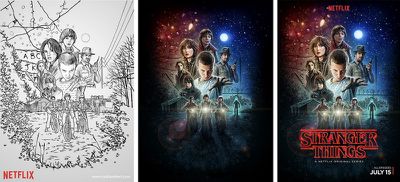
In a recent interview with Mashable, an artist based in the United Kingdom, Kyle Lambert, divulged his process of creating the memorable poster art for Netflix's science fiction series Stranger Things. Netflix asked the artist to keep with the 80's theme of the show, and provided him with a vague plot outline, rough cuts of only the first few episodes, and some still shots "to communicate the story in a single image."

Ultimately, Lambert said he decided on the iPad Pro for the project because the tablet lets him "sketch in a very natural way," especially when used in conjunction with the Apple Pencil. He used the Apple device in the sketching process of the main poster art that has gained fame online in the weeks since Stranger Things launched in July, but Lambert has also been known to create impressive art on iPads over the years, particularly in a photorealistic representation of Morgan Freeman he created on an iPad Air in 2013.
Stranger Things ipad pro 1

"This was a very exciting project for me, as an artist that trained with oil paints, I really enjoyed the challenge of reproducing this traditional painting style using digital tools," Lambert told Mashable.

"I used the iPad Pro to do the preliminary composition ideas and the sketch that became the final Stranger Things poster. I chose to use the iPad Pro for the drawing stage of the poster because I find that I am able to sketch in a very natural way on the device using the Apple Pencil. The device in general is nice to hold for long periods of time, it is really portable and Procreate, the app that I used, has some really great Pencil brushes for drawing with."

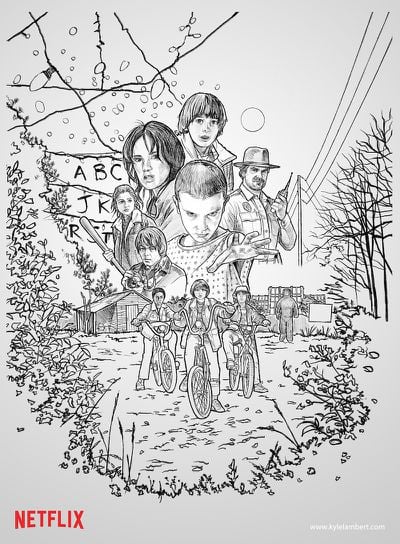
Specifically, on the iPad Pro Lambert used the iOS app Procreate to assist in his drawing process, and then he transitioned to Photoshop on the Mac to upscale the image to a higher resolution so he could "paint small elements at the best possible resolution." During the coloring process, the artist used an Intuos Wacom tablet -- which connects to a Mac to act as a sketch pad -- so he could "focus on as much of the image" as he needed, without his hand obscuring a piece of the artwork like it does when using the iPad Pro/Apple Pencil combo.
Stranger Things ipad pro 3

The original sketch that eventually became the final Stranger Things poster

The process wasn't particularly straightforward, however, as Lambert describes moving back to the iPad Pro to "add layers of detail to areas" that he thought needed "a more fluid sketch style" that the desktop didn't grant. He went back and forth between the two devices and applications several times to ultimately give the Stranger Things poster its finished, recognizable look. Lambert was also commissioned to work on several character portraits to serve as gifts for actors, specifically those of Sheriff Hopper, Eleven and Dr. Brenner, and various still shots from iconic moments in the 8-episode series.

Ever since early adopters began getting their hands on the iPad Pro and its companion stylus, the Apple Pencil, talented artists have shared what they can do with the technology in MacRumors' own discussion forums. Apple has remained adamant that the Apple Pencil is a drawing-enhancement tool, and "will absolutely not replace the finger as a point of interface" on the tablet, so it's interesting to see how much the technology has grown and been used, and on such a highly professional level, in under a year of its availability.


Related Roundup: iPad Pro
Buyer's Guide: iPad Pro (Buy Now)
Related Forum: iPad Accessories

Top Rated Comments

snebes Avatar
124 months ago
stranger things poster ipad pro image
Score: 11 Votes (Like | Disagree)
zed Avatar
124 months ago
Yeah but mostly a Xerox!
You do realize that this an homage to classic movie posters right? And that the layout of The Force Awakens poster was a throwback vintage Star Wars artwork?
Score: 5 Votes (Like | Disagree)
earthTOmitchel Avatar
124 months ago
That looks a lot like the Force Awakens poster from last year... o_O

stranger things poster ipad pro image
Well Netflix did want Lambert to be inspired by pop culture of the 80's ;)
Score: 4 Votes (Like | Disagree)
x0vash0x Avatar
124 months ago

Couldn't is a strong word. It was better to do it on the Mac. Just like some aspects were better on the iPad Pro "as Lambert describes moving back to the iPad Pro to "add layers of detail to areas" that he thought needed "a more fluid sketch style" that the desktop didn't grant". Always smart to use the best tool for the job. Which is why I'm glad Apple haven't tried to shoehorn desktop and touch interfaces into each other. Macs for pointers and iOS for touch.
This so much. Every so often, I'm tempted to get a SurfaceBook. Then, I realize, it's just a bunch of compromises. Using it as at tablet, the battery life sucks. You have a confusing mix of input methods. It's relatively heavy. I mean, it's a great 2-in-1 but at the end of the day, I'd honestly rather have two devices. Plus, that is a huge deal break, and your point exactly: what if I want to use a tablet AND have access to a desktop.

I'm so thankful Apple has kept these two devices separate. There's a way to integrate them better into a work flow, and I think that's the future: integrations. Convergence is stupid, integration is the key. Have the iPP and Mac work together seamlessly, so work can transition from one device to the other depending on which input method is best for the task at hand.

Apple is heading this direction, as can be seen with the 'copy and paste from an iDevice to macOS'.
Score: 4 Votes (Like | Disagree)
Chupa Chupa Avatar
124 months ago


During the coloring process, the artist used an Intuos Wacom tablet ('https://www.wacom.com/en-kr/products/pen-tablets/intuos') -- which connects to a Mac to act as a sketch pad -- so he could "focus on as much of the image" as he needed, without his hand obscuring a piece of the artwork like it does when using the iPad Pro/Apple Pencil combo.


The process wasn't particularly straightforward, however, as Lambert describes moving back to the iPad Pro to "add layers of detail to areas" that he thought needed "a more fluid sketch style" that the desktop didn't grant. He went back and forth between the two devices and applications several times to ultimately give the Stranger Things poster its finished, recognizable look.
So the iPP couldn't do it alone? Other devices involved: Mac & Wacom tablet. Bolsters the point that for serious work, iPP is a great companion device to a Mac or PC, not a replacement for them.
Score: 4 Votes (Like | Disagree)
Keane16 Avatar
124 months ago
Pretty cool. Flies in the face of the all the naysayers on this forum telling me the iPad is nothing but a glorified consumption device.

I can't draw to save my life, but the iPad Pro and Pencil combo has changed my working life - all my notes/sketches/scribbles/ideas are now taken on the device and it's glorious. No more paper notepads and everything is searchable as well as available in my bag at all times.

So the iPP couldn't do it alone? Other devices involved: Mac & Wacom tablet. Bolsters the point that for serious work, iPP is a great companion device to a Mac or PC, not a replacement for them.
Couldn't is a strong word. It was better to do it on the Mac. Just like some aspects were better on the iPad Pro "as Lambert describes moving back to the iPad Pro to "add layers of detail to areas" that he thought needed "a more fluid sketch style" that the desktop didn't grant". Always smart to use the best tool for the job. Which is why I'm glad Apple haven't tried to shoehorn desktop and touch interfaces into each other. Macs for pointers and iOS for touch.
Score: 4 Votes (Like | Disagree)

Popular Stories

Aston Martin CarPlay Ultra Screen

Apple's CarPlay Ultra to Expand to These Vehicle Brands Later This Year

Sunday February 1, 2026 10:08 am PST by
Last year, Apple launched CarPlay Ultra, the long-awaited next-generation version of its CarPlay software system for vehicles. Nearly nine months later, CarPlay Ultra is still limited to Aston Martin's latest luxury vehicles, but that should change fairly soon. In May 2025, Apple said many other vehicle brands planned to offer CarPlay Ultra, including Hyundai, Kia, and Genesis. In his Powe...
Apple Logo Black

Apple's Next Launch is 'Imminent'

Sunday February 1, 2026 12:31 pm PST by
The calendar has turned to February, and a new report indicates that Apple's next product launch is "imminent," in the form of new MacBook Pro models. "All signs point to an imminent launch of next-generation MacBook Pros that retain the current form factor but deliver faster chips," Bloomberg's Mark Gurman said on Sunday. "I'm told the new models — code-named J714 and J716 — are slated...
iOS 26

iOS 26.3 and iOS 26.4 Will Add These New Features to Your iPhone

Tuesday February 3, 2026 7:47 am PST by
We are still waiting for the iOS 26.3 Release Candidate to come out, so the first iOS 26.4 beta is likely still at least a week or two away. Following beta testing, iOS 26.4 will likely be released to the general public in March or April. Below, we have recapped known or rumored iOS 26.3 and iOS 26.4 features so far. iOS 26.3 iPhone to Android Transfer Tool iOS 26.3 makes it easier...
Apple MacBook Pro M4 hero

New MacBook Pros Reportedly Launching Alongside macOS 26.3

Sunday February 1, 2026 5:42 am PST by
Apple is planning to launch new MacBook Pro models with M5 Pro and M5 Max chips alongside macOS 26.3, according to Bloomberg's Mark Gurman. "Apple's faster MacBook Pros are planned for the macOS 26.3 release cycle," wrote Gurman, in his Power On newsletter today. "I'm told the new models — code-named J714 and J716 — are slated for the macOS 26.3 software cycle, which runs from...
iOS 26 Home Feature

Apple Gives Final Warning to Home App Users

Tuesday February 3, 2026 8:55 am PST by
In 2022, Apple introduced a new Apple Home architecture that is "more reliable and efficient," and the deadline to upgrade and avoid issues is fast approaching. In an email this week, Apple gave customers a final reminder to upgrade their Home app by February 10, 2026. Apple says users who do not upgrade may experience issues with accessories and automations, or lose access to their smart...

















