

Apple Reiterates: Force Quitting iOS Apps Doesn’t Help Battery Life

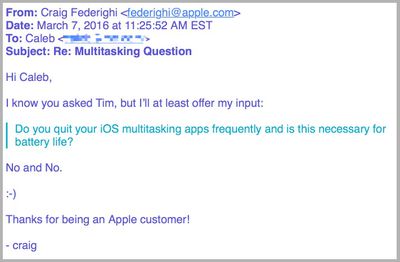
It's been a long-standing belief in some circles that using the multitasking feature of iOS to force quit apps can help save an iPhone's battery life, or improve the speediness of the software when the smartphone becomes slow. Earlier in the week, an iPhone user decided to email Apple CEO Tim Cook to put the issue to bed once and for all, and instead got a reply from Craig Federighi, Apple's senior VP of Software Engineering (via 9to5Mac).

Asked specifically whether Cook quits apps to save battery and if it's truly "necessary for battery life," Federighi jumped in with a concise "no and no." Although far from an official condemnation of the force quit belief by Apple, it is the most the company has directly said about the myth in the six years since multitasking became available in iOS 4.
multitasking battery email

Image via 9to5Mac

The simplistic nature of swiping apps off of the multitasking landing pad, and subsequently "quitting" them, helped create a widespread belief that an iPhone's battery could be preserved for a little longer. But as many have pointed out over the years, doing so could in fact do the complete opposite: you could be shortening the battery life of your iPhone.

A few exceptions can be made to certain processes, but for the most part when an app is pushed into the background it becomes completely frozen and ceases to use any of an iPhone's battery power. As relayed by a former Genius Bar technician, Scotty Loveless, force quitting an app purges all of its code from the RAM of the iPhone, requiring it to be re-loaded upon the next time you visit the app.

If it's an app you're going to often -- a weather or traffic experience, for example -- all of the forced closing and re-opening actually can worsen the life of an iPhone. Exceptions can be made by toggling off a feature called "Background App Refresh," which the Facebook app was found to be suspiciously circumventing in recent months, but in all other occurrences the process of force quitting each app to prolong battery life is erroneous.

Plus, iOS closes apps automatically as it needs more memory, so you're doing something your device is already doing for you. You are meant to be the user of your device, not the janitor. The truth is, those apps in your multitasking menu are not running in the background at all: iOS freezes them where you last left the app so that it's ready to go if you go back.

Unless you have enabled Background App Refresh, your apps are not allowed to run in the background unless they are playing music, using location services, recording audio, or the sneakiest of them all: checking for incoming VOIP calls , like Skype. All of these exceptions, besides the latter, will put an icon next to your battery icon to alert you it is running in the background.

In the case of the Facebook app, the company's mobile app was discovered to be the cause behind cases of dramatic battery drain, even when Background App Refresh was turned completely off. The social network site eventually implemented a fix for the problem, citing the major culprits as "CPU spin" in the app's code and silent background audio continuing to emanate from the service's auto-play videos after the app was closed.

That was a rare case, however, and users should stick closer to Federighi's succinct advice today instead of continuing to put long-term strain on the smartphone. If you're ever really concerned about daily battery usage, Apple offers a simple but useful tool to keep on top of things. Go to Settings > Battery > and scroll down to Battery Usage. "Last 24 Hours" and "Last 7 Days" can give you a full picture at where the heaviest-hitting battery life apps are coming from.

You can also restrict specific app access to Background App Refresh -- or turn it off altogether, although that can drastically hinder certain apps' key features -- in Settings > General > Background App Refresh.


Related Forum: iOS 9

Popular Stories

Aston Martin CarPlay Ultra Screen

Apple's CarPlay Ultra to Expand to These Vehicle Brands Later This Year

Sunday February 1, 2026 10:08 am PST by
Last year, Apple launched CarPlay Ultra, the long-awaited next-generation version of its CarPlay software system for vehicles. Nearly nine months later, CarPlay Ultra is still limited to Aston Martin's latest luxury vehicles, but that should change fairly soon. In May 2025, Apple said many other vehicle brands planned to offer CarPlay Ultra, including Hyundai, Kia, and Genesis. In his Powe...
Apple Logo Black

Apple's Next Launch is 'Imminent'

Sunday February 1, 2026 12:31 pm PST by
The calendar has turned to February, and a new report indicates that Apple's next product launch is "imminent," in the form of new MacBook Pro models. "All signs point to an imminent launch of next-generation MacBook Pros that retain the current form factor but deliver faster chips," Bloomberg's Mark Gurman said on Sunday. "I'm told the new models — code-named J714 and J716 — are slated...
Apple MacBook Pro M4 hero

New MacBook Pros Reportedly Launching Alongside macOS 26.3

Sunday February 1, 2026 5:42 am PST by
Apple is planning to launch new MacBook Pro models with M5 Pro and M5 Max chips alongside macOS 26.3, according to Bloomberg's Mark Gurman. "Apple's faster MacBook Pros are planned for the macOS 26.3 release cycle," wrote Gurman, in his Power On newsletter today. "I'm told the new models — code-named J714 and J716 — are slated for the macOS 26.3 software cycle, which runs from...
iOS 26

iOS 26.3 and iOS 26.4 Will Add These New Features to Your iPhone

Tuesday February 3, 2026 7:47 am PST by
We are still waiting for the iOS 26.3 Release Candidate to come out, so the first iOS 26.4 beta is likely still at least a week or two away. Following beta testing, iOS 26.4 will likely be released to the general public in March or April. Below, we have recapped known or rumored iOS 26.3 and iOS 26.4 features so far. iOS 26.3 iPhone to Android Transfer Tool iOS 26.3 makes it easier...
14 inch MacBook Pro Keyboard

Apple Changes How You Order a Mac

Saturday January 31, 2026 10:51 am PST by
Apple recently updated its online store with a new ordering process for Macs, including the MacBook Air, MacBook Pro, iMac, Mac mini, Mac Studio, and Mac Pro. There used to be a handful of standard configurations available for each Mac, but now you must configure a Mac entirely from scratch on a feature-by-feature basis. In other words, ordering a new Mac now works much like ordering an...

Top Rated Comments

jdillings Avatar
129 months ago
I'm going to email him and ask him what hair product he recommends.
Score: 18 Votes (Like | Disagree)
arggg14 Avatar
129 months ago
In my experience quitting apps that are running in the backdrop absolutely improves battery life...
Score: 16 Votes (Like | Disagree)
mpe Avatar
129 months ago
Better answer would be: No and no, unless the app you are closing is Facebook.

Killing facebook is the only known way how to avoid it sucking battery in the background. (turning off background refresh won't help)
Score: 12 Votes (Like | Disagree)
mpe Avatar
129 months ago
My Facebook battery stats are:
8 minutes on screen, 3 hours in the background.

Federighi is wrong. Killing apps that would otherwise run in the background absolutely helps with battery life.
Score: 11 Votes (Like | Disagree)
pika2000 Avatar
129 months ago
My Facebook battery stats are:
8 minutes on screen, 3 hours in the background.

Federighi is wrong. Killing apps that would otherwise run in the background absolutely helps with battery life.
As such I have uninstalled Facebook. Apple should mark the Facebook app as malware at this point since it is behaving like one, and Facebook's refusal to actually do anything about it.
Score: 10 Votes (Like | Disagree)
ChrisCW11 Avatar
129 months ago
This is one feature I can't stand about iOS. While I am confident that apps suspended in the background are not necessarily consuming battery life I can't stand the idea of going to the app switcher view and seeing every app that I have ever used on iOS hanging out there. Seriously some app that I used once 6 months ago should not be shown in the app switcher even if it not going to consume even one tiny fraction of extra battery. Having to sit there an swipe shut every suspended app that I have ever used is absolutely ridiculous.

Simply put a time and count limit on the apps shown in the app switcher. Only show the last X apps used in the last Y amount of time. If I open up more than X apps, then the least accessed and oldest app is removed from the app switcher view. This doesn't mean the app loses its current state, just that you have to access it by "launching" from its icon. Any open app that hasn't been used after Y amount of time should just disappear from the app switcher.

NOBODY uses the app switcher to go back to an app they suspect they used once a year ago possibly sometime, they simply relaunch the app from its icon. Just restore its previous state and end this ******** by keeping it shown indefinitely on the app switcher.

I think fixing this stupid concept this will address a lot of the FUD around the app switcher and people thinking all these apps are consuming battery in the background. Personally the idea of having to "manage" the app switcher is one of the dumbest features that Apple ever implemented and someone with half a brain at Apple needs to re-engineer this feature as they have done it WRONG on iOS and now TVOS and OS X.
Score: 8 Votes (Like | Disagree)














