

Apple Watch 'Lookout' App Helps Users Find a Misplaced iPhone - MacRumorsOpen MenuShow RoundupsShow Forums menuVisit ForumsOpen Sidebar
Skip to Content

Apple Watch 'Lookout' App Helps Users Find a Misplaced iPhone

by

Mobile security company Lookout released an app yesterday that alerts Apple Watch users if they are about to leave their iPhone behind.

The iOS and Apple Watch app uses the Bluetooth connection of an Apple Watch to keep tabs on a user's iPhone location, so that if the wearer steps out of range of their phone, the app automatically buzzes their watch.
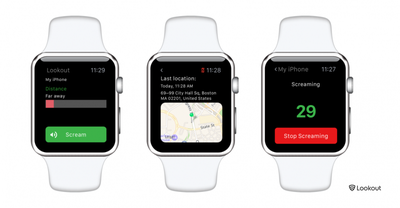
Lookout for Apple Watch
Lookout can also make an iPhone in silent mode emit a loud alarm or "scream" to help the owner find the device, even if it is out of Bluetooth range, by way of a local Wi-Fi connection.

If an iPhone has been misplaced but is within Bluetooth range, the user can consult Lookout's distance meter display that shows how far away they are from the device. As they move around, the bar changes color to indicate if they're getting "warmer" or "colder" in relation to the phone's location.

If an iPhone has been left a greater distance away, the app displays a map showing the device's last known location using its GPS signal (note that continuous use of this feature is likely to significantly impact iPhone battery life). The facility is similar to that found in Apple's Find My iPhone app, although Apple has yet to release an app for Apple Watch from which to use the location service.

Lookout for iPhone is available for free on the App Store. [Direct Link]

Top Rated Comments

ck2875 Avatar
136 months ago
Why not just use the glance that's built into the watch to find your phone?

Just go to the Settings glance and it allows you to play the sonar sound even if the phone is on silent. Or if you press and hold the ping button on the glance it makes the flash pulsate.


How to locate your iPhone with Apple Watch
Step 1: Press the Digital Crown until you’re at the watch face
Step 2: Swipe up from the bottom of the screen to open the glances interface
Step 3: Swipe left or right until you locate the Settings glance
Step 4: Tap the ping button to ping your iPhone and your iPhone should emit a high pitched sound

Make the LED flash light up when pinging your iPhone
You can make your iPhone’s LED flash light up when pinging your iPhone from your Apple Watch. To do this, tap and hold the ping button on the Settings glance instead of just tapping it.
Score: 6 Votes (Like | Disagree)
Jmausmuc Avatar
136 months ago
I can't believe that Apple didn't include this functionality with the watch.
It even has a photos app.

I really hope that Apple will integrate Find My Device in Watch OS3
Score: 3 Votes (Like | Disagree)
bushido Avatar
136 months ago
Or if you press and hold the ping button on the glance it makes the flash pulsate.
wow i had no idea this was even possible. nice
Score: 2 Votes (Like | Disagree)
136 months ago
You can turn off the contacts sync which I did, useless for those with corporate or iCloud sync.
Yes you can but why should you have to! Why on earth do you think they have that strange, and lone backup feature, in a phone tracking app?

The developer has bet that most users will leave it on. This app's real purpose is to gather data, GPS and if possible your contacts. The fact this app. which "sort of works" to alert you when you walk away from your phone, SHOULD NOT need access to your "Contacts" or your GPS position. It only needs Bluetooth locally do it's job that's it! The rest of this data collection is NOT needed for the app's stated purpose. Heck, I can use Find My Phone to get GPS location.

Make no mistake this app is reliable at one thing and that's tracking you too bad it's not as reliable at tracking a phone! Too bad reviewers such as this aren't really looking at these things.
Score: 1 Votes (Like | Disagree)
bbotte Avatar
136 months ago
I deleted it, never let it get to my contacts.
Score: 1 Votes (Like | Disagree)
bbotte Avatar
136 months ago
Tried installing this on my watch several times. Will not install. What a joke.
Score: 1 Votes (Like | Disagree)

Popular Stories

Apple Event Logo

Apple Working on All-New Operating System

Wednesday July 29, 2026 11:39 am PDT by
Apple is developing an all-new operating system that is essentially a mix of tvOS, watchOS, and iOS, according to Bloomberg's Mark Gurman. In a report this week, he said the operating system will feature a grid of icons, widgets, and apps, along with customizable clock faces. The new software platform is intended for Apple's long-rumored smart home hub. With built-in facial recognition,...
imac video apple feature

Apple Made Its Second-Biggest Acquisition Ever This Year

Wednesday July 29, 2026 12:03 pm PDT by
Apple this year acquired Israeli startup Q.ai for close to $2 billion, according to the Financial Times. That would make this Apple's second-biggest acquisition ever, after it paid $3 billion for the popular headphone maker Beats in 2014. This is also the largest known Apple acquisition since the company purchased Intel's smartphone modem business and patents for $1 billion in 2019. Q.ai...
Dynamic Island iPhone 18 Pro Feature

iPhone 18 Pro: Twelve Changes Coming to Apple's Next Flagship

Thursday July 30, 2026 3:43 am PDT by
We're less than two months out from the launch of Apple's premium next-generation smartphone lineup, and while we're not expecting a dramatic change in terms of functionality, there are still several enhancements rumored to be coming to the iPhone 18 Pro and iPhone 18 Pro Max. One thing worth noting is that Apple is reportedly planning a major change to its iPhone release cycle this year,...

🔗 Related Apple News & Rumors

Stay updated with the latest Apple ecosystem news and verified rumors













































