

Apple Music on Sonos Officially Launching Tomorrow - MacRumorsOpen MenuShow RoundupsShow Forums menuVisit ForumsOpen Sidebar
Skip to Content

Apple Music on Sonos Officially Launching Tomorrow

Sonos today announced that Apple Music will be officially available on Sonos wireless speakers starting tomorrow, ending a two month beta testing period. Sonos customers across the world will be able to stream Apple Music content and directly access Apple Music features including For You, Radio, and My Music.

Over the course of the beta test, which started on December 15, Apple Music on the Sonos platform was tested by hundreds of thousands of listeners. Apple's Eddy Cue commented on the beta test, calling it "great" and an "amazing listening experience."
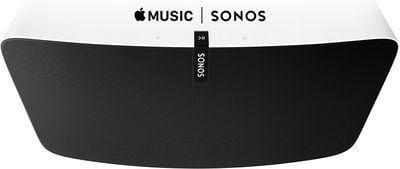
Apple-Music-Sonos

"The feedback from Apple Music members on Sonos during the beta period has been great," said Eddy Cue, Apple's senior vice president of Internet Software and Services. "Sonos plus Apple Music provides an amazing listening experience at home - and we're excited to offer it to all Sonos customers starting tomorrow."

Beginning Wednesday, February 10, streaming Apple Music on Sonos speakers can be done by selecting "Add Music Services" from a Sonos controller app, choosing the Apple Music icon, and logging into the service. An Apple Music subscription or free trial is required.

Apple Music on Sonos has been highly anticipated as it was noticeably absent from the system when Apple Music first launched on June 30. Sonos previously supported the direct streaming of Beats Music and promised to implement Apple Music support before the end of 2015.

Ahead of the announcement of official Apple Music support, Sonos conducted a study on the positive effects of music listening in the home using an Apple Music subscription paired with a Sonos sound system. The study found that families who regularly listened to music in the home spent 67 percent more time together and ate together more often, among other positive effects.

Popular Stories

apple music

Apple Music Now Costs $11.99 as Apple Increases Subscription Prices

Friday July 17, 2026 11:25 am PDT by
Apple today increased the price of Apple Music and some Apple One subscription bundles. An individual Apple Music subscription is now $1 more expensive in the United States, going from $10.99 to $11.99 per month. Pricing on the Apple Music Family plan increased by $3, increasing from $16.99 to $19.99. Student pricing is up $1, with the plan now priced at $6.99. The price of the individual ...
Apple Event Logo

Apple Working on All-New Operating System

Wednesday July 29, 2026 11:39 am PDT by
Apple is developing an all-new operating system that is essentially a mix of tvOS, watchOS, and iOS, according to Bloomberg's Mark Gurman. In a report this week, he said the operating system will feature a grid of icons, widgets, and apps, along with customizable clock faces. The new software platform is intended for Apple's long-rumored smart home hub. With built-in facial recognition,...
imac video apple feature

Apple Made Its Second-Biggest Acquisition Ever This Year

Wednesday July 29, 2026 12:03 pm PDT by
Apple this year acquired Israeli startup Q.ai for close to $2 billion, according to the Financial Times. That would make this Apple's second-biggest acquisition ever, after it paid $3 billion for the popular headphone maker Beats in 2014. This is also the largest known Apple acquisition since the company purchased Intel's smartphone modem business and patents for $1 billion in 2019. Q.ai...

Top Rated Comments

137 months ago
Yet Apple can't be bothered to put it on the 3rd gen Apple TV.
No time ... all hands on deck, working on new watch bands.
Score: 19 Votes (Like | Disagree)
Junipr Avatar
137 months ago
"YESSS!! I've been waiting for this" - No one
Score: 9 Votes (Like | Disagree)
137 months ago
I don't understand why you wouldn't just connect by Bluetooth with iPHone and launch the Apple Music app.
Score: 8 Votes (Like | Disagree)
HobeSoundDarryl Avatar
137 months ago
I don't understand why you wouldn't just connect by Bluetooth with iPHone and launch the Apple Music app.
Even if that could work, not every buyer is single living alone. iPhones are highly mobile devices. If we rely on them for something like this or as THE remote for :apple:TV or as THE game controller or as THE __________ and the iPhone owner takes it out with them- as they are inclined to do probably every single day- those left behind could NOT listen to music or watch :apple:TV or play the game or run the _________. Companies make products to work for situations other than "single living alone" and they also don't assume that every single person has an iPhone. And that's good... because there's an awful lot of families and other non-single cohabitants that appreciate stuff that can "just work" without dependency on very mobile devices that often are NOT at home.
Score: 7 Votes (Like | Disagree)
Nunyabinez Avatar
137 months ago

Ahead of the announcement of official Apple Music support, Sonos conducted a study ('http://sonos.tumblr.com/tagged/themes') on the positive effects of music listening in the home using an Apple Music subscription paired with a Sonos sound system. The study found that families who regularly listened to music in the home spent 67 percent more time together and ate together more often, among other positive effects.

Three words: Correlation Versus Causation. I find it highly unlikely that listening to Apple music makes you spend more time together. So yes, people who listen on Sonos spend more time together but it is not a "positive effect" of doing so.
Score: 3 Votes (Like | Disagree)
dumastudetto Avatar
137 months ago
Been on the beta and had very few issues. The only issue I had at the start of the beta was the radio stations would stop playing and you'd have to close the sonos app and restart to get them working again.


How do we get off the beta to the public release?
Here are my steps:

1. Remove Apple Music from the list of services from the Mac Sonos app. Probably unnecessary but I want to start from scratch with my library later when it officially launches.

2. From the Mac Sonos app: Preferences > Advanced > Improve Sonos tab. Choose Beta program and then Leave Beta Program.

3. Download the current stable version of the Sonos Mac app from the Sonos website. (http://www.sonos.com/redir/controller_software_mac)

4. Install the stable version of the Mac app you just downloaded.

5. Launch Sonos app and then check for updates.

6. Install the updates it finds to restore your entire Sonos system to the current stable version.

Now I'm just waiting for the non-beta software to be made available. :)
Score: 2 Votes (Like | Disagree)

🔗 Related Apple News & Rumors

Stay updated with the latest Apple ecosystem news and verified rumors









































