

Microsoft Office Update Brings Drawing Tools for iPad, 3D Touch for iPhone 6s - MacRumorsOpen MenuShow RoundupsShow Forums menuVisit ForumsOpen Sidebar
Skip to Content

Microsoft Office Update Brings Drawing Tools for iPad, 3D Touch for iPhone 6s

by

Microsoft today updated its suite of Office apps designed for the iPad and the iPhone, adding features to take advantage of the iPad Pro's Apple Pencil and the 3D Touch function in the iPhone 6s and 6s Plus. Word, Excel, and PowerPoint have all been updated with the new tools.

On iPads, there's a new Draw tab that can be found in each of the three apps. The drawing tools in this tab allow iPad owners to use a pen, finger, or Apple Pencil to write, draw, highlight, and annotate various Microsoft Office documents. Hand-drawn shapes can even be transformed into customized shapes. Draw is limited to the iPad and not available on the iPhone at this time.
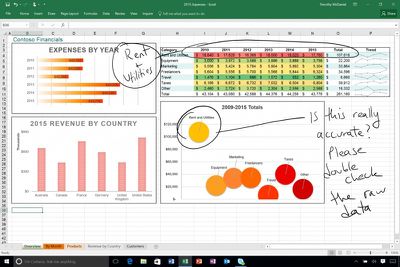
microsoftdrawingtool
On the iPhone 6s and 6s Plus, Word, Excel, and PowerPoint have new 3D Quick Actions that are accessible on the iPhone's Home screen. The Quick Actions let users create new documents or quickly open recently created documents. For all iOS 9 users, Microsoft Office documents will now show up in Spotlight search, making it easy to locate files.

All three apps are also gaining a new cloud font feature, which provides on-demand access to fonts. PowerPoint includes one additional new feature not found in the other updates, a Morph update that allows Morph to be used to move several objects at once.

What's New
- Annotate with Ink: With the tools on the new Draw tab, use your pen, finger, or Apple Pencil to write, draw, and highlight. (iPad only)
- 3D Touch: Use 3D Touch from the home screen to quickly create or open a file. (iPhone 6s or 6s Plus only)
- Fonts from the cloud: Download fonts on demand, when you need them.
- Spotlight search: Quickly find recently opened documents in Spotlight. (iOS 9 required)

All of Microsoft's Office apps can be downloaded from the App Store for free. Documents can be created and edited at no cost on most iOS devices, but unlocking additional tools requires an Office 365 subscription priced at $6.99 per month. Using the Office apps on the iPad Pro requires a subscription.

- Microsoft Word [Direct Link]
- Microsoft Excel [Direct Link]
- Microsoft PowerPoint [Direct Link]


Top Rated Comments

139 months ago
A shiver went down my spine… for a few seconds I started liking a Microsoft product :) Seriously, can Apple's own iWork apps do that? I mean if Microsoft is ahead of the game - and Apple itself - on iPad Pro, what's the world come to?
Score: 3 Votes (Like | Disagree)
Franksan Avatar
139 months ago
Mad respect for Microsoft stepping up their game. Solid update. I love using the iOS Office suite!
Score: 2 Votes (Like | Disagree)
139 months ago
I take it you mean move/resize note containers?

It's possible to move text using cut/paste, but there doesn't appear to be a way to move/resize note containers on the iOS app.
Yes that's what I meant. Damn I wish they would fix that annoying bug already
Score: 1 Votes (Like | Disagree)
Krevnik Avatar
139 months ago
Will annotations drawn on a Word document on ipad be viewable on Word for Mac? Can you manipulate the drawings on a Mac?
Yes, and kinda. It's a shape, so you can use tools that work with shapes (resize, recolor, move, delete, group, etc), but you can't manipulate it in the sense of splitting it or erasing parts of it.
Score: 1 Votes (Like | Disagree)
sza Avatar
139 months ago
I never fit myself to devices. Use productivity apps like iWork/Office are neither ergonomic nor productive on small screens.
Score: 1 Votes (Like | Disagree)
69Mustang Avatar
139 months ago
A shiver went down my spine… for a few seconds I started liking a Microsoft product :) Seriously, can Apple's own iWork apps do that? I mean if Microsoft is ahead of the game - and Apple itself - on iPad Pro, what's the world come to?
Weird ain't it? Usually, I like the bad guy to be clearly defined. This new MS under Nadella is like some sort of anti-hero. Kills for a good reason, but likes it just a little too much.
Score: 1 Votes (Like | Disagree)

Popular Stories

iOS 27 Next to iPhone

Here's When iOS 27 Rolls Out Today in Every Time Zone [Update: It's Out]

Sunday September 13, 2026 3:00 am PDT by
Update 10:04 a.m.: iOS 27 is rolling out now, though it may take a bit for all users to see it, so keep checking! Apple is about to release iOS 27, which will finally deliver more advanced Siri AI capabilities as well as a variety of other refinements, improvements, and new features to iPhones. It's Apple's biggest software update of the year, and Apple announced at Wednesday's iPhone event...
iOS 27 Icon iPhone

iOS 27 Available Today With These 8 New Features

Monday September 14, 2026 9:00 am PDT by
Update: Apple has released iOS 27. During its iPhone 18 Pro and iPhone Duo event last week, Apple announced that iOS 27 will be released widely on Monday, September 14. iOS 27 should be available around 10 a.m. Pacific Time / 1 p.m. Eastern Time today via the Settings app, under General → Software Update. Below, we have highlighted eight new features and changes coming with iOS...
deep black iphone 18 pro

Apple Says iPhone 18 Pro Max Sold in U.S. Differs in One Way

Saturday September 12, 2026 3:27 pm PDT by
As noted by Nicolas Lellouche, who writes for the French tech website Numerama, Apple has updated its tech specs pages for the iPhone 18 Pro and iPhone 18 Pro Max to clarify which models are equipped with its new C2 cellular modem and where. Apple now says the iPhone 18 Pro has a C2 modem worldwide, while the iPhone 18 Pro Max uses the chip in every country except for the U.S. According...

🔗 Related Apple News & Rumors

Stay updated with the latest Apple ecosystem news and verified rumors











































