

Lightroom for iOS Now Available to All Users, No Longer Requires Creative Cloud Subscription - MacRumorsOpen MenuShow RoundupsShow Forums menuVisit ForumsOpen Sidebar
Skip to Content

Lightroom for iOS Now Available to All Users, No Longer Requires Creative Cloud Subscription

by

Adobe updated its lineup of mobile apps earlier this week, and among those updates was a new version of Lightroom, the company's iOS-based photo editing app. As part of the recent update to Lightroom, Adobe quietly made the app available to all users, removing the need for a subscription to Creative Cloud.

Prior to this week, the free Lightroom app was dependent on the desktop version of Lightroom and it required users to have one of Adobe's Creative Cloud subscription plans. Signing up first on Lightroom used to activate a trial Creative Cloud account, giving iOS users only a limited amount of time to use the app. Now restriction free, Lightroom can be downloaded by all iOS users at no cost and used to manage and edit photos on iOS indefinitely.
adobelightroom
The Next Web was the first to highlight the change to Lightroom, and the site spoke to Adobe's director of product management for digital imaging Tom Hogarty who said Lightroom has been a popular choice for mobile users. Adobe is likely hoping the change will draw potential subscribers to Adobe's other apps.

We're seeing alot of people come in first on Lightroom mobile, so now we're allowing people to use it locally on their local assets, their local photos and videos on their phone and tablet for as long as they like.

More and more people are adopting the phone as their primary camera, taking the DSLR out less and less, and we're seeing the same thing with the use of Lightroom. Some users are creative pros who are aiming for efficiency, but many others are just consumers who love photography.

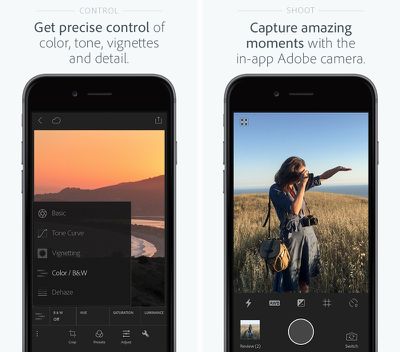
Lightroom for mobile devices has many of the same capabilities that are available for the desktop and it's a powerful editing tool on iOS devices. It includes one-touch improvement tools and more advanced adjustments for fixing problems like insufficient lighting or unwanted objects.

The recent update to the app adds a new haze removal feature that's useful for removing haze in landscaping photos, and it includes a targeted adjustment to that allows colors in a specific area to be tuned. It also offers an in-app Adobe camera, integration with Photoshop Fix, and better organizational tools.

Adobe Photoshop Lightroom for iPhone is available for free from the App Store. [Direct Link]

Adobe Photoshop Lightroom for iPad is available for free from the App Store. [Direct Link]

Top Rated Comments

Glassed Silver Avatar
143 months ago
False. No need for ANY sign in or subscription fees like this article states.
You're right, another article I read didn't highlight this.

Still need to sign in and subscribe for sync though. So, pass. (for me, frankly)

Glassed Silver:mac
Score: 4 Votes (Like | Disagree)
143 months ago
Yes, it can handle RAW images just fine.
??? No, Lightroom for IOS does not even recognize RAW files.
Which actually makes it useless for me.

My ideal workflow would be: import RAWs from shooting into iPad, do some quick adjustments and rate them in Lightroom IOS, then later import the good ones onto my Macbook. Does not work, as Lightroom does not import the RAWs.
Score: 2 Votes (Like | Disagree)
nunes013 Avatar
143 months ago
Hmmmm I downloaded it and it prompted me to sign in. Once signing in with my Adobe ID it started a 30 day free trial of creative cloud. There was no option to bypass sign in...
Score: 2 Votes (Like | Disagree)
143 months ago
Beg to differ. U cannot use the app if you don't sign up or sign in. The app is unusable as that's as far as you get without signing in.

And yes I have the trial at the top of my page as well and I downloaded Lightroom the day of the announcements.
I didn't have to sign it. I just hit Get Started and I could import photos from my Camera Roll or any other album from my Phone. You need to sign in and have a CC account for syncing with Lightroom desktop. I Just deleted the app and redownloaded to test again and all you have to choose "Get Started" when you launch the app for the first time.
Score: 1 Votes (Like | Disagree)
AllergyDoc Avatar
143 months ago
I just downloaded it, tapped Get Started and started using it immediately. It's a nice app.

Attachment Image
Score: 1 Votes (Like | Disagree)
dearfriendx Avatar
143 months ago
The way I understood is that you still need to sign in, but you don't need the subscription for basic use.

Glassed Silver:mac
False. No need for ANY sign in or subscription fees like this article states.
Score: 1 Votes (Like | Disagree)

Popular Stories

iOS 27 Next to iPhone

Here's When iOS 27 Rolls Out Today in Every Time Zone [Update: It's Out]

Sunday September 13, 2026 3:00 am PDT by
Update 10:04 a.m.: iOS 27 is rolling out now, though it may take a bit for all users to see it, so keep checking! Apple is about to release iOS 27, which will finally deliver more advanced Siri AI capabilities as well as a variety of other refinements, improvements, and new features to iPhones. It's Apple's biggest software update of the year, and Apple announced at Wednesday's iPhone event...
iOS 27 Icon iPhone

iOS 27 Available Now With These 8 New Features

Monday September 14, 2026 9:00 am PDT by
Update — 10 a.m. Pacific Time: Apple has released iOS 27. During its iPhone 18 Pro and iPhone Duo event last week, Apple announced that iOS 27 will be released widely on Monday, September 14. iOS 27 should be available around 10 a.m. Pacific Time / 1 p.m. Eastern Time today via the Settings app, under General → Software Update. Below, we have highlighted eight new features and...
Apple iCloud Plus expansion hero

iCloud+ Now Includes Apple TV, Apple Arcade, and Curated Apple Music Stations in Over 100 Countries

Tuesday September 15, 2026 1:43 am PDT by
Apple today announced a new subscription initiative that turns paid iCloud+ subscriptions into a broader services bundle in more than 100 countries. In select countries, Apple says every paid iCloud+ plan, including the cheapest 50GB tier, now includes Apple TV and Apple Arcade "at no additional cost," while family sharing extends the storage, TV and Arcade access to up to five people....

🔗 Related Apple News & Rumors

Stay updated with the latest Apple ecosystem news and verified rumors












































