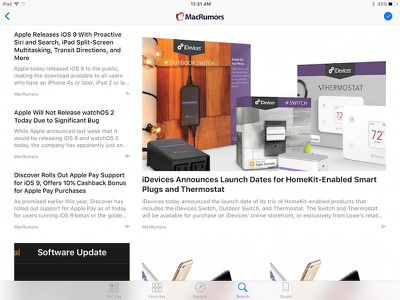
Apple News is an all-new app on iOS 9 that aggregates stories from several sources into one mobile-friendly format for reading on iPhone, iPad and iPod touch. The app is very similar to existing news apps such as Flipboard and Zine, displaying a list of news articles and personalized stories based on publications that interest you.
International readers should note that Apple News is currently available in the U.S. only.
Apple allows publishers of all sizes to sign up to be included on Apple News using News Publisher, ranging from traditional publications such as The New York Times, CNN, ESPN, The Atlantic, The Daily Mail and Slate to independent blogs such as MacRumors, TouchArcade and Daring Fireball.
During setup, you can choose news publications and topics that interest you, including business, technology, fashion, sports and more. You can also choose to have news stories emailed straight to your inbox.
News stories are displayed in a scrollable grid and have interactive layouts accompanied by photo galleries, videos and animations, and content can be shared for offline reading. Apple News Format is also coming soon, which integrates with a publisher's existing content management system and provides access to a rich suite of tools to measure user engagement with published content.
Apple News is split into five sections:
For You: A continuously updated feed of personalized stories based on your likes and interests
Favorites: The latest news from your favorite publications, magazines and blogs
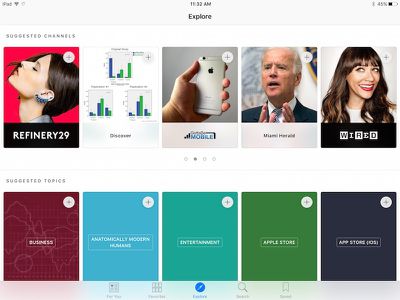
Explore: Recommended topics and channels that you are not following yet
Search: Enter keywords to discover and add specific topics and channels
Saved: Save articles into a list that supports offline reading and syncs to your other iOS devices through iCloud
Be sure to add MacRumors to Apple News for the latest news and rumors delivered right to your iPhone, iPad or iPod touch.
i played with this on the betas and while its not bad one thing stuck out. No categories. There are easily 100 sources that i might be looking at but I might not want them all jumbled up. but I can't separate my tech sources from my movies sources and so on. real newspapers knew the power of separating front page from entertainment from sports etc
You can checkout the categories in the news app by clicking on the Favorites button on the bottom icon bar. This will take you to all your added news sources by category.
Still can't rearrange them (like in Flipboard) or group under one header (like in Feedly). I follow several food blogs, and in Flipboard I can rearrange my followed blogs so they're grouped together, or in Feedly I can put them all under a category and browse them all together.
So I already set up news app on my iPad while running iOS 9 public beta and I just recently updated my iPhone to iOS 9 today at work. Is there a way to transfer or sync my news sources from iPad to iPhone?
Settings > iCloud > News
Turning this option On for both my iPhone and iPad made the news sources sync.
Um...yes it does. I've been using it for a few days now on the 9.1 public beta. All the British newspapers I'd usually skim through are pushing articles to the News app. I'm finding it pretty good, actually.
Um...no it doesn't! As you stated you are using 9.1 which is not 9.0
Wednesday October 28, 2026 10:11 am PDT by Juli Clover
Apple today announced a new high-end MacBook Pro, which is available in 14-inch and 16-inch sizes. The new device has a PROLED XDR display that supports touch gestures, and a glowing rear Apple logo.
Pricing on the MacBook Pro starts at $2,899 for the 14-inch model and $3,399 for the 16-inch model.
Apple says the MacBook Pro has the "world's best display in a pro laptop." The PROLED...
Friday October 30, 2026 3:20 pm PDT by Joe Rossignol
In a memo shared with Apple Stores and Apple Authorized Service Providers this week, and later obtained by MacRumors, Apple provided technicians with guidance on how to diagnose and address the iPhone Duo's inner display cracking issue.
If a customer reports the issue, Apple advised technicians to inspect the iPhone Duo and repair or replace it in accordance with their standard procedures....
Thursday October 29, 2026 1:47 pm PDT by Joe Rossignol
While the new iPad mini has an OLED display, the device does not support ProMotion, meaning the display's refresh rate is limited to 60Hz instead of 120Hz.
ProMotion support would have allowed for the iPad mini's refresh rate to automatically adjust from 10Hz to 120Hz depending on the content being displayed, but evidently Apple has kept the feature exclusive to the iPad Pro among iPad...




















































Top Rated Comments
real newspapers knew the power of separating front page from entertainment from sports etc
Turning this option On for both my iPhone and iPad made the news sources sync.