

How Apple Music's Liking System Works to Customize 'For You' Recommendations

Apple Music's main draw is its focus on curation and its ability to learn about your music preferences to provide recommendations that suit your tastes. Apple's new Music app focuses heavily on content discovery, with an entire "For You" section dedicated to recommendations.

According to Apple, its music experts "handpick songs, artists, and albums based on what you listen to and like," and this content is what populates the "For You" section. Apple's explained that "For You" recommendations get better over time based on "whether you love a song or not," but the company hasn't explicitly spelled out how to best use likes and listens to better tailor Apple Music to your tastes.

To clear up confusion on how recommendations work, The Loop's Jim Dalrymple has spoken directly with Apple to get some insight on how the "Like" feature in Apple Music works to affect recommendations, and he's penned a useful guide on liking from the information he obtained, which is well worth reading.

Any song played from Beats 1 radio, a default radio station, a curated playlist, or from a search can be liked by expanding the miniplayer and tapping the heart icon. You can essentially heart anything that's playing via Apple Music.
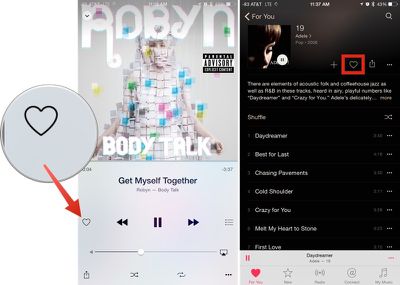
likingapplemusic
As Dalrymple explains, tapping the heart button on a song you like influences the content that's then displayed in the "For You" section of Apple Music. As more content is liked, the feature gets a better idea of each individual user's tastes, and is able to offer up a more tailored selection of music. Music that's added to a library and music that's played in full also affects "For You."

Tapping the heart does affect "For You," the section of Apple Music that's custom built with playlists, albums and songs tailored to your individual tastes. For You also takes into account music you add to your library and full plays you listen to. Skips aren't really taken into account, because there are so many reasons you may skip a song--maybe you're just not in the mood for it right now.

Radio stations created from individual songs, done by tapping on the hamburger button when any song is playing and choosing "Start Station," work a bit differently. Instead of displaying a heart, these playlists display a star. Tapping the star allows you to choose "Play More Like This" or "Play Less Like This" to tune a radio station to your particular tastes at that time without affecting overall "For You" recommendations.
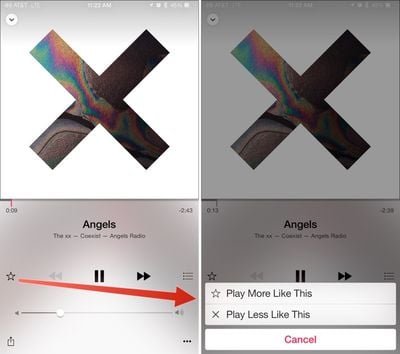
playlesslikethisapplemusic
Pressing on any album or playlist recommendation in "For You" gives you an option to customize the section even more, by choosing "I Don't Like This Suggestion." It appears that this customization option is limited to iOS devices for the time being, as Apple Music on Mac doesn't offer this menu.
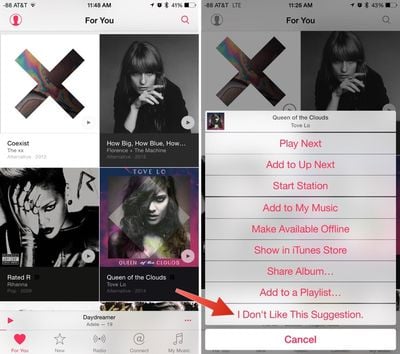
dislikesuggestionsapplemusic
Apple Music's ability to offer up intensively tailored song recommendations over time may be one of the reasons why Apple insisted on giving users a three month trial to experience the service. Regularly liking songs and culling the "For You" section of recommendations that aren't suitable should vastly change the quality of suggestions over the course of the next few months.


Popular Stories

Aston Martin CarPlay Ultra Screen

Apple's CarPlay Ultra to Expand to These Vehicle Brands Later This Year

Sunday February 1, 2026 10:08 am PST by
Last year, Apple launched CarPlay Ultra, the long-awaited next-generation version of its CarPlay software system for vehicles. Nearly nine months later, CarPlay Ultra is still limited to Aston Martin's latest luxury vehicles, but that should change fairly soon. In May 2025, Apple said many other vehicle brands planned to offer CarPlay Ultra, including Hyundai, Kia, and Genesis. In his Powe...
Apple Logo Black

Apple's Next Launch is 'Imminent'

Sunday February 1, 2026 12:31 pm PST by
The calendar has turned to February, and a new report indicates that Apple's next product launch is "imminent," in the form of new MacBook Pro models. "All signs point to an imminent launch of next-generation MacBook Pros that retain the current form factor but deliver faster chips," Bloomberg's Mark Gurman said on Sunday. "I'm told the new models — code-named J714 and J716 — are slated...
Apple MacBook Pro M4 hero

New MacBook Pros Reportedly Launching Alongside macOS 26.3

Sunday February 1, 2026 5:42 am PST by
Apple is planning to launch new MacBook Pro models with M5 Pro and M5 Max chips alongside macOS 26.3, according to Bloomberg's Mark Gurman. "Apple's faster MacBook Pros are planned for the macOS 26.3 release cycle," wrote Gurman, in his Power On newsletter today. "I'm told the new models — code-named J714 and J716 — are slated for the macOS 26.3 software cycle, which runs from...
iOS 26

iOS 26.3 and iOS 26.4 Will Add These New Features to Your iPhone

Tuesday February 3, 2026 7:47 am PST by
We are still waiting for the iOS 26.3 Release Candidate to come out, so the first iOS 26.4 beta is likely still at least a week or two away. Following beta testing, iOS 26.4 will likely be released to the general public in March or April. Below, we have recapped known or rumored iOS 26.3 and iOS 26.4 features so far. iOS 26.3 iPhone to Android Transfer Tool iOS 26.3 makes it easier...
14 inch MacBook Pro Keyboard

Apple Changes How You Order a Mac

Saturday January 31, 2026 10:51 am PST by
Apple recently updated its online store with a new ordering process for Macs, including the MacBook Air, MacBook Pro, iMac, Mac mini, Mac Studio, and Mac Pro. There used to be a handful of standard configurations available for each Mac, but now you must configure a Mac entirely from scratch on a feature-by-feature basis. In other words, ordering a new Mac now works much like ordering an...

Top Rated Comments

Spendlove Avatar
138 months ago
Apple Music - "Do you like Biffy Clyro, Katherine Jenkins and Whitney Houston?"

Me - "No thank you Apple" delete, delete, delete.

Apple Music - "Do you like Biffy Clyro, Katherine Jenkins and Whitney Houston?"

Me - "Must have done something wrong, could have sworn I clicked no" DELETE DELETE DELETE

Apple Music - "Do you like Biffy Clyro, Katherine Jenkins and Whitney Houston?"

Me - "ARGHHH!" DELETE DELETE DELETE

Apple Music - "Do you like Biffy Clyro, Katherine Jenkins and Whitney Houston?"

Me - *sounds of smashing iPhone*
Score: 16 Votes (Like | Disagree)
Rogifan Avatar
138 months ago
I think Apple needs to add more options when the ellipse is selected, there's not enough of them. :rolleyes:
Score: 12 Votes (Like | Disagree)
Populism Avatar
138 months ago
I wish the new "For You" system relied on the old five-star rating system that has been in place since the dawn of iTunes. It gets the same job done, many of us rely heavily on the star system for creating smart playlists, and it isn't as binary as a simply hear/no-heart system.
Score: 7 Votes (Like | Disagree)
\-V-/ Avatar
138 months ago
Yep ... figured this out by accident. I really didn't like For You at first, then came back to it after liking a bunch of stuff and it actually gave me some great recommendations and cool playlists.
Score: 6 Votes (Like | Disagree)
iMcLovin Avatar
138 months ago
Its interesting how apple is so bad at informing people what features their services have. THere should be a step by step introduction highlighting each button. Honestly im not all that impressed with Apple music. Connect seems like a rather useless feature with ugly UI. Radio is just meh... The itunes shop and Apple music are completely separated and its confusing when you enter one or the other. Why cant they do like spotify, let you search through all the library of music but grey out what you cannot listen to and give you the option to buy it? also why do I have to add every single song to my library of music? If I want to create a playlist of various songs I need to add a new cover for each and every one of them. Only apples own playlists lets you listen to music outside your personal album. Also the whole thing is slow and unresponsive when you hit play or fast forward in a song, compared to spotify which is instant. I must say that currently, the spotify app, particularly the desktop version, is miles ahead both in UI and design and in quality of the service. Itunes was a bloated, slow and messy program before they re-made itunes a while back. Now it feels bloated, slow and messy once again, great job apple! :( Also itunes store looks really bad on the PC version, with jagged unreadable fonts. If it wasn't for spotifys slow adaptation of the family plan to compete with apple I would switch right back to spotify today. I thought music and UI was apples strengths, but apple music and streaming seems like a feature they have just half-heartedly made because they felt forced to do so by competition.
Score: 6 Votes (Like | Disagree)
ckelley Avatar
138 months ago
Only complaint I have about the liking feature so far is if I'm listening to Beats 1 and "heart" a song, it rarely goes away for the next one, unless it's a song that you can't tap the heart icon on anyways. Is it counting that I've liked this song? Is it just a UI bug? It doesn't do this on the other radio stations, so I'm guessing it's a UI bug. Hopefully this can be fixed, otherwise it's been a great experience on Beats 1 so far.
Score: 5 Votes (Like | Disagree)














