

Connected file management service Dropbox today announced an update to its iPhone and iPad apps that will debut a trio of new features to iOS devices, bringing easier navigation, introducing communication features, and allowing the creation of Microsoft Word documents from within the app itself.
Right from the home screen the Dropbox team has decided to make big changes, doing away with a static list of files and instead curating a showcase of documents and files with which a user has most recently interacted. This way, the company suggests, "The files you’re most likely to need on the go will always be front and center."
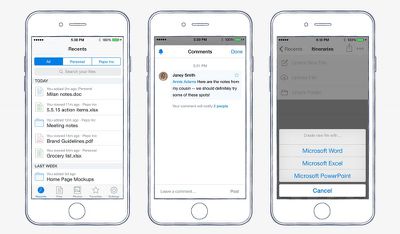
The recently introduced comment feature for the Dropbox website will now also be available on iOS devices. Using an "@" symbol followed by a Dropbox user's name or email address, anyone can be brought into discussion over a particular document, with the app sending push notifications to the lock screen to ensure everyone is kept in the loop on any particular conversation.
The company also confirmed that "in the next few weeks" it would be introducing the ability to create and interact with Microsoft Office documents from within the iOS Dropbox apps. Any Word, Excel, or Powerpoint file created inside of the app will be subsequently saved to whatever Dropbox folder a user was in when creating the document, allowing instantaneous access to the file from everywhere a user can sign in to Dropbox.
As the company points out, however, the new update's most interesting feature is not any one of its individual new aspects but how they have the potential to work together to create a unique, more streamlined experience for its users.
The best part, though, is how these features work together. For example, when you’re meeting with a client to brainstorm ideas for an upcoming project, you can use the recents tab on your iPhone or iPad to quickly pull up your last project for reference. Then you can create a Word doc to take notes as you discuss. After the meeting, you can @mention your client in a comment, so they have the notes and can add anything you’ve missed. Then when you get back to your desk, you can turn that Word doc into a full project plan.
The team also notes in its blog that while the main crux of today's new update centers on the enterprise and work-related world, all of the features can be used for "vacation planning, apartment hunting, or whatever else Dropbox helps you do." The new 3.9 update to Dropbox on iOS [Direct Link] will begin rolling out today, with an upcoming smaller update for in-app document editing planned for the near future.


















































Top Rated Comments
I like dropbox and agree with macintologist that Dropbox is awesome in many ways. Having said that, I finally surrendered to Apple and am now using their icloud drive. The integration with all their applications especially music and photos is what got me. Since then, I rarely use Dropbox. I will say that the interface for dropbox is better. But using the apple apps like pages and numbers, or photos and music, i really don't think about it too much.
Can you browse previous versions from within the app?
The tendency for software companies to develop flashy whizbang features before getting their basics ironed out is the reason we're ditching iOS as a productivity tool. Everything comes with so many exceptions on what it can't do, nothing just works when you need it to, out in the field. ...as a mobile device.
Not singling out Dropbox either, we've got iPads full of semi-functional software, and some of it made by Apple themselves. If we operated like this in our industry people would die and we'd be out of business, sued to pieces, and possibly in jail. I don't know why software companies consider this acceptable. It can't be lack of funding. Software makes 10x the money entire industries make, yet the product is hardly ever as solid.
Perhaps this is just burnout and when I go off and live in a cave.
I use it for Everything.
OneDrive is great and beats Dropbox in many areas but the upload & download sync speeds are terrible!
iCloud is just a trainwreck. Apple can't do cloud stuff.
Box.com is ok but geared more towards business users. Having said that, the personal plan is decent. Upload & download speeds are still crap but not as slow as OneDrive.
Copy.com is horrendous in every way imaginable.
Google Drive is really poor although their mobile apps have improved. The desktop sync client murders your CPU and hogs resources, rather like every other Google application! Google's software is clearly the result of a development team who do no testing whatsoever.
It doesn't matter that Dropbox are more expensive. They are the best so get my money.