

Apple today released iOS 8.3, the third major update to iOS 8. Seeded to developers in February and to public beta testers in mid-March, iOS 8.3 brings several new features and design tweaks to the operating system.
iOS 8.3 is available immediately as an over-the-air download. Xcode 6.3 is also available, as is a 7.2 update for the Apple TV and a 1.2 update for Swift, Apple's programming language.
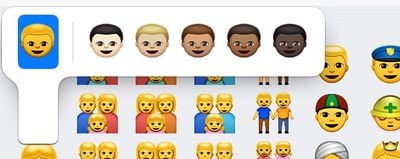
iOS 8.3 has a heavy focus on emoji improvements, bringing an updated emoji picker that organizes emoji into categories in an easily scrollable list, new diversified emoji with expanded family options, and emoji skin tone modifiers for changing the look of people emoji. There are also several new flags and updated phone, computer, and watch emoji that now resemble the iPhone, iMac, and Apple Watch.
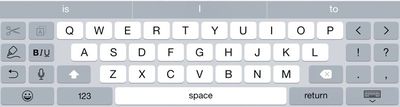
Other iOS 8.3 changes include wireless CarPlay, letting users connect their iPhones to their CarPlay systems sans Lightning cable, support for Google two-factor authentication that makes it possible to add Google accounts without the need for app specific passwords, and Apple Pay support for the China UnionPay network. On the iPhone 6 Plus, in landscape mode, there's now a bold/italics/underline key for formatting text. Previously, the key only allowed for bolding.
There are also minor changes to Passbook (dividing Apple Pay and Passes) and the Photos app (icon overlays for albums). Siri has gained new languages plus the ability to make calls using the iPhone's speakerphone, and in Messages, there's now an option to enable filtering to separate iMessages from friends from iMessages from Unknown Senders.
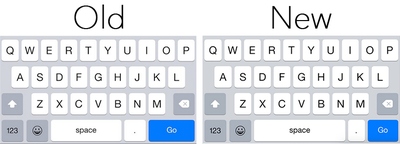
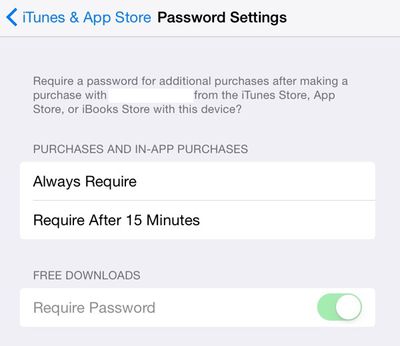
One of smaller but most notable UI changes includes an update to the space bar, which has been elongated to prevent users from hitting the period key in Safari when attempting to make a space. It's also now possible to turn on a setting to allow you to download free apps without the need to enter your password. We have a full list of the changes in iOS 8.3 in our iOS 8 Features Roundup.
iOS 8.3 also has a very long list of bug fixes, which we've added in below. There are multiple fixes to Wi-Fi, Bluetooth, orientation, messages, and more.
Improved performance for:
- App launch
- App responsiveness
- Messages
- Wi-Fi
- Control Center
- Safari tabs
- 3rd-party keyboards
- Keyboard shortcuts
- Simplified Chinese keyboardWi-Fi and Bluetooth fixes
- Fixes an issue where you could be continuously prompted for login credentials
- Addresses an issue where some devices disconnect intermittently from Wi-Fi networks
- Fixes an issue where hands-free phone calls could become disconnected
- Fixes an issue where audio playback could stop working with some bluetooth speakersOrientation and rotation fixes
- Addresses an issue that sometimes prevented rotating back to portrait after having rotated to landscape
- Improves performance and stability issues that occurred when rotating the device between portrait and landscape
- Fixes an issue where device orientation appeared upside down after pulling the iPhone 6 Plus from your pocket
- Resolves an issue that sometimes prevented apps from rotating to correct orientation after switching apps in multitaskingMessages fixes
- Addresses issues that caused group messages to sometimes split
- Fixes an issue that sometimes removed the ability to forward or delete individual messages
- Resolves an issue that sometimes prevented a preview from appearing when taking a photo in Messages
- Adds the ability to report junk messages directly from the Messages app
- Adds the ability to filter out iMessages that are not sent by your contactsFamily Sharing fixes
- Fixes a bug where certain apps would not launch or update on family members' devices
- Fixes a bug that prevented family members from downloading certain free apps
- Increased reliability for Ask to Buy notificationsCarPlay fixes
- Fixes an issue where Maps could come up as a black screen
- Fixes an issue where the UI could be incorrectly rotated
- Fixes an issue where the keyboard could appear on the CarPlay screen when it shouldn'tEnterprise fixes
- Improves reliability of installing and updating enterprise apps
- Corrects the time zone of Calendar events created in IBM Notes
- Fixes a problem that could cause web clip icons to become generic after restarting
- Improves reliability of saving the password for a web proxy
- Exchange out-of-office message can now be edited separately for external replies
- Improves recovery of Exchange accounts from temporary connection problems
- Improves compatibility of VPN and web proxy solutions
- Allows use of physical keyboards to log into Safari web sheets, such as for joining a public Wi-Fi network
- Fixes an issue that caused Exchange meetings with long notes to be truncatedAccessibility fixes
- Fixes an issue where using the back button in Safari causes VoiceOver gestures to not respond
- Fixes an issue where VoiceOver focus becomes unreliable in draft Mail messages
- Fixes an issue where Braille Screen Input cannot be used to type text in forms on webpages
- Fixes an issue where toggling Quick Nav on a Braille Display announces that Quick Nav is off
- Fixes an issue keeping app icons from being moveable on home screen when VoiceOver is enabled
- Fixes an issue in Speak Screen where speech will not start again after pausingOther improvements and bug fixes
- Introduces a redesigned Emoji keyboard with over 300 new characters
- iCloud Photo Library has been optimized to work with the new Photos app on OS X 10.10.3 and is now out of beta
- Improves the pronunciation of street names during turn-by-turn navigation in Maps
- Includes support for Baum VarioUltra 20 and VarioUltra 40 braille displays
- Improves the display of Spotlight results when Reduce Transparency is turned on
- Adds Italic and Underline format options for iPhone 6 Plus landscape keyboard
- Adds the ability to remove shipping and billing addresses used with Apple Pay
- Additional language and country support for Siri: English (India, New Zealand), Danish (Denmark), Dutch (Netherlands), Portuguese (Brazil), Russian (Russia), Swedish (Sweden), Thai (Thailand), Turkish (Turkey)
- Additional dictation languages: Arabic (Saudi Arabia, United Arab Emirates) and Hebrew (Israel)
- Improves stability for Phone, Mail, Bluetooth connectivity, Photos, Safari tabs, Settings, Weather and Genius Playlists in Music
- Addresses an issue where Slide to Unlock could fail to work on certain devices
- Addresses an issue that sometimes prevented swiping to answer a phone call on the Lock screen
- Addresses an issue that prevented opening links in Safari PDFs
- Fixes an issue where selecting Clear History and Website Data in Safari Settings did not clear all data
- Fixes an issue that prevented autocorrecting "FYI"
- Addresses an issue where contextual predictions did not appear in Quick Reply
- Fixes an issue where Maps did not enter night mode from hybrid mode
- Resolves an issue that prevented initiating FaceTime calls from a browser or 3rd-party app using FaceTime URLs
- Fixes an issue that sometimes prevented photos from properly exporting to Digital Camera Image folders on Windows
- Fixes an issue that sometimes prevented an iPad backup from completing with iTunes
- Fixes an issue that could cause Podcast downloads to stall when switching from Wi-Fi to cellular networks
- Fixes an issue where remaining time on timer would sometimes incorrectly display as 00:00 on Lock screen
- Fixes an issue that sometimes prevented adjusting call volume
- Fixes an issue that caused the status bar to sometimes appear when it shouldn't
Previous iOS updates have included iOS 8.1 and iOS 8.2, with the former introducing support for Apple Pay in October and the latter bringing support for the Apple Watch in March, plus several minor updates. Apple is already working on the next big update to iOS 8, iOS 8.4, which may include the company's upcoming revamped streaming music service.




















