

Apple's 'Force Touch' Trackpad Fools Users Into Feeling Clicks Without Actually Moving - MacRumorsOpen MenuShow RoundupsShow Forums menuVisit ForumsOpen Sidebar
Skip to Content

Apple's 'Force Touch' Trackpad Fools Users Into Feeling Clicks Without Actually Moving

At its "Spring Forward" event on Monday, Apple announced a brand-new MacBook and updated 13-inch MacBook Pros with a fully redesigned trackpad called the Force Touch trackpad.

Like on the Apple Watch, Force Touch allows the device to distinguish between a light press and a deep press, opening up new methods for interaction. For example, while a light press could be a simple click, a deep press while browsing in Safari could bring up a Wikipedia entry in a pop-up window.
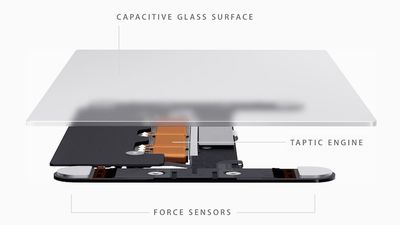
forcetouch
The Force Touch trackpad on the MacBook and new MacBook Pros achieves this through a total reinvention of the way the trackpad works. Apple ditched the "diving board" structure of older trackpads for a new design with four sensors, called Force Sensors.

These Force Sensors allow the user to click anywhere on the Force Touch trackpad. The "diving board" design on previous trackpads made it difficult to click toward the top of the trackpad, forcing users to move their fingers toward the bottom of the trackpad to click.

The Force Sensors are bundled together with the Taptic Engine, which is also featured in the upcoming Apple Watch. The Taptic Engine senses when a user clicks on the trackpad and issues haptic feedback to let a user know that their action was successful. As noted by TechCrunch's Matthew Panzarino, this is because the trackpad itself doesn't move. While the Force Touch trackpad sounds like it clicks and feels like it clicks, it doesn't actually click.

There is a set of vibrating motors underneath that provides ‘force feedback’, also known as haptics in some applications. This feedback fools your finger into believing that you’ve pressed down on a hinged button, the way your current trackpad works. This feedback relies on phenomenon called lateral force fields (LFFs), which can cause humans to experience vibrations as haptic ‘textures’. This can give you the feel of a ‘clickable’ surface or even depth. The Force Touch feature of the new trackpad allows you to press ‘deeper’, giving you additional levels of tapping feedback. The effect is done so well that you actually feel like you’re pressing down deeper into a trackpad that still isn’t moving at all. It’s so good it’s eerie.

While the Force Touch trackpad was a main highlight of Apple's introduction of the new MacBook, the updated 13-inch MacBook Pro is actually the first Mac to ship with the feature. iFixit has already performed a teardown of the new MacBook Pro to get a closer look at the workings of the Force Touch trackpad after removing the machine's well-glued battery.

iFixit's teardown reveals the electromagnets that make up the Taptic Engine, with four separate magnets likely working together in various combinations to generate different types of vibrational feedback.
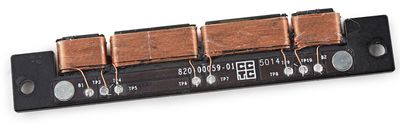
force_touch_coils

Electromagnetic coils on Force Touch trackpad (Source: iFixit)

The magnets rapidly push and pull against a metal rail mounted beneath the trackpad, to create a tiny "buzz" of feedback with each click (and a second buzz for a "force click.")

Digging further into the trackpad, iFixit discovered what appear to be strain gauges mounted on metal supports, allowing the trackpad to sense the amount of force being applied to the surface of the trackpad.
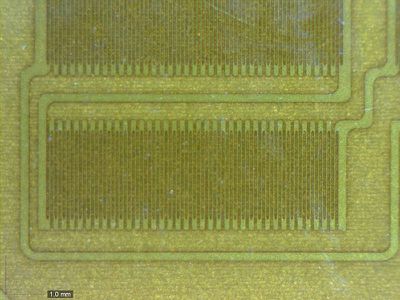
force_touch_strain_gauge

Microscope view of apparent strain gauge. Gauges are located near each of the four corners of the trackpad. (Source: iFixit

The internals of the new MacBook Pro are otherwise largely unchanged from the previous generation, with only some minor tweaks in the layout of logic board components, a not unexpected development considering the update is primarily a speed bump with the new trackpad offering a nice extra feature to entice customers to upgrade.

Watch on YouTube

While iFixit's look at the Force Touch trackpad gives a sense of the hardware involved, software also plays an important role in the overall user experience, with the new Force Click "deep press" able to feature multiple levels of "clicks" performing varying functions in different applications. MacRumors forum member TylerWatt12 notes that in QuickTime users can push harder to access around 10 additional "click levels". In its hands-on of the new MacBook, The Verge says that this added complexity can be difficult to get used to and some users may need to meddle with Force Touch's sensitivity options to find what's most comfortable for them.

Watch on YouTube

Gizmodo, on the other hand, said it "loved" the new feature and that it feels like something that could make it easier to get work done because of how OS X makes smart use of the new input feature. Engadget agreed, saying Force Touch feels "very deliberate" and "controlled", and that it can't see many users "deep pressing" when they meant to "lightly press" and vice versa.

While Force Touch is currently limited to the updated 13-inch MacBook Pros and the upcoming Apple Watch and MacBook, it's likely the feature will make its way across other Apple devices as well. Yesterday, a report indicated that Apple is going to add the new feature to both the iPhone 6s and iPhone 6s Plus later this year.

Related Forums: MacBook Neo, MacBook Pro

Popular Stories

iPhone Duo Display Cracking

Apple Alerts Stores to iPhone Duo's Display Cracking Issue

Friday October 30, 2026 3:20 pm PDT by
In a memo shared with Apple Stores and Apple Authorized Service Providers this week, and later obtained by MacRumors, Apple provided technicians with guidance on how to diagnose and address the iPhone Duo's inner display cracking issue. If a customer reports the issue, Apple advised technicians to inspect the iPhone Duo and repair or replace it in accordance with their standard procedures....
iPad mini OLED feature 1

Apple Executive Comments on New iPad Mini Lacking 120Hz Display

Thursday October 29, 2026 1:47 pm PDT by
While the new iPad mini has an OLED display, the device does not support ProMotion, meaning the display's refresh rate is limited to 60Hz instead of 120Hz. ProMotion support would have allowed for the iPad mini's refresh rate to automatically adjust from 10Hz to 120Hz depending on the content being displayed, but evidently Apple has kept the feature exclusive to the iPad Pro among iPad...
Pinched iPad Mini

Apple Avoids Showing Pinched Fingers on iPad Mini Page in South Korea

Thursday October 29, 2026 11:52 am PDT by
In the U.S. and most other countries, Apple's website shows the new iPad mini being held by pinched fingers, but this is not the case in South Korea. The new iPad mini shown with pinched fingers on Apple's website in the U.S. On its South Korean website, Apple simply shows an image of the iPad mini on its own. The new iPad mini shown without pinched fingers on Apple's website in South Korea ...

Top Rated Comments

152 months ago
So vibration is not movement anymore in Physics 2.0?
Your brain feels your finger moved, when it did not in a meaningful way (feeling a few mm movement, when it vibrated a fraction of a mm). Perception is manipulated, just like you can manipulate vision. I'm sure you got that mr obtuse, since you're into Physics 2.0, 3.0 and even 4.0..
Score: 32 Votes (Like | Disagree)
bchreng Avatar
152 months ago
So vibration is not movement anymore in Physics 2.0?

In the context of the article, and English 101, it isn't.
Score: 26 Votes (Like | Disagree)
AlecZ Avatar
152 months ago
Can't wait to try it. My favorite part about Apple laptops in comparison to other laptops has since 2006 been the trackpad and keyboard quality. Everything else feels like junk.
Score: 17 Votes (Like | Disagree)
n-evo Avatar
152 months ago
Can't wait for this to come to the Magic Trackpad. Hopefully a new desktop keyboard with black keys as well. Can't believe those are still white.
Score: 15 Votes (Like | Disagree)
152 months ago
So vibration is not movement anymore in Physics 2.0?
Score: 12 Votes (Like | Disagree)
152 months ago
Here's the settings for the new trackpad.
Score: 10 Votes (Like | Disagree)
Read All Comments
Latest Stories
Apple Watch Ultra 4 Hits All-Time Low Price With Amazon's $99 Discount
16 hours ago
Reminder: Apple's Big Discount on Beats 360 Ear Cushions Ends Today
16 hours ago
Here's a New Tour of Apple's HomeView Software
17 hours ago
Apple Reveals New iPad Mini's Battery Capacity
18 hours ago
Top Stories: Apple's Big MacBook Pro, iPad mini and iMac Updates
19 hours ago
'Pluribus' Season 2 Reportedly Starts Production Today
1 day ago
iPhone 18 Pro Sales Surge in China, Offsetting Decline in U.S. and Japan
1 day ago
HomeView Software 27.2: Wallpapers, Control Center, and More
1 day ago
Apple Alerts Stores to iPhone Duo's Display Cracking Issue
1 day ago
iOS 27.3 Will Enable These Apple Intelligence Features in China
1 day ago
Apple Says iOS 27.3 Beta Coming Next Week
1 day ago
Apple's Flash Storage Suppliers Are Finally 'Getting Their Revenge'
2 days ago
14 New Things Your iPhone Can Do in iOS 27.2
2 days ago
iPhone Duo Review: One Week Later
2 days ago
Samsung Mocks iPhone Duo Display Cracks in New Ad Campaign
2 days ago
The MacRumors Show: OLED MacBook Pro, iPad Mini 8, and More
2 days ago
MacBook Pro With Touch Display: 15 More Details Revealed
2 days ago
Russia Places Apple on State Surveillance Registry
2 days ago
Halloween Weekend Brings Discounts on Apple Accessories and Pre-Orders
2 days ago
Apple Has Released More Than 25 New Products in the Past Two Months
2 days ago
Local Code Launches as Free, Private AI Assistant Tool for Mac
2 days ago
Apple Acquires Ascend.io
2 days ago
HomePod Mini 2 Launches Today: All the New Features
2 days ago
AirTag 2 4-Pack Drops to New Low Price of $69.99
2 days ago
Rian Johnson's iPhone Camera App Goes Viral
2 days ago
Where Did All the iPhone Duos Go? Mostly to Apple's Stores
2 days ago
Apple's Touchscreen MacBook Pro Could Ship 1.5M Units in 2027
2 days ago
New Apple TV 4K and iPad Mini: RAM Amounts Revealed
2 days ago
Apple Executive Comments on New iPad Mini Lacking 120Hz Display
3 days ago
Here's a Hands-On Look at HomePod Mini 2's New Two-Tone Colors
3 days ago

🔗 Related Apple News & Rumors

Stay updated with the latest Apple ecosystem news and verified rumors












































