Gmail for iOS Updated With Quick Actions, Share Sheet and Attachment Viewer - MacRumorsOpen MenuShow RoundupsShow Forums menuVisit ForumsOpen Sidebar
Skip to Content

Gmail for iOS Updated With Quick Actions, Share Sheet and Attachment Viewer

by

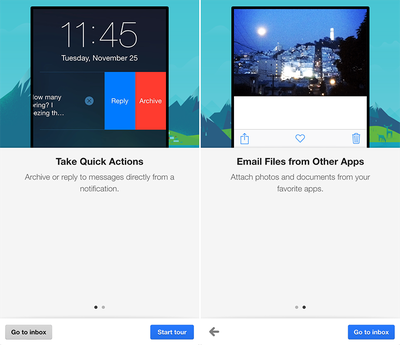
Google on Thursday updated Gmail for iOS with a trio of notable new features: quick actions, the ability to email files from other apps and a new attachment viewer. Gmail users on iPhone and iPad can now attach photos and documents to Gmail from other apps such as Instagram using the updated in-app share sheet, and open attachments from Gmail into any app.
Gmail for iOS 4.0
Taking advantage of Apple's addition of interactive notifications in iOS 8, quick actions enable Gmail users to archive or reply to emails directly from a notification without leaving the app. The functionality also works for notifications in Notification Center and on the Lock screen. The latest release of Gmail for iOS pushes the app to version 4.0 on the App Store.

What's New in Version 4.0
• Take quick actions - Archive or reply to messages directly from a notification
• Email files from other apps - Attach photos and documents to Gmail right from your favorite apps
• New attachment viewer - Open attachments from Gmail into any app

Gmail for iOS [Direct Link] is free on the App Store for iPhone and iPad.

Top Rated Comments

151 months ago
Nice update, but why archive and not delete? I never have understood archive as an action in email. It doesn't get rid of it, it throws it to my "All Mail" section but still stays in my inbox. I would have preferred "Reply" and "Delete" as options.

Furthermore, these actions really don't work on the lock screen if you have a passcode/TouchID...I have to unlock my phone to complete the action. I also still have to leave the app I'm in to reply to an email. Not sure why it says I can do it right from the notification. Disappointing.
Score: 5 Votes (Like | Disagree)
151 months ago
Nice update, but why archive and not delete? I never have understood archive as an action in email. It doesn't get rid of it, it throws it to my "All Mail" section but still stays in my inbox. I would have preferred "Reply" and "Delete" as options.

With Gmail, you are the product. Google wants you to retain as much email as possible so that they can profile you for adverting campaigns. Regarding "All Mail" messages staying in your inbox, you just need to adjust some settings. Archived messages don't stay in your Inbox when configured properly.
Score: 2 Votes (Like | Disagree)
151 months ago
I recently switched from using the Gmail app to accessing Gmail via the Outlook app. I love it -- you can do almost everything that you can do via the Gmail app (except for "Labeling" messages while leaving them in the Inbox), plus a lot more... without the hassles and annoyances of the Gmail app (poor design, notifications that don't clear when you view the message in the app, account sign-in issues, etc.).
Score: 2 Votes (Like | Disagree)
151 months ago
I've been using all the Google iOS apps. They enhance the iPhone experience a lot. Very enjoyable.

Perhaps best of all is how rapidly Google Innovates without fear. They just do it and do it well.
Score: 2 Votes (Like | Disagree)
151 months ago
Nice update, but why archive and not delete? I never have understood archive as an action in email. It doesn't get rid of it, it throws it to my "All Mail" section but still stays in my inbox. I would have preferred "Reply" and "Delete" as options.

You aren't using Gmail correctly.
Score: 1 Votes (Like | Disagree)
151 months ago
With Gmail, you are the product. Google wants you to retain as much email as possible so that they can profile you for adverting campaigns.
That simply isn't true. Deleting email will not have any affect on advertising campaigns shown to you. Google uses an automated process to scan emails when they arrive. Once you delete the email, nothing will change. So there is no incentive for Google to want you to archive the email. To be fair, Apple scans emails (incoming and outgoing) as well. They just choose to not retain the data for advertising purposes.
Score: 1 Votes (Like | Disagree)

Popular Stories

intel macs no more updates

Mac App Store Apps Can Now Drop Support for Intel Macs

Tuesday September 1, 2026 4:50 pm PDT by
Apple today informed developers that universal Mac App Store apps that require macOS 13 or later can remove support for Intel-based Mac computers. We're reaching out to let you know that universal macOS apps on the Mac App Store that require macOS 13 or later can now remove support for Intel-based Mac computers. By removing support for Intel-based Mac computers, you can simplify your...
MapQuest Logo 2026

MapQuest Tops App Store Charts After Refusing 'Lake America' Change

Monday August 31, 2026 7:49 am PDT by
MapQuest is in the spotlight this week after refusing to change "Lake Ontario" to "Lake America" on its map following an executive order issued by U.S. President Donald Trump last week. As of Monday morning, the MapQuest app is the top free iPhone app on Apple's App Store charts in Canada and fourth on the equivalent U.S. chart. For our younger readers, MapQuest was once a popular service...
Liquid Glass App Store Feature

Apple Plans to Squeeze More Revenue From the App Store, Report Says

Monday September 7, 2026 3:19 am PDT by
Apple is looking at further ways to monetize the App Store and increase the company's recurring revenue from the platform, according to a new report. Writing in his latest Power On newsletter, Bloomberg's Mark Gurman said that newly appointed Apple CEO John Ternus and services chief Eddy Cue are behind the effort to raise margins from the App Store, which already generates Apple an estimated ...

🔗 Related Apple News & Rumors

Stay updated with the latest Apple ecosystem news and verified rumors